User Manual for Ugreen 2-in-1 Magnetic Wireless Charger W709
Quick guide for the Ugreen 2-in-1 Magnetic Wireless Charger W709. Includes setup instructions, charging zones, technical specifications, and usage tips.
Quick answers from the manual
Quick answer
- The Ugreen W709 is a 2-in-1 magnetic wireless charger. Connect it to power and place your devices on the charging zones to begin charging. p. 1, 2
Key actions
- Connect the charger to a power source. p. 2
- Place device on charging zone. p. 2
Maintenance and reset
- Disconnect the charger after full charge to avoid unnecessary power consumption. p. 2
Technical specifications
| Parameter | Value | Meaning | Pages |
|---|---|---|---|
| Input | 5V-3A / 9V-3A / 12V-2.5A | Power input requirements | p. 1 |
| Wireless Output | Max 20W | 15W for main, 5W for AirPods | p. 1 |
Where to find it in the PDF
- Product Overview p. 1
- Usage Instructions p. 2
Table of contents
Manual images
Click an image to enlargeQuick Guide
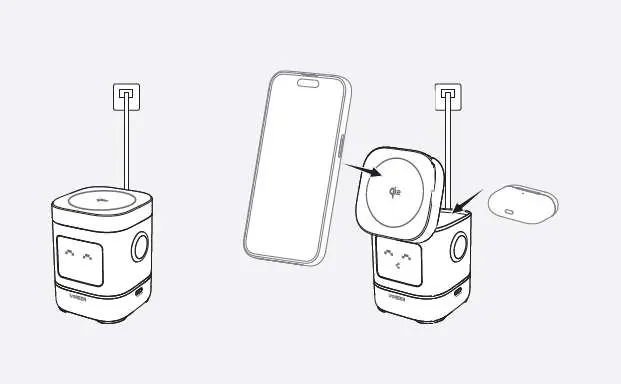
To use the Ugreen 2-in-1 Magnetic Wireless Charger, connect the device to a power source using the provided cable. Place your iPhone and AirPods or Apple Watch on the designated charging zones to initiate charging. Unplug the charger after your devices are fully charged to prevent unnecessary power consumption.
Product Overview
The charger features the following components:
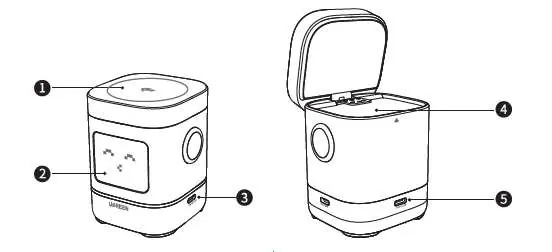
- 1. Wireless charging zone for iPhone
- 2. Display screen
- 3. USB-C output port
- 4. Wireless charging zone for AirPods
- 5. USB-C input port
How to Use
- Connect the device to a power source.
- Place your iPhone, AirPods, or Apple Watch on the wireless charging zone to start charging.
Note: After the device is fully charged, disconnect the charger to avoid unnecessary power usage.
Technical Specifications
- Input: 5.0V-3.0A / 9.0V-3.0A / 12V-2.5A
- Output: 5.0V-1.0A
- Wireless Charging Power: Max 20W (Main: 15.0W, AirPods: 5.0W)
- Total Power: Max 25W
Manufacturer information
UGREEN
Practical help
Common problems
Ensure the device is properly aligned with the charging zone and the charger is connected to a power source.
Before use
- Connect the charger to a power source.
- Ensure the device is compatible with wireless charging.
- Place the device on the correct charging zone.

Manual page author
David Miller
Documentation analyst
Organizes user manual content into clear summaries, with attention to model details, product context, and everyday usability.