ULTIMATE SPEED ULG 17 B2 17A Car Battery Charger
Professional 17A car battery charger for 12V lead-acid and LFP batteries, featuring a battery push function, alternator test, and automatic maintenance mode.
Table of contents
Product Overview
The Ultimate Speed 17A Car Battery Charger (ULG 17 B2) is a multi-stage charger designed for 12V (6-cell) batteries. It is compatible with various battery types, including lead-acid (GEL, MF, EFB, AGM, WET) and LFP (Lithium Iron Phosphate) batteries with an integrated Battery Management System (BMS). The device supports batteries with capacities between 8 Ah and 250 Ah.
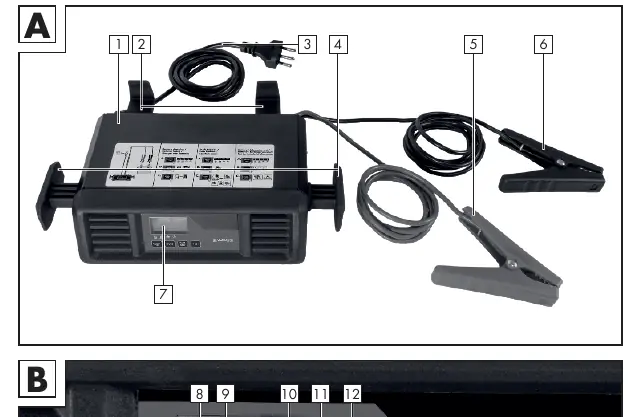
Key Features
- Battery Push Function: Provides a 20-minute pre-charge followed by a 75A short-term current pulse to assist with engine starting.
- Testing Functions: Includes modes for testing battery state-of-charge and alternator performance.
- Maintenance Mode: Features an automatic trickle-charging function, allowing the battery to remain connected for extended periods.
- Safety Protections: Equipped with protection against short-circuiting, overheating, and reverse polarity.
Safety Instructions
Danger: Improper use can lead to serious injury or death. Always operate in a well-ventilated, weather-protected indoor area. Keep away from open flames, sparks, and flammable materials. Do not use if cables or plugs are damaged. Ensure the vehicle is turned off and in a secure parking position before connecting.
Operation
Before connecting, ensure the battery is at ambient temperature. Connect the clamps to the battery terminals (red to positive, black to negative) before plugging the device into the mains. Use the BATTERY TYPE button to select the correct battery chemistry and the MODE button to choose between car or van settings. Press START/STOP to begin the charging process. The display will indicate progress and show 'FUL' when charging is complete.
Maintenance and Troubleshooting
The device is maintenance-free. Clean surfaces with a dry cloth; do not use aggressive solvents. If an error code appears on the display (Er1–Er5), refer to the troubleshooting table in the manual. Common issues include poor clamp contact, defective batteries, or incorrect polarity. If the device overheats, it will automatically reduce output power until it cools down.
Disposal
This device must not be disposed of with household waste. It must be taken to a designated collection point for electronic waste in accordance with local regulations.

Manual page author
Michael Turner
Technical manual editor
Reviews PDF manuals for structure, safety notes, and practical product details so readers can find the right information quickly.