Universal 2.4GHz Wireless Optical Pen Mouse
Quick guide for the Universal 2.4GHz Wireless Optical Pen Mouse. Learn about features, button layout, technical specifications, and compatibility for PC, Smart TV, and Android TV Box.
Quick answers from the manual
Quick answer
- The Universal 2.4GHz Wireless Optical Pen Mouse is a wireless air mouse designed for PC, Smart TV, and Android TV Box, featuring a gyro sensor and adjustable DPI (800/1200/1600). p. 1, 2
Key actions
- Adjusting DPI p. 1
First start
- Insert 1x AAA battery and plug the receiver dongle into the USB port. p. 2
Technical specifications
| Parameter | Value | Meaning | Pages |
|---|---|---|---|
| Resolution | 800/1200/1600 DPI | Adjustable mouse accuracy | p. 2 |
| Frequency | 2.402GHz - 2.480GHz | Wireless operating frequency | p. 2 |
| Battery | 1 x AAA | Power source | p. 2 |
Where to find it in the PDF
- Product Overview and Features p. 1
- Technical Specifications p. 2
Table of contents
Manual images
Click an image to enlargeQuick guide from the manual
The Universal 2.4GHz Wireless Optical Pen Mouse is designed for use with PCs, Smart TVs, and Android TV Boxes. It utilizes a gyro sensor to translate hand movements into on-screen pointer actions, providing a flexible and efficient control method.
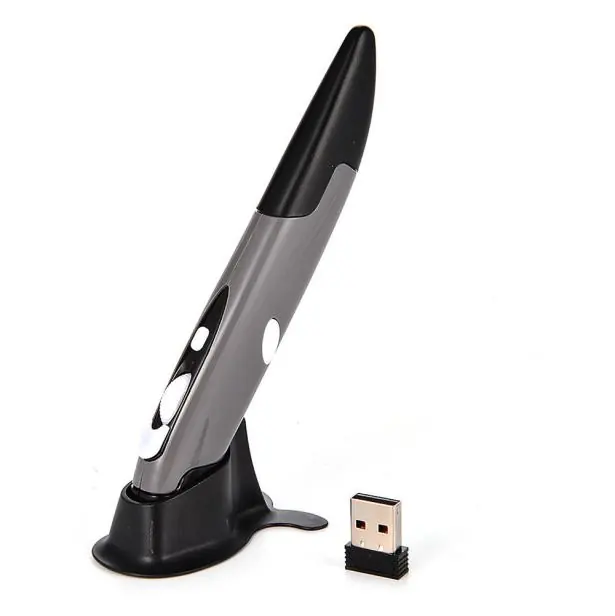
Device Overview
The pen mouse features the following controls and components:
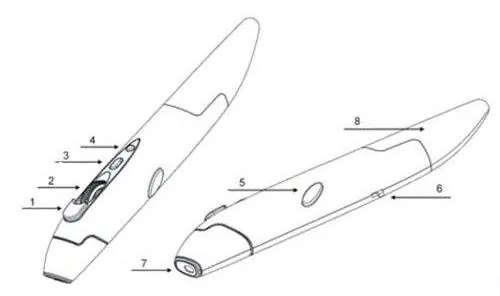
- 1. Left key
- 2. Wheel
- 3. DPI switch
- 4. Low voltage alarm
- 5. Right key
- 6. Power switch
- 7. Optical sensor
- 8. Battery compartment
Features
- Gyro Sensor: Operates on a 2.4GHz frequency for smooth, delay-free pointer movement.
- Adjustable DPI: Sensitivity can be adjusted between 800, 1200, and 1600 DPI to suit your needs.
- Compatibility: Supports Windows, Linux, Mac, and Android OS.
Technical Specifications
- Resolution: 800/1200/1600 DPI
- Frequency: 2.402GHz - 2.480GHz
- Battery: 1 x AAA Battery
- Effective Distance: 10 meters
- Dimensions: 14 x 2 x 1.5 cm
Package Contents
- 1x 2.4GHz Wireless Pen Style Air Mouse
- 1x Receiver Dongle
- 1x User Manual
Practical help
Common problems
Check if the battery is inserted correctly and has charge. Ensure the receiver dongle is securely connected to the USB port.
Replace the AAA battery when the low voltage alarm activates.
Before use
- Insert 1x AAA battery into the battery compartment
- Plug the receiver dongle into a USB port on your device
- Switch the power switch to the ON position

Manual page author
Michael Turner
Technical manual editor
Reviews PDF manuals for structure, safety notes, and practical product details so readers can find the right information quickly.