StarTech.com USB Bluetooth 5.3 Adapter AV53C1-USB-BLUETOOTH
Quick start guide for the StarTech.com USB Bluetooth 5.3 Adapter (AV53C1-USB-BLUETOOTH). Includes installation steps, system requirements, and feature overview.
Table of contents
Quick guide from the manual
To install the adapter, simply plug it into an available USB Type-A port on your Windows host computer. The device is designed to install automatically using native drivers, requiring no manual software installation.
Product Overview
The adapter features the following components:
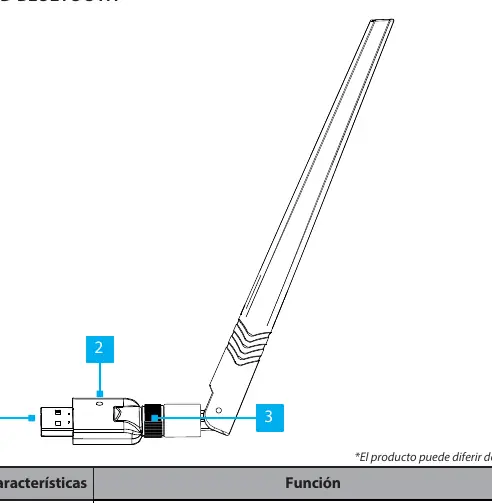
- USB Type-A: Connects the adapter to the host computer.
- Power LED: Illuminates green when the unit is powered on.
- Antenna Connector: Screw-on connection for the external antenna.
Requirements
- Windows host computer.
- Available USB Type-A port.
Support
For additional technical support and community forums, visit www.StarTech.com/support. For manuals, product information, technical specifications, and declarations of conformity, visit www.StarTech.com/AV53C1-USB-BLUETOOTH.
Official resources from the manual
Practical help
Common problems
Ensure the adapter is fully inserted into a functional USB Type-A port on a Windows host computer.
Ensure the external antenna is securely screwed onto the antenna connector.
Before use
- Verify you have a Windows host computer.
- Ensure an available USB Type-A port is accessible.
- Attach the external antenna to the adapter's connector.

Manual page author
Michael Turner
Technical manual editor
Reviews PDF manuals for structure, safety notes, and practical product details so readers can find the right information quickly.