Home Appliances / Washing Machines
Utilitech 16-ft Plug-in Color-Changing LED Indoor Strip Light
Comprehensive guide for the Utilitech 16-ft color-changing LED indoor strip light, covering installation, remote control operation, cutting instructions, and safety guidelines.
Table of contents
Product Overview
The Utilitech 16-ft Plug-in Color-Changing LED Indoor Strip Light is a versatile lighting solution designed for indoor use. The kit includes the LED strip, a controller, a power adapter, a remote control, and mounting hardware for secure installation.
Safety Information
Read all instructions before use. To prevent electric shock or fire hazards, do not look directly at the LED light source. Ensure the product is not installed near flammable materials, liquids, or gases. Maintain proper ventilation to prevent overheating. Do not use the product if the cord or housing is damaged. Keep button cell batteries out of reach of children, as ingestion can cause severe internal chemical burns or death.
Installation
Before starting, ensure all parts are present. Clean the mounting surface thoroughly. The strip features permanent adhesive backing for quick mounting, or use the included mounting clips and screws for long-term installations. Connect the LED strip to the controller, then plug the power adapter into a standard 120V wall outlet. Ensure the controller is mounted securely to the surface.
Cutting and Rejoining
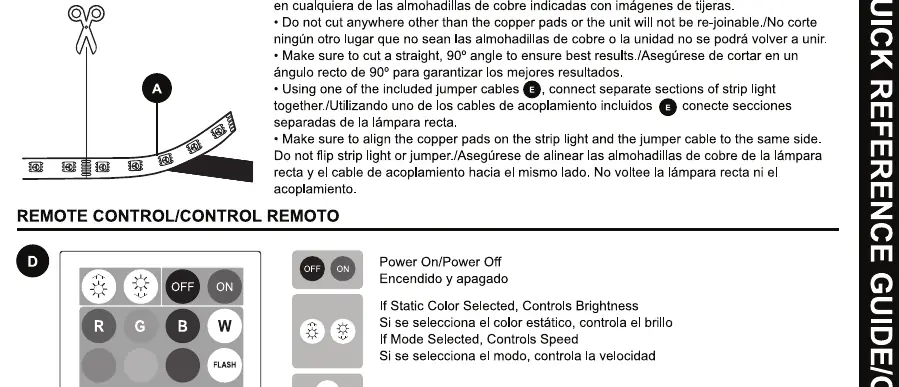
This product is linkable up to two units. To customize the length, cut the strip only at the designated copper pad locations marked with a scissor icon. Ensure cuts are straight at 90 degrees. Use the included jumper cables to connect separate sections, ensuring the polarity (+/-) matches on both ends.
Operation
The included remote control allows for color selection, brightness adjustment, and mode selection. Pre-programmed modes include various color rotations, strobe, fade, and smooth transitions. The remote has a maximum operating range of 20 feet.
Maintenance and Troubleshooting
Keep the light free of dust buildup. If the light fails to turn on, verify that the power adapter is securely connected to a live 120V outlet. If the remote is unresponsive, ensure the battery is installed correctly and the battery insulation sheet has been removed. If the issue persists, ensure the controller is within the 20-foot range.
Disposal
Dispose of used batteries immediately according to local regulations. Keep batteries away from children and seek medical attention if ingestion is suspected.
Related manuals
Related manuals from the same brand or category.

Manual page author
Michael Turner
Technical manual editor
Reviews PDF manuals for structure, safety notes, and practical product details so readers can find the right information quickly.