Home Appliances / Washing Machines
Weller WAD 101 / WAD 101IG Hot Air Station Kit
Comprehensive instruction manual for the Weller WAD 101 and WAD 101IG hot air soldering stations, covering setup, operation, technical specifications, and maintenance.
Table of contents
Product Overview
The Weller WAD 101 is a versatile hot air station designed for a wide range of soldering and desoldering tasks. The WAD 101IG model is specifically designed as an inert gas soldering station for use with WP 80IG and WP 120IG soldering irons. Both units utilize advanced microprocessor control to ensure optimal performance and automatic tool recognition, allowing for precise temperature regulation across various soldering tools.
Operation and Setup
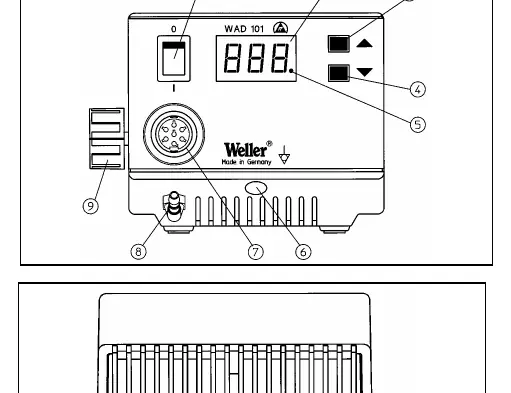
To begin operation, place the soldering tool in the safety holder. Connect the compressed air hose (6 mm outer diameter) to the quick-action coupling on the unit. Ensure the air supply is dry, oil-free, and set to 400 kPa (58 psi). If using nitrogen, ensure the room is well-ventilated. Connect the tool's electrical cable to the 7-pole socket on the front panel and secure it. After verifying the mains voltage, switch the unit on using the main power switch. The system performs a self-test before displaying the set temperature and then switching to the actual temperature value.
Temperature and Airflow Control
The desired temperature is easily adjusted using the UP and DOWN buttons. For hot air tools, the range is 50°C to 550°C (122°F - 999°F), while soldering irons are automatically limited to 450°C (842°F). A red LED on the display serves as an optical regulator monitor; continuous light indicates heating, while flashing signals that the operating temperature has been reached. Airflow for the WAD 101 is controlled via a finger switch on the handle and adjusted using a flow control valve.
Maintenance and Safety
Regular maintenance is essential for accurate temperature regulation. Ensure the transition between the heating element/sensor and the soldering tip is free from dirt, foreign bodies, or damage. When heating for the first time, tin the soldering tip to remove oxidation. Always keep the tip well-tinned during breaks and before placing it in the holder. Avoid using overly aggressive fluxes. The hot air nozzles are screwed into the heating element; use an 8 mm socket spanner for replacement, ensuring the thread depth does not exceed 5 mm to prevent damage to the heating element.
Manufacturer information
Weller Tools
Practical help
Common problems
System does not heat up
Check mains connection, fuse, and ensure the tool is correctly connected to the 7-pole socket.
Inaccurate temperature regulation
Clean the transition area between the heating element/sensor and the soldering tip; ensure the tip is correctly seated.
Before use
- Ensure mains voltage matches the rating plate.
- Verify air supply is dry, oil-free, and at 400 kPa.
- Check that the soldering tool is securely placed in the safety holder.
- Ensure the soldering tip is correctly seated.
- If using nitrogen, ensure adequate room ventilation.
Specs in practice
- Temperature Range
- 50°C - 550°C for hot air; 50°C - 450°C for soldering irons.
- Compressed Air
- 400 kPa (58 psi) inlet pressure required.
Images and diagrams
- The front panel features the main switch, digital display, temperature adjustment buttons, and connection ports for tools and air.
Model compatibility
- WAD 101IG is designed for WP 80IG and WP 120IG inert gas soldering irons.
- HAP 1 hot air tool cannot be operated with WAD 101IG.
- WCB 1 and WCB 2 input units are optional accessories for extended functionality.

Manual page author
Emily Carter
User documentation editor
Prepares concise manual descriptions and highlights the most useful setup, operation, and maintenance information for readers.