User Guide for Xiaomi Pad 6S Pro Touchpad Keyboard
Quick start guide for the Xiaomi Pad 6S Pro Touchpad Keyboard. Learn how to connect, power, and safely use your keyboard with the Xiaomi Pad 6S Pro 12.4.
Quick answers from the manual
Quick answer
- The keyboard attaches magnetically to the Xiaomi Pad 6S Pro 12.4 and is powered directly by the tablet. p. 2
Key actions
- Attach the keyboard to the tablet magnetically. p. 2
First start
- Align the keyboard with the tablet to establish a magnetic connection. p. 2
Show 2 more answers Show less
Technical specifications
| Parameter | Value | Meaning | Pages |
|---|---|---|---|
| Input | 3.4-5V 200mA | Power requirements | p. 2 |
| Operating Temperature | 0°C to 35°C | Safe operating range | p. 2 |
Where to find it in the PDF
- Installation p. 2
- Safety Information p. 2, 3
Table of contents
Quick guide from the manual
This guide provides instructions for the Xiaomi Pad 6S Pro Touchpad Keyboard. This device is designed for use with the Xiaomi Pad 6S Pro 12.4.
Installation
The keyboard connects to the tablet via a magnetic interface. To install:
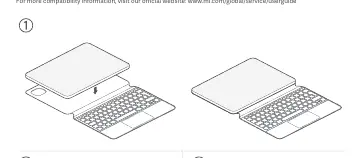
- Align the keyboard with the tablet.
- Ensure the magnetic connection is secure.
- The keyboard will only enter operating mode once correctly linked.
Power Supply
The keyboard does not require a separate power source. It is powered directly by the tablet once the two devices are fitted together.
Safety Precautions
- Temperature: Operate the device between 0°C and 35°C. Store between -20°C and 45°C.
- Moisture: Keep the device dry. Do not use in high-humidity areas like bathrooms.
- Maintenance: Do not attempt to repair the device yourself. Contact customer support for assistance.
- Compatibility: Use only authorized accessories. Do not connect incompatible devices.
- Medical Devices: Maintain a minimum distance of 15 cm from pacemakers.
Disposal
This product must not be discarded with household waste in the EU. Please use authorized return and collection systems for recycling.
Manufacturer information
Xiaomi Corporation
Practical help
Common problems
Ensure the keyboard and tablet are correctly linked magnetically.
Do not use outside the 0°C to 35°C temperature range.
Before use
- Ensure compatibility with Xiaomi Pad 6S Pro 12.4
- Keep the device dry
- Do not connect incompatible devices
- Check for authorized accessories only

Manual page author
Emily Carter
User documentation editor