Furniture / Home Furnishing
User Guide for StarTech.com 18U Knock-Down Server Rack Cabinet 32" Deep
A comprehensive assembly and installation guide for the StarTech.com 18U server rack cabinet (SKU: RK1836BKF). Includes safety warnings, component list, step-by-step assembly instructions, leveling procedures, and equipment mounting...
Table of contents
Manual images
Jump to the sectionQuick guide from the manual
This document provides assembly and safety instructions for the StarTech.com 18U Knock-Down Server Rack Cabinet (SKU: RK1836BKF). The rack is designed for indoor use only. Always ensure the floor can support the combined weight of the rack and installed equipment. Never move or lift the cabinet without assistance, and do not extend more than one component at a time to prevent tipping.
Safety Warnings
- Weight Capacity: Stationary = 800 kg, Rolling = 150 kg. Do not exceed these limits.
- Stability: Never extend more than one component at a time.
- Grounding: This product requires a protective earth connection. Do not use without it.
- Handling: The cabinet is extremely heavy; use assistance for moving or lifting.
- Environment: Indoor use only. Keep away from liquids.
Assembly Instructions
The assembly requires a spirit level, a 14 mm wrench, and a Phillips screwdriver. Follow these steps:

- Attach the side panels to the middle beams using M8x20 mm bolts and spring washers.
- Turn the frame upside down to install the casters (two with brakes, two without) using M6x10 mm screws.
- Install the leveling feet into the bottom of the frame and adjust them using a 14 mm wrench until they are shorter than the casters.
- Attach the top and bottom panels to the frame using the provided M6x12 mm screws.
- Install the front and rear doors by inserting the hinge pins into the side panel holes.
Leveling and Grounding
Before installing equipment, ensure the rack is level using a spirit level. Lower the leveling feet until they firmly contact the floor to take the weight off the casters. The cabinet must be grounded by attaching an earth cable to the designated grounding points on the interior of the doors and side panels.
Equipment Installation
When loading equipment, always place the heaviest items at the bottom of the rack to maintain stability. Use the provided M6 cage nuts and screws to secure your equipment to the mounting rails. If you need to adjust the mounting depth, remove the M6 screws holding the rails, slide them to the desired position, and re-secure them.
Official resources from the manual
Practical help
Common problems
Cabinet tipping over
Never extend more than one component from the rack at a time.
Difficulty removing cage nuts
Use a dedicated cage nut tool if you have trouble pressing the prongs on the back of the nut.
Rack is unstable
Ensure the leveling feet are lowered firmly against the floor surface to support the weight.
Before use
- Verify the floor can support the total weight of the rack and equipment.
- Ensure a protective earth connection is available.
- Check that you have a spirit level and a 14 mm wrench.
- Confirm all components from the package list are present.
- Ensure the installation site is flat and level.
Specs in practice
- Stationary Weight Capacity
- Maximum load of 800 kg when the rack is in a fixed position.
- Rolling Weight Capacity
- Maximum load of 150 kg when the rack is being moved on its casters.
- Mounting Rail Adjustment
- The distance between adjustment holes on the mounting rail is 7/8 inch.
Images and diagrams
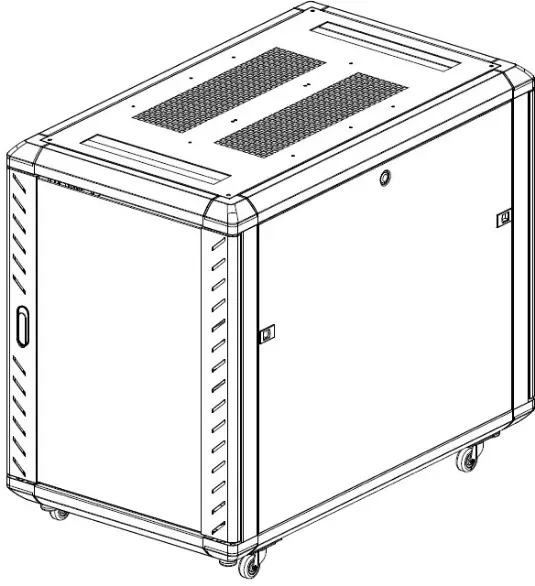
- The front view diagram identifies the top panel, side walls, front/rear doors, and the caster/leveling foot assembly.
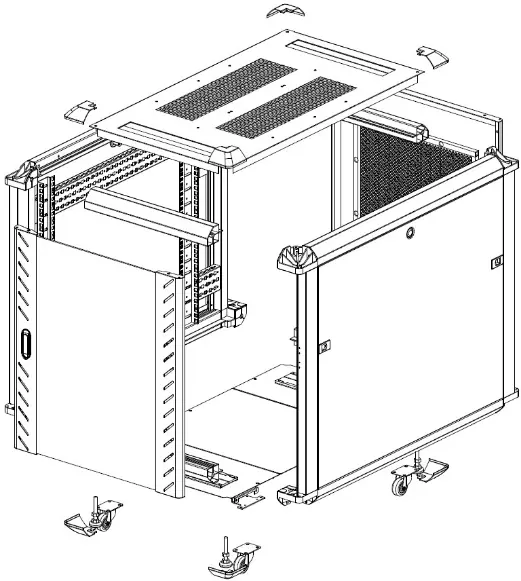
- The exploded view shows the structural frame components and how they connect at the corners.
Model compatibility
- Designed for indoor use only.
- Requires M6 cage nuts and screws for standard rack-mount equipment.

Manual page author
David Miller
Documentation analyst
Organizes user manual content into clear summaries, with attention to model details, product context, and everyday usability.