Baby / Baby Walkers
Assembly Guide for Fisher-Price 2-Sided Steady Speed™ Tiger Walker HMJ55
Quick assembly and usage guide for the Fisher-Price 2-Sided Steady Speed™ Tiger Walker (HMJ55). Learn how to assemble the walker, install batteries, and understand the Smart Stages™ play modes.
Quick answers from the manual
Quick answer
- The Fisher-Price 2-Sided Steady Speed™ Tiger Walker (HMJ55) requires adult assembly using a Phillips screwdriver and 3 AA batteries. It features three 'Smart Stages' play modes (Explore, Encourage, Pretend). p. 2, 10
Key actions
- Assemble the walker p. 4, 5, 6, 7
- Install batteries p. 9
First start
- Install 3 AA batteries and set the power mode switch to 1, 2, or 3. p. 9, 10
Problems and fixes
Erratic operation
Slide the power-mode switch off and back on to reset.
p. 9Maintenance and reset
- Reset electronics by toggling the power switch. p. 9
Technical specifications
| Parameter | Value | Meaning | Pages |
|---|---|---|---|
| Batteries | 3 x AA (LR6) | Alkaline batteries recommended | p. 2, 9 |
Where to find it in the PDF
- Assembly Instructions p. 4, 5, 6, 7
- Battery Installation p. 9
- Power & Modes p. 10
Table of contents
Manual images
Click an image to enlargeImportant Information
The Fisher-Price 2-Sided Steady Speed™ Tiger Walker (HMJ55) requires adult assembly. Please ensure you have a Phillips screwdriver (not included) and three AA (LR6) alkaline batteries ready before starting. Assembly takes approximately 10 minutes.
Assembly
Follow these steps to assemble the walker:
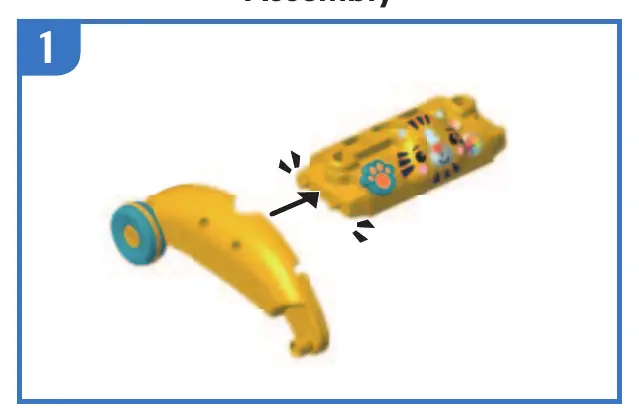
- Attach the side frame to the main tiger body.
- Secure the wheels using the provided screws.
- Attach the remaining side frame to the main body.
- Install the remaining wheels and secure with screws.
- Attach the toucan accessory to the main body.
- Insert the top activity panel into the main body.
- Attach the top handle bar to the frame.
- Ensure the handle is securely locked by pulling up on it.
Battery Installation
To install or replace batteries:
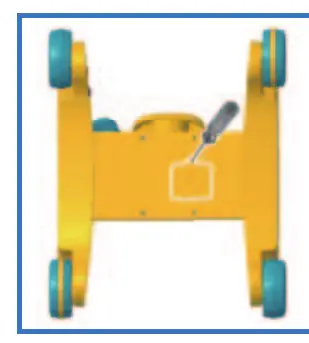
- Locate the battery door on the underside of the unit.
- Use a Phillips screwdriver to loosen the screw and remove the door.
- Insert three new AA (LR6) alkaline batteries, ensuring correct polarity (+ and -).
- Replace the battery door and tighten the screw.
Note: If the toy begins to operate erratically, slide the power-mode switch off and back on to reset the electronics. If sounds or lights become faint, replace the batteries.
Power & Modes
The walker features a Smart Stages™ switch with the following settings:
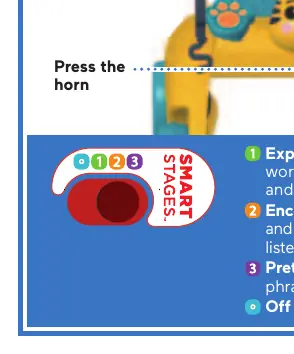
- 0 (Off): Turns the toy off.
- 1 (Explore): Plays fun sounds, music, first words, and phrases introducing opposites and colours.
- 2 (Encourage): Plays sounds, phrases, and songs about the alphabet and counting, with prompts followed by rewards.
- 3 (Pretend): Plays engaging music and phrases to inspire imaginative play.
Maintenance & Safety
- Clean the toy with a damp cloth. Do not immerse in water.
- Do not mix old and new batteries or different battery types.
- Remove batteries during long periods of non-use.
- Dispose of the product and batteries according to local recycling regulations.
Practical help
Common problems
Toy operates erratically
Reset the electronics by sliding the power-mode switch off and back on.
Sound or lights become faint or stop
Replace the batteries with three new AA (LR6) alkaline batteries.
Before use
- Phillips screwdriver (not included)
- 3x AA (LR6) alkaline batteries (not included)
- Adult assembly required
- Plan for approximately 10 minutes of assembly time
Specs in practice
- Power Source
- 3 x AA (LR6) alkaline batteries
- Assembly Time
- Approximately 10 minutes
Images and diagrams
- Assembly steps 1-9 illustrate the connection of the tiger body, wheels, and handle.
- Battery compartment is located on the underside of the unit.
Model compatibility
- Use only alkaline batteries for longer life.

Manual page author
Emily Carter
User documentation editor
Prepares concise manual descriptions and highlights the most useful setup, operation, and maintenance information for readers.