Baby / Baby Walkers
User Manual for Baby Trend Trend PLUS 2-in-1 Walker
Comprehensive user guide for the Baby Trend Trend PLUS 2-in-1 Walker. Includes step-by-step assembly instructions, safety warnings, height adjustment, folding procedures, and maintenance tips.
Quick answers from the manual
Quick answer
- The Baby Trend Trend PLUS 2-in-1 Walker is for infants who can sit upright unassisted (approx. 6 months). It supports up to 30 lbs and 32 inches in height. It features 3 height adjustments and a folding frame. p. 1, 3, 9
Key actions
- Adjusting Height p. 5
- Folding the Walker p. 8
First start
- Assemble the base, wheels, seat, and toys as described in the assembly section. Ensure all parts click into place and the walker is locked in the open position. p. 4, 5, 6, 7
Problems and fixes
Difficulty with assembly or missing parts
Do not return to the store. Contact Baby Trend Customer Service at 1-800-328-7363.
p. 3Maintenance and reset
- Clean stoppers and wheels regularly. Clean seat pad with mild soap and warm water; do not machine wash. p. 3
Technical specifications
| Parameter | Value | Meaning | Pages |
|---|---|---|---|
| Max Weight | 30 lbs | Maximum weight capacity | p. 3 |
| Max Height | 32 inches | Maximum height capacity | p. 3 |
Where to find it in the PDF
- Assembly p. 4, 5, 6, 7
- Safety Warnings p. 3
Table of contents
Manual images
Click an image to enlargeQuick guide from the manual
The Baby Trend Trend PLUS 2-in-1 Walker is designed for infants who can sit upright unassisted, typically around 6 months of age. It features adjustable height settings, removable toy attachments, and a folding mechanism for storage. Always ensure the walker is locked in the open position before use and never leave a child unattended.
Parts List
- Base
- Seat
- Front Wheels (2x)
- Rear Wheels (2x)
- Stoppers (6x)
- Toys & Sockets (2x)
- Toy Bar with Base
- Push Handle
Assembly
To Assemble Walker
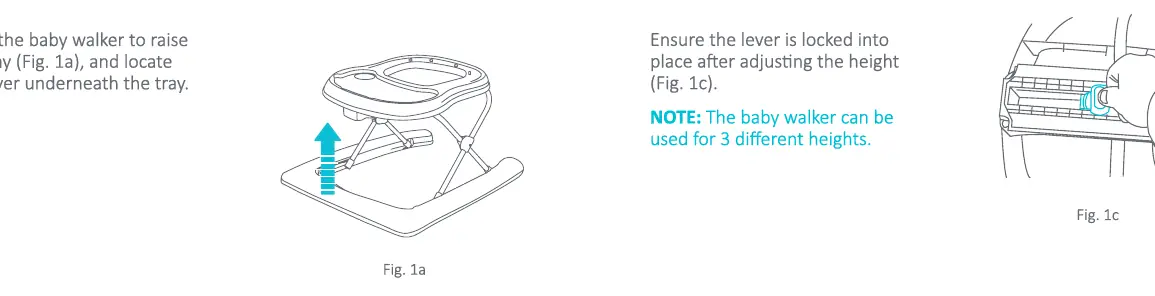
Open the walker to raise the tray and locate the lever underneath. Ensure the lever is locked into place after adjusting the height.
Inserting the Seat
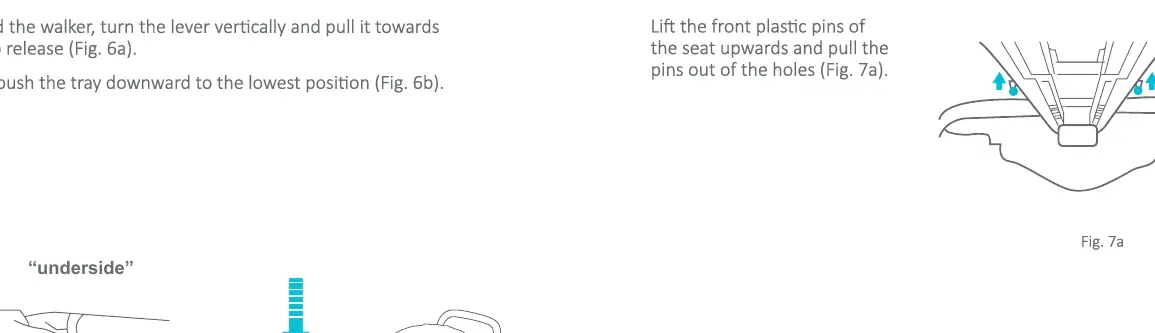
Insert the seat by aligning the buttonholes to the walker. Connect the seat fabric by inserting the plastic button pins into the upper, larger openings and pushing them firmly downwards until they snap into position. Insert the pins on the back of the seat into the holes until they click.
Wheels
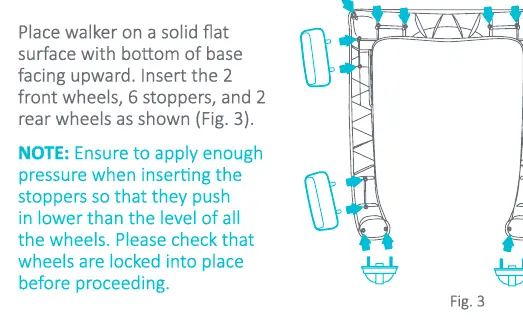
Place the walker on a solid flat surface with the bottom of the base facing upward. Insert the 2 front wheels, 6 stoppers, and 2 rear wheels. Apply enough pressure when inserting the stoppers so they push in lower than the level of the wheels.
Push Handle
Insert the Push Handle into the frame and push firmly until it clicks into position. Do not lift the walker by the Push Handle.
Height Adjustment
The walker can be used at 3 different heights. To adjust, remove the baby from the walker. Twist the lever, slide it vertically while simultaneously pushing the lever up to adjust. Ensure the lever is locked into place after adjusting. Always check that the safety button is turned 90 degrees to prevent accidental release.
Folding the Walker
To fold the walker, turn the lever vertically and pull it towards you to release. Then, push the tray downward to the lowest position.
Maintenance and Cleaning
Clean the stoppers and wheels regularly to maintain performance. To clean the seat pad, use only mild household soap and warm water with a sponge or cloth; do not machine wash. For metal and plastic parts, use only lukewarm water and mild soap.
Safety Warnings
- Stair Hazard: Block stairs or steps securely before using the walker.
- Weight/Height Limits: Discontinue use when the child can walk unassisted, reaches 30 lbs (13.5 kg) in weight, or reaches 32 inches (80 cm) in height.
- Surface: Use only on flat surfaces free of objects that could cause the walker to tip over.
- Supervision: Never leave the child unattended.
- Carpet: Not designed for use on carpets or rugs.
- Adjustment: Never adjust tray height with the baby in the walker.
Manufacturer information
Baby Trend, Inc.
Practical help
Common problems
Walker will not fold
Ensure the lever is turned vertically and pulled towards you to release the mechanism before pushing the tray down.
Toys are loose or falling out
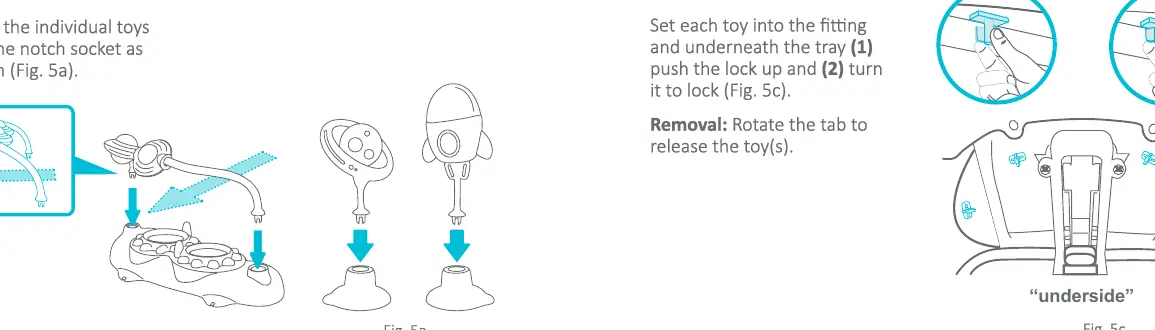
Ensure toys are aligned with the single/double tab housings and locked underneath the tray by pushing the lock up and turning it.
Height adjustment is stuck
Ensure the baby is removed from the walker, then twist the lever and slide it vertically while pushing up.
Before use
- Check that the walker is locked in the open position.
- Inspect for damaged hardware, loose joints, or missing parts.
- Ensure the child can sit upright unassisted.
- Verify both feet touch the floor.
- Check that the safety button is turned 90 degrees.
Specs in practice
- Weight Limit
- Maximum weight capacity is 30 lbs (13.5 kg).
- Height Limit
- Maximum height capacity is 32 inches (80 cm).
- Age Recommendation
- Approximately 6 months; child must be able to sit upright unassisted.
Images and diagrams
- Fig 1a/1b: Shows the height adjustment lever mechanism located under the tray.
- Fig 3: Illustrates the correct placement of wheels and stoppers on the base.
- Fig 5c: Demonstrates the locking mechanism for toy attachments.
Model compatibility
- Not designed for use on carpets or rugs.

Manual page author
Michael Turner
Technical manual editor
Reviews PDF manuals for structure, safety notes, and practical product details so readers can find the right information quickly.