Baby / Baby Monitors
User Manual for Alecto SMARTBABY5 Smart Life Camera
Quick guide for the Alecto SMARTBABY5 Smart Life Camera. Learn how to install, pair with the Smart Life app, understand LED indicators, and configure settings.
Table of contents
Manual images
Click an image to enlargeQuick Start Guide
The Alecto SMARTBABY5 is a smart camera designed for indoor use. To begin, download the Smart Life app on your smartphone or tablet. Ensure your device is connected to a 2.4GHz Wi-Fi network before starting the installation process. Keep the camera within range of your router during the initial setup.
Device Description
The camera features the following components:
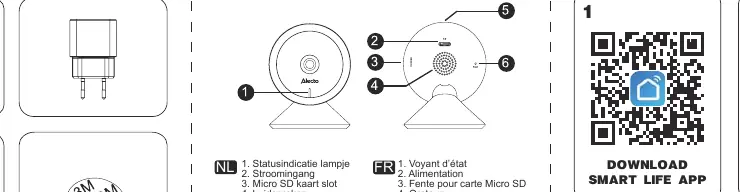
- Status indicator light: Shows the connection status.
- Power input: For the included 5V 1.0A adapter.
- Micro SD card slot: Supports up to 128GB for local storage.
- Speaker: For two-way audio.
- Microphone: For audio recording.
- Reset button: Used to reset the device (hold for 6 seconds).
Installation and Pairing

- Download and install the Smart Life app.
- Power on the camera.
- If the status light is flashing red, the camera is awaiting Wi-Fi connection. If it is solid red, the network is not OK.
- In the app, select 'Add Manually' and follow the on-screen instructions.
- If the camera is not in pairing mode, hold the reset button for 6 seconds until you hear a beep.
- Ensure your smartphone is connected to the same 2.4GHz Wi-Fi network you intend to use for the camera.
- Scan the QR code displayed on your phone with the camera lens (keep 15-20cm distance).
- Wait for the connection to complete (approx. 2 minutes).
LED Status Indicators
- Red solid: Camera network not OK.
- Red blinking: Awaiting Wi-Fi connection.
- Blue solid: Camera running correctly.
- Blue blinking: Currently connecting.
App Functions
The Smart Life app provides the following features:
- Screenshot: Capture images from the live feed.
- Microphone button: Enable two-way talk.
- Video recording: Record live video.
- Playback: View recordings from the SD card (if installed).
- Detection settings: Configure motion and sound detection alerts.
- Photo album: Access stored screenshots and videos.
Placement
The camera is designed for indoor use. Ensure it is not placed in an enclosed area that restricts airflow. Keep the power cable at least 1 meter away from the crib and out of reach of children at all times.
Safety and General Warnings
- This product is not a toy; keep out of reach of children.
- Only use the provided 5V 1.0A power adapter.
- Do not expose the unit to rain, moisture, or direct heat sources.
- The device supports 2.4GHz Wi-Fi networks only.
- Motion and sound detection alarms are off by default; activate them in the app settings after installation.
- The device can only be registered to one account at a time. Remove the device from the app before changing ownership.
Specifications
- Resolution: 1920x1080 (Full HD)
- Night Vision: Up to 10m
- Storage: Micro SD (max 128GB), Cloud, NVR
- Wireless: 2.4GHz Wi-Fi (IEEE802.11 b/g/n)
- Operating Temperature: -20°C to 50°C
- Power: 5V DC, 1.0A
Practical help
Common problems
Camera not connecting to Wi-Fi
Ensure you are using a 2.4GHz network (5GHz is not supported). Check that the camera is within range of the router during setup.
No notifications received
Motion and sound detection alarms are off by default. Enable these notifications in the app settings after installation.
Connection timeout during setup
Verify your Wi-Fi password, ensure your phone is on the same network, and try the pairing process again.
Device needs to be reset
Hold the reset button on the camera for 6 seconds until you hear a beep.
Before use
- Download the Smart Life app.
- Ensure a 2.4GHz Wi-Fi network is available.
- Check that the power adapter is 5V 1.0A.
- Keep the camera within range of the router during registration.
- Ensure the camera is not placed in an enclosed area.
Specs in practice
- 2.4GHz Wi-Fi
- The camera only connects to 2.4GHz networks; 5GHz networks are not supported.
- Micro SD Slot
- Supports cards up to 128GB for local video storage.
- Operating Temperature
- The device is rated for use between -20°C and 50°C.
Images and diagrams
- Red solid LED: Network error.
- Red blinking LED: Awaiting Wi-Fi connection.
- Blue solid LED: Camera running correctly.
- Blue blinking LED: Connecting to network.
Model compatibility
- Requires Android 5.0+ or iOS 9.0+.
- Supports 2.4GHz Wi-Fi networks only.
- Only one account can be registered to the device at a time.

Manual page author
David Miller
Documentation analyst
Organizes user manual content into clear summaries, with attention to model details, product context, and everyday usability.