Electronics / Two-Way Radios
User Manual for Motorola PIP15 Audio Baby Monitor
Comprehensive user guide for the Motorola PIP15 Audio Baby Monitor. Includes setup instructions, battery charging, pairing, VOX settings, lullaby control, and troubleshooting tips.
Table of contents
Manual images
Click an image to enlargeQuick guide from the manual
Before using your Motorola PIP15 for the first time, you must charge both the parent and baby units for at least 16 hours continuously. Ensure the baby unit is placed on a flat surface at least 1 meter away from the baby's cot. Keep the parent and baby units at least 2 meters apart to prevent audio feedback.
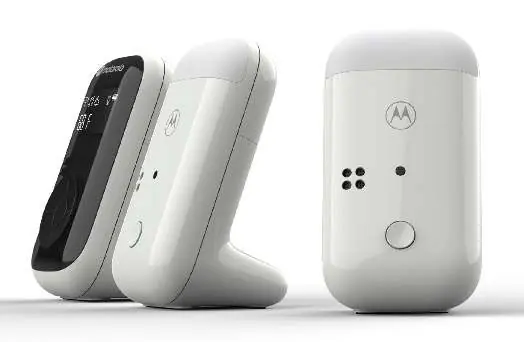
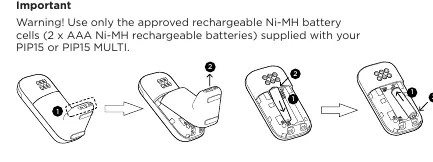
Getting started
The system comes with rechargeable Ni-MH AAA batteries. To install them, lift the battery cover on the back of the unit, insert the batteries according to the polarity markings, and replace the cover. Connect the provided USB-C power cables to the units and plug them into a wall outlet. The charging LED will light up in red while charging and dim when fully charged.
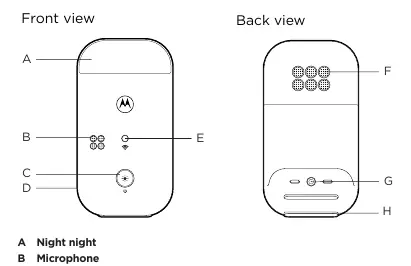
Understanding your units
Baby Unit: Features a power/night light button. A single press toggles the night light brightness (off, low, medium, high), while a long press turns the unit on or off. The LED indicator shows power status and charging progress.
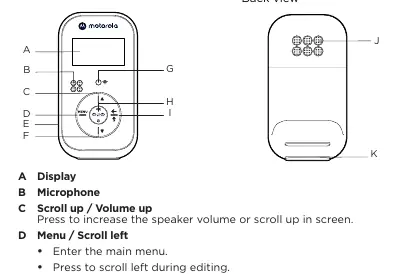
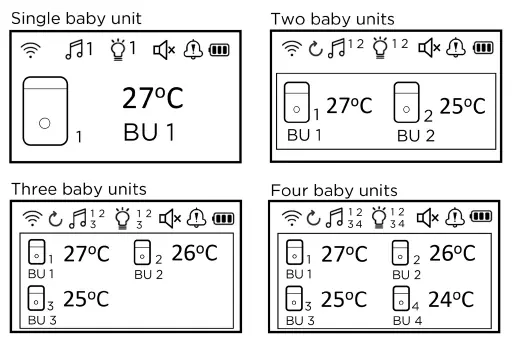
Parent Unit: Features an LCD display, menu navigation, volume control, and a talk-back button. The screen displays signal strength, battery level, temperature, and active modes like cycle or lullaby.
Using the baby monitor
- Listening and cycling: In standby mode, press the OK button to select an individual baby unit, all units, or cycle through them.
- Talk back: Press and hold the talk-back button to speak to your baby through the parent unit.
- VOX (Voice Activated Alert): Adjust the microphone sensitivity (Levels 1-4 or Off). At higher levels, the unit only transmits louder sounds.
- Lullabies: You can play lullabies from the baby unit, adjust volume, select specific tracks, or set a timer (5, 10, 15 minutes, or constant).
Settings and adjustments
Access the main menu to configure settings such as:
- Naming baby units: Assign custom names to your units.
- Temperature: Set the temperature format (°C/°F) and configure high/low temperature alerts.
- Pairing: If a unit loses its link, use the Register/Deregister menu to pair it again.
- Key tones and alerts: Enable or disable key tones and beeping alerts.
Troubleshooting
- High-pitched noise: Move the parent and baby units further apart or decrease the volume.
- No temperature reading: Clean the pogo pin contacts inside the baby unit battery compartment with a damp or anti-static cloth.
- LED flashing: The units may be out of range. Ensure they are within 450 meters (1500 feet) of each other.
Safety and maintenance
Always switch off and disconnect the power adapter before cleaning. Use a slightly damp or anti-static cloth. Do not use solvents or chemicals. Keep the monitor away from humid areas, direct sunlight, and heat sources. This device is an aid and not a substitute for responsible adult supervision.
Manufacturer information
Motorola
Practical help
Common problems
High-pitched noise
The parent and baby units are too close together. Move them further apart or decrease the volume on the parent unit.
No temperature reading on display
Clean the pogo pin contacts inside the baby unit battery compartment with a slightly damp or anti-static cloth.
Power/linking LED flashes
The units may be out of range. Reduce the distance between them (ensure it is less than 450 meters/1500 feet).
Parent unit not turning on
Check if the unit is powered on, batteries are correctly installed, or connect to the power supply to recharge.
Before use
- Charge both parent and baby units for 16 hours before initial use.
- Ensure baby unit is at least 1 meter (3 feet) away from the baby.
- Keep parent and baby units at least 2 meters (6 feet) apart to avoid audio feedback.
- Ensure power adapters are connected to easily accessible outlets.
- Test the monitor and all functions before actual use.
Specs in practice
- Operating Range
- Up to 450 meters (1500 feet) outdoors with a clear line of sight.
- Battery Type
- Rechargeable Ni-MH AAA battery cells.
Images and diagrams
- The parent unit features a display, volume/scroll buttons, menu/select buttons, and a talk-back button.
- The baby unit features a power/night light button and a temperature sensor.
- LCD icons indicate signal strength, battery level, temperature, and active modes.
Model compatibility
- Supports up to 4 baby units.
- If Ni-MH batteries are unavailable, standard AAA alkaline batteries can be used (do not connect power adapters in this case).

Manual page author
Michael Turner
Technical manual editor
Reviews PDF manuals for structure, safety notes, and practical product details so readers can find the right information quickly.