HVAC / Heaters & Fireplaces
User Manual for Allen + Roth 1-Light Pendant
Quick guide for the Allen + Roth 1-Light Pendant. Includes assembly instructions, wiring diagrams, safety warnings, and troubleshooting steps for models 43532 and 43533.
Table of contents
Manual images
Click an image to enlargeQuick guide from the manual
This document provides installation and safety instructions for the Allen + Roth 1-Light Pendant. The fixture is designed for indoor use only and is not suitable for damp or outdoor locations. The net weight of the unit is 3.96 lbs. Ensure the power is disconnected at the circuit breaker before beginning installation.
Package Contents
Before starting, ensure all parts are present:
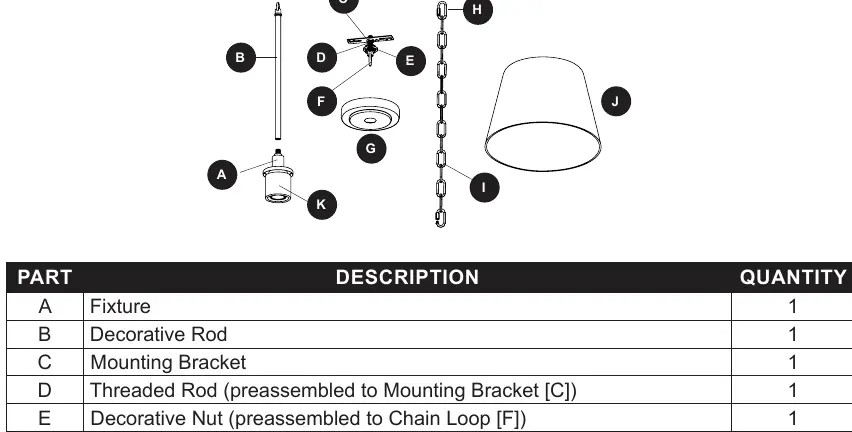
- Fixture (A)
- Decorative Rod (B)
- Mounting Bracket (C)
- Threaded Rod (D)
- Decorative Nut (E)
- Chain Loop (F)
- Ceiling Plate (G)
- Open Links (H)
- Chain (I)
- Glass Shade (J)
- Socket Ring (K)
Hardware included: Wire Connectors (AA), Bracket Screws (RR).
Safety Information
- Danger: Do not connect to an ungrounded electrical system. Never connect the ground wire to current-carrying wires (black or white).
- Warning: All electrical connections must comply with local codes and the National Electric Code (NEC).
- Do not suspend the fixture by house wires; it must be mounted directly to an outlet box.
- Use gloves if handling parts with sharp edges.
Assembly Instructions
1. Preparation: Turn off power at the circuit breaker. Twist the decorative rod (B) clockwise into the fixture (A). Use pliers to adjust the chain (I) length if necessary.
2. Mounting: Connect the chain (I) to the decorative rod (B) using an open link (H). Weave wires through the chain. Feed the chain and wires through the decorative nut (E), ceiling plate (G), and mounting bracket (C). Secure the mounting bracket (C) to the outlet box using bracket screws (RR).
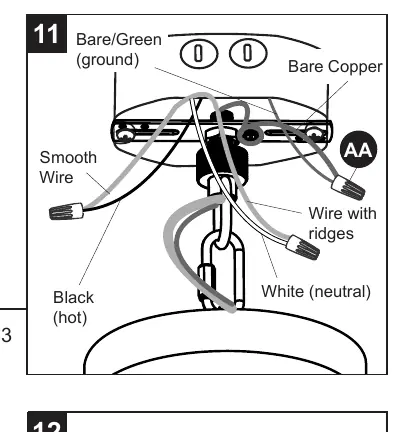
3. Wiring: Loosen the ground screw on the mounting bracket and wrap the bare fixture wire around it. Tighten the screw. Strip 1/2 inch of insulation from the fixture wires. Connect wires as follows:
- Bare Copper (Fixture) to Bare/Green (Supply)
- Ridged Wire (Fixture) to White/Neutral (Supply)
- Smooth Wire (Fixture) to Black/Hot (Supply)
Secure connections with wire connectors (AA) and wrap with electrical tape. Push wires into the outlet box.
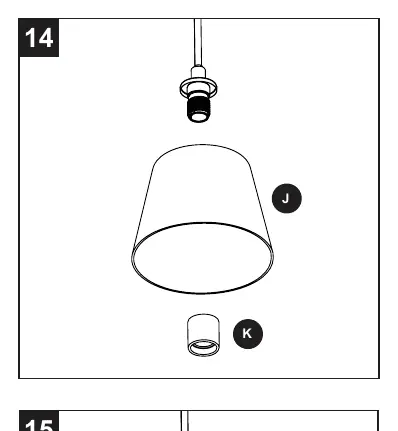
4. Finishing: Lift the ceiling plate (G) flush to the ceiling and secure with the decorative nut (E). Remove the socket ring (K), place the glass shade (J) over the socket, and secure with the socket ring (K). Install an E26-base bulb (LED/CFL 25W max or Incandescent 60W max).
Troubleshooting
- Bulbs will not light: Check wiring or replace the bulb.
- Ceiling plate not flush: Remove the chain loop (F) from the threaded rod (D) and adjust the hex nuts on the lower part of the threaded rod. Reinstall the chain loop.
Practical help
Common problems
Bulbs will not light
Check the wiring connections or replace the bulb.
Ceiling plate does not sit flush with the ceiling
Remove the chain loop (F) from the threaded rod (D) and adjust the hex nuts on the lower part of the threaded rod, then reinstall.
Before use
- Disconnect power at the circuit breaker or fuse box.
- Ensure the outlet box is properly grounded.
- Verify you have the necessary tools: screwdriver, pliers, safety glasses, electrical tape, and a ladder.
- Check that the fixture is intended for indoor use only.
- Ensure you have compatible E26-base bulbs (LED/CFL 25W max or Incandescent 60W max).
Images and diagrams
- The wiring diagram illustrates connecting the bare copper wire to the ground supply, the ridged wire to the white (neutral) supply, and the smooth wire to the black (hot) supply.
Model compatibility
- Indoor use only.
- Not suitable for damp or outdoor locations.
- Requires an outlet box capable of supporting the fixture weight.

Manual page author
David Miller
Documentation analyst
Organizes user manual content into clear summaries, with attention to model details, product context, and everyday usability.