Lighting / Fixtures
Troubleshooting Guide for Allen + Roth 1137MFP-72-36-503 Electric Fireplace
Quick troubleshooting guide for the Allen + Roth 1137MFP-72-36-503 electric fireplace. Learn how to fix a non-functioning flame effect by reconnecting the internal USB cable with step-by-step instructions.
Table of contents
Manual images
Click an image to enlargeQuick guide from the manual
This document provides instructions for troubleshooting a non-functioning flame effect on the Allen + Roth 1137MFP-72-36-503 electric fireplace. The issue is typically caused by a loose or disconnected USB cable between the heater assembly and the log set.
Troubleshooting the flame effect
If the flame effect is not operating correctly, follow the steps below to access the internal components and secure the USB connection.
Step-by-step repair procedure
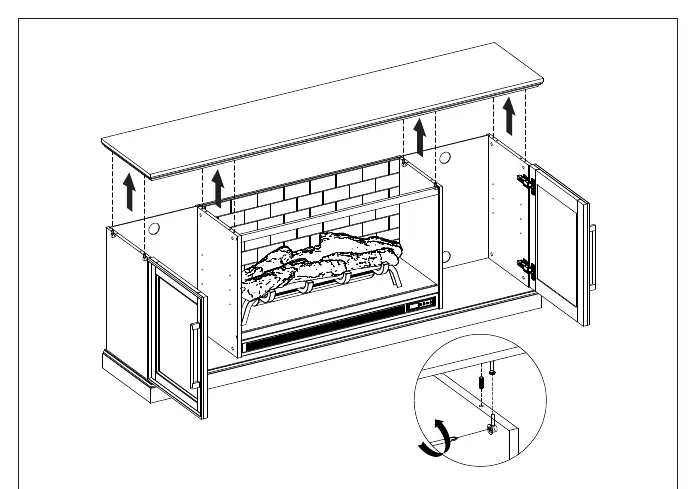
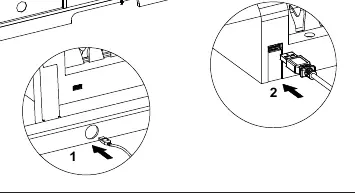
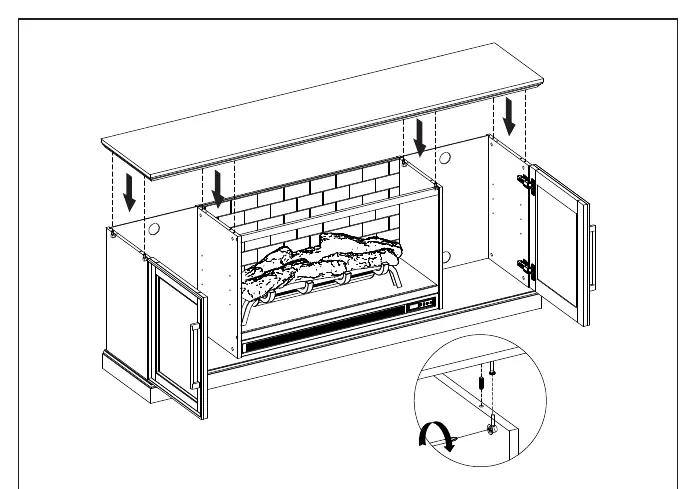
Disassembly
- Unplug: Disconnect the fireplace from the wall outlet and move it away from the wall to access the rear of the unit.
- Loosen locknuts: Use a Phillips head screwdriver to turn the eight locknuts on the inner and outer walls counterclockwise.
- Remove top panel: With assistance, lift off the top panel and place it upside down on a clean, scratch-free surface. Be careful not to bend the connecting rods.
- Remove brick panel: Slide the middle brick panel upward out of its routed channel and set it aside.
Repair
- Connect USB: Locate the USB cable attached to the heater assembly. Pass the cable through the round hole at the lower left side of the metal base, then connect it to the bottom left corner of the log set assembly. Use the included twist tie to secure excess wiring to prevent it from getting caught or pulled loose.
- Test: Plug the fireplace back into the wall outlet. Turn on the power and adjust the flame using the Flame Brightness icon. If the flame operates correctly, proceed to reassembly.
Reassembly
- Reinsert brick panel: Ensure the unit is unplugged for safety. Slide the middle brick panel downward into the routed channel.
- Secure top panel: With assistance, place the top panel back onto the mantel, aligning the pins and dowels. Use a Phillips head screwdriver to turn the eight locknuts clockwise to secure the top in place.
Contact and support
For questions, problems, or missing parts, contact customer support at 866-439-9800 (8 a.m.-8 p.m., EST, Monday - Sunday) or via email at [email protected].
Practical help
Common problems
Flame effect not working
Check the internal USB connection between the heater assembly and the log set; it may be loose or disconnected.
Before use
- Unplug the fireplace from the wall outlet
- Have a Phillips head screwdriver ready
- Have an assistant to help lift the top panel
- Ensure you have a clean, scratch-free surface for the top panel
Images and diagrams
- The USB cable must be passed through the round hole at the lower left side of the metal base before connecting to the log set.
Model compatibility
- This guide is specific to the 1137MFP-72-36-503 model.

Manual page author
Michael Turner
Technical manual editor
Reviews PDF manuals for structure, safety notes, and practical product details so readers can find the right information quickly.