General / Service Manuals
Amazon Basics 15W Qi Certified Wireless Charging Pad
User guide for the Amazon Basics 15W Qi Certified Wireless Charging Pad, covering setup, device compatibility, and safety instructions for optimal charging performance.
Table of contents
Product Overview
The Amazon Basics 15W Wireless Charging Pad is a Qi-certified device designed to provide efficient and convenient wireless power to compatible smartphones. Its compact design ensures it fits seamlessly into any workspace or bedside table.
Setup and Operation
To begin using the charging pad, connect it to a compatible power source. Once powered, the device will indicate its status through LED light signals:
- Blue Pulse: Charging is in progress.
- Solid Blue: The device is in standby mode.
- Flashing Green: A foreign object has been detected, which may interfere with charging.
For optimal performance, always align your smartphone centrally on the charging pad. Misalignment may result in slower charging speeds or a failure to charge.
Safety and Compatibility
To ensure safe and efficient operation, please adhere to the following guidelines:
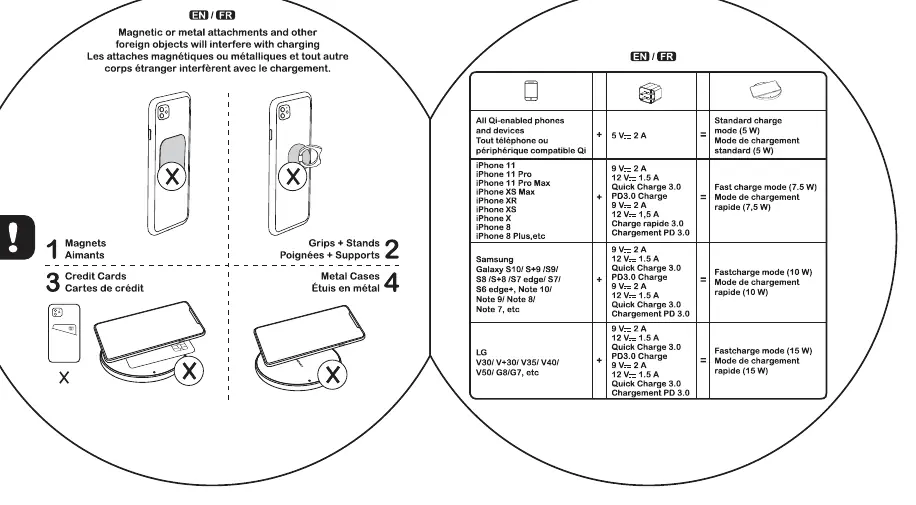
- Foreign Objects: Do not place magnets, metal attachments, credit cards, grips, stands, or metal cases on the charging pad, as these can interfere with the wireless charging process and potentially cause overheating.
- Device Compatibility: The pad supports various Qi-enabled devices. Charging speeds vary based on the device model and the power adapter used. For example, standard charging operates at 5W, while fast charging modes (7.5W, 10W, or 15W) are available for supported models when paired with appropriate Quick Charge or PD adapters.
- Case Thickness: Ensure your phone case is no thicker than 5mm to maintain a stable connection.
Troubleshooting
If the charging pad is not functioning as expected, check the following:
- Ensure the phone is placed directly in the center of the pad.
- Verify that there are no metal objects or magnets between the phone and the charger.
- Check that the phone case is within the recommended thickness limit.
- If the LED flashes green, remove any foreign objects from the surface immediately.
Related manuals
Related manuals from the same brand or category.
Power / Batteries Chargers
Amazon Basics 6V/12V Intelligent Automatic Battery Charger
Amazon BasicsHome Appliances / Vacuum Cleaners
Amazon Basics 12-Piece Vacuum Compression Storage Bags with Hand Pump
Amazon Basics
Manual page author
Emily Carter
User documentation editor
Prepares concise manual descriptions and highlights the most useful setup, operation, and maintenance information for readers.