Documents / Warranty Safety
AMETEK Cyclops L Portable Infrared Thermometers User Guide
Comprehensive user guide for the AMETEK Cyclops L series portable infrared thermometers, covering operation, configuration, maintenance, and technical specifications.
Table of contents
Manual images
Jump to the sectionProduct Overview
The Cyclops L series is a range of high-precision, portable infrared thermometers designed for accurate non-contact temperature measurement. These instruments feature a reflex optical system for precise target definition, internal memory for data logging, and Bluetooth or USB connectivity for data transfer. The series includes models such as the 100L, 160L, 390L, and 055L, each tailored for specific temperature ranges and industrial applications.
Safety Information
Warning: Never look at the sun through this instrument, as it can cause severe eye damage. Always wear appropriate protective clothing, face, and eye protection when installing or operating the equipment near high-temperature or high-pressure machinery. Ensure all electrical power lines are isolated before working on connections.
Operation and Setup
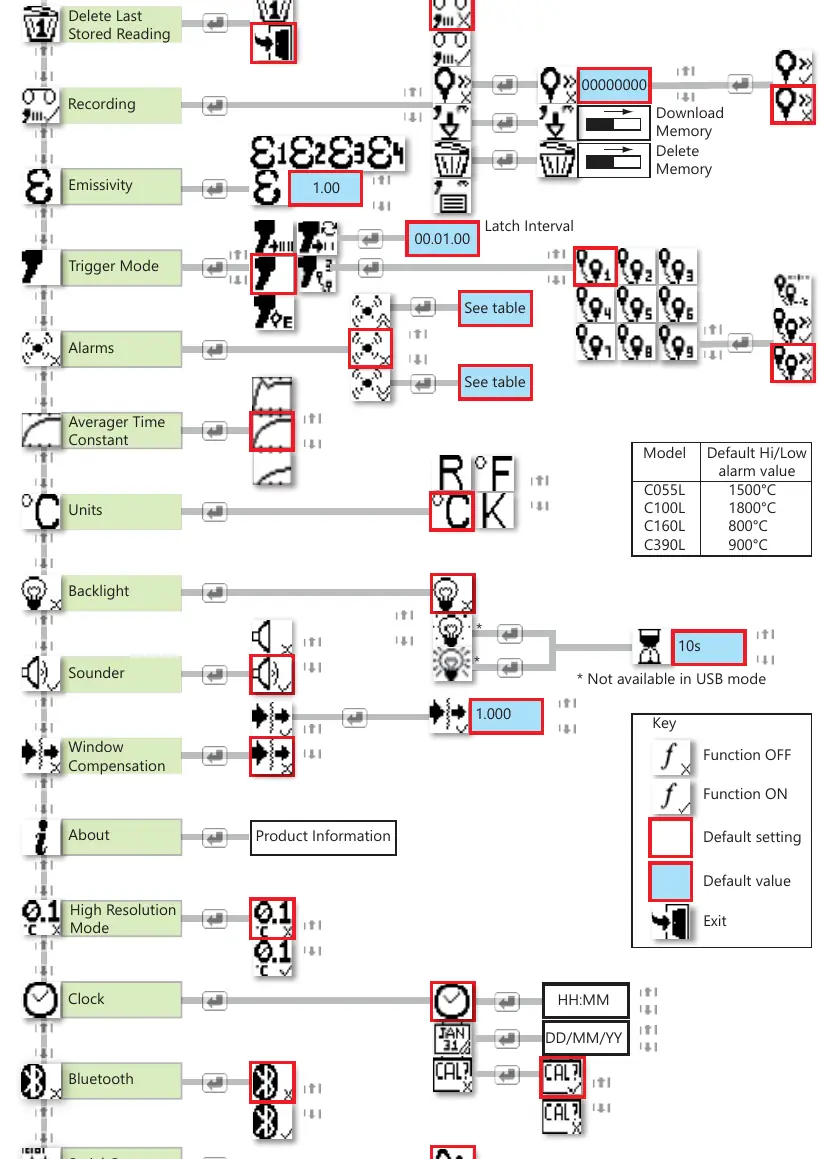
The thermometer operates in three main modes: Measure Mode, Route Mode, and Menu Mode. Users can configure settings such as emissivity, alarm thresholds, and time-processing functions (Peak, Continuous, Average, Valley) via the icon-based menu system. The trigger operation can be set to Classic, Burst, or Latched modes to suit different monitoring requirements. For accurate readings, it is essential to set the correct emissivity value for the target material. The device also supports window compensation for measurements taken through viewing ports.
Maintenance and Storage
The Cyclops L requires minimal maintenance. Keep the lens assembly, eyepiece, and display panel clean using a soft lens cloth and proprietary lens cleaner. Always fit the lens cap when the instrument is not in use. Store the device in its packaging in a dry, sheltered area. If a fault occurs, do not attempt on-site repairs; contact AMETEK Land for assistance.
Data Management
The instrument features internal storage for up to 9999 readings. Data can be downloaded via Bluetooth or USB to a PC or mobile device using the provided software. The device also supports route management, allowing users to pre-load location IDs for regular plant tours. If the memory becomes full, it must be cleared before further measurements can be recorded.
Manufacturer information
AMETEK, Inc.
Practical help
Common problems
Instrument fails to turn on
Reset by pressing the On and Off switches simultaneously.
Memory is 100% full
Clear the internal memory using the Erase icon in the menu.
Bluetooth pairing fails
Ensure the device is paired with the Logger software using the pass key 0000.
Error Code 1 (Unknown Cyclops Type)
Return the instrument to AMETEK Land for repair.
Error Code 3 (Lost User Setting)
Re-enter the desired user settings as the device has reverted to factory defaults.
Before use
- Check all equipment for damage.
- Ensure the battery is fully charged.
- Adjust the eyepiece to match your eyesight.
- Set the correct emissivity for the target material.
- Ensure the lens is clean and free of contaminants.
- Verify the correct trigger mode is selected.
- Check that the date and time are correctly set.
Specs in practice
- Window Compensation
- Adjusts the reading to account for energy losses when measuring through a viewing window.
Images and diagrams
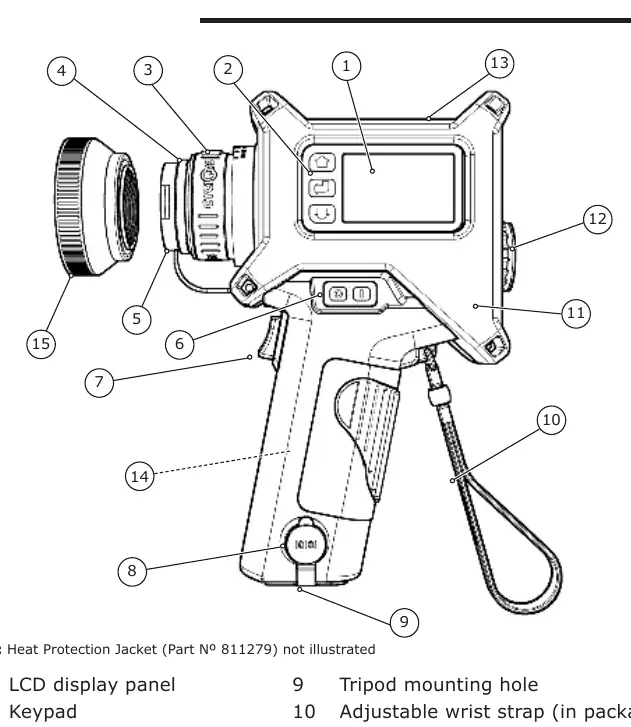
- Fig 3-1: Identifies key components like the lens cap, trigger, display, and USB connector.
- Fig 6-1: Illustrates the target size calculation based on distance from the optical datum.
- Fig 7-7: Shows the menu structure for navigating settings.
- Fig 7-2: Graphically represents how Peak temperature measurement functions.
- Fig 9-1: Demonstrates a complex measurement setup using a viewing port window.
Model compatibility
- Compatible with Type 110 and Type 135 Close-up lenses for short-distance measurements.
- Industrial rubber casing is compatible with all Cyclops models.
- Bluetooth communication requires pairing with AMETEK Land Logger software.
- USB power is recommended when streaming data to avoid battery drain.

Manual page author
David Miller
Documentation analyst
Organizes user manual content into clear summaries, with attention to model details, product context, and everyday usability.