Anolis Calumma Calibration Repair Procedure
Official service procedure for restoring lost white color calibration values (CTC channel) on Anolis Calumma and Calumma Remote fixtures using RDM Manager.
Table of contents
Overview
This document outlines the official service procedure for restoring lost white color calibration values (CTC channel) for Anolis Calumma and Calumma Remote fixtures. This process is intended for service personnel only and requires the use of RDM Manager software to interface with the device.
Preparation and DMX Configuration
Before beginning the calibration recovery, ensure the fixture is correctly configured:
- Switch the Calumma fixture to DMX mode 3 (12 channels).
- Send a DMX data packet where the CTC values correspond to specific calibrated color temperatures.
- Recommended CTC values: 1800K (21), 2700K (66), 3200K (91), 4200K (141), 5600K (211), and 6500K (255).
- It is recommended to also send RGBW and Dimmer values to ensure the fixture responds correctly during the process.
Calibration Recovery Procedure
Once the fixture is responding to the DMX signal, follow these steps to restore the calibration data:
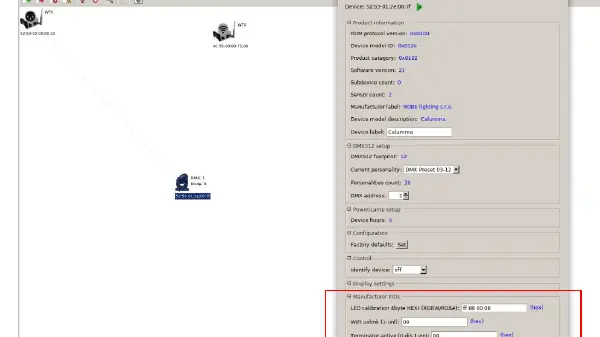
- Read the fixture in the RDM Manager software.
- Locate the Manufacturer PIDs section and identify the field labeled LED calibration 4 bytes HEX (RGBW/RGBA).
- Enter the factory-provided calibration values for the specific fixture.
- Save the values using the green arrow icon in the software interface.
- If the color beam does not change, attempt to modify a single byte of the calibration values, save, and then revert that byte to the correct value before saving again.
- If the field displays FF FF FF FF, the CTC color is likely set incorrectly in the DMX packet, preventing successful saving.
- Repeat the process for each required CTC color temperature to ensure full calibration coverage.

Manual page author
David Miller
Documentation analyst
Organizes user manual content into clear summaries, with attention to model details, product context, and everyday usability.