Health / Dental Equipment
Instructions for Use for Anthogyr Healing and Cover Components
Quick guide for Anthogyr healing and cover components. Includes installation protocols for Axiom BL, TL, and 2.8 systems, MRI safety, and usage precautions.
Table of contents
Quick guide from the manual
Anthogyr healing and cover components are sterile, single-use devices intended to protect the inner configuration of implants and stabilize soft tissue during the healing phase. They must be used by a surgeon trained in dental implantology. These components have a maximum usage duration of 180 days and must not be re-sterilized or reworked.
Product Description
The range includes components for different implant systems:
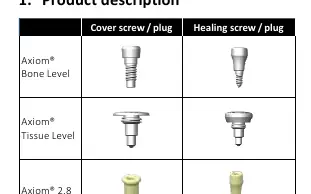
- Axiom Bone Level: Cover and healing screws.
- Axiom Tissue Level: Cover and healing screws.
- Axiom 2.8: Cover and healing plugs.
Protocol for Use
Before placement, ensure the implant connection is free of any fluid or substance that may compromise the fit. Do not use components after the expiry date.
Axiom BL and Axiom TL
- Connect the manual surgical wrench OPCS100 to the cover/healing screw.
- Ensure the instrument is sufficiently engaged.
- Manually tighten to less than 10 N.cm without forcing.
- Suture around the component to begin the integration period.
- After the integration period, connect a hexagonal wrench to unscrew it.
Axiom 2.8
- Cover plug: Thread the threaded gripper wrench OPCF100 into the plug. Insert into the implant and apply moderate hand pressure.
- Healing plug: Thread the threaded gripper wrench OPCF100 into the plug or insert into the prehensive wrench OPOP028. Insert into the implant and apply moderate hand pressure.
- Remove the instrument by rotating counterclockwise or pressing the release button.
- Suture around the plug.
- To remove after the integration period, thread the OPCF100 wrench into the plug and pull.
MRI Safety
Patients with Anthogyr Dental Implant System products can be scanned safely in an MR system under the following conditions:
- Static magnetic field of 1.5 Tesla and 3 Tesla only.
- Maximum spatial gradient magnetic field of 4,000 gauss/cm (40 T/m).
- Maximum whole-body averaged SAR of 2 W/kg and head average SAR of 3.2 W/kg for 15 minutes of scanning.
Clinical Precautions
- Single-use: Do not reuse or re-sterilize.
- Stability: Healing screws/plugs must be fixed on a sufficiently stable implant.
- Fastening: Prosthetic parts must be firmly fastened to avoid inhalation or swallowing.
- Tightening: Do not use a dynamometric wrench or contra-angle for tightening.
- Impact: Axiom 2.8 components must not be impacted.
Practical help
Common problems
Inhalation or swallowing of parts
Ensure prosthetic parts are firmly fastened during intraoral use.
Implant failure or bone loss
Ensure correct surgical technique and that the implant is sufficiently stable before fixing healing components.
Poor fit of the component
Ensure the connection is free of any fluid or other substance before placement.
Before use
- Verify that the packaging is undamaged.
- Check the expiry date on the packaging.
- Perform a pre-clinical assessment and treatment plan.
- Ensure compatibility between the component and the implant connection.
- Ensure the surgeon is trained in dental implantology.
Specs in practice
- Tightening torque
- Manually tighten to <10 N.cm; do not force.
- Maximum usage duration
- 180 days.
- MRI Compatibility
- Conditional for 1.5T and 3T systems under specific SAR limits.
Images and diagrams
- The compatibility table lists the specific instruments required for placement and removal of Axiom BL, TL, and 2.8 components.
Model compatibility
- Axiom BL/TL components require manual surgical wrench OPCS100.
- Axiom 2.8 components require threaded gripper wrench OPCF100 or prehensive wrench OPOP028.
- Only use Anthogyr parts compatible with the specific implant connection.

Manual page author
David Miller
Documentation analyst
Organizes user manual content into clear summaries, with attention to model details, product context, and everyday usability.