Documents / Warranty Safety
Apple MacBook Pro User Guide
Essential guide for setting up and using your MacBook Pro, including trackpad gestures, Touch ID, and port connectivity.
Table of contents
Getting Started with Your MacBook Pro
Your MacBook Pro is designed for ease of use. The device automatically powers on when you lift the lid. Upon the first startup, the Setup Assistant will guide you through the initial configuration process to get you up and running quickly.
Touch ID and Security
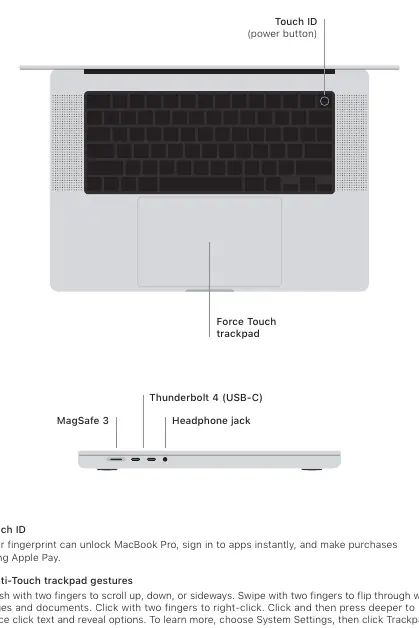
The power button features integrated Touch ID technology. This allows you to use your fingerprint to securely unlock your MacBook Pro, sign in to applications instantly, and authorize purchases using Apple Pay.
Mastering the Force Touch Trackpad
The trackpad supports a variety of Multi-Touch gestures to enhance your productivity:
- Scrolling: Brush with two fingers to scroll up, down, or sideways.
- Navigation: Swipe with two fingers to flip through web pages and documents.
- Right-Click: Click with two fingers to open context menus.
- Force Click: Click and then press deeper to reveal additional options for selected text or items.
You can customize these settings by navigating to System Settings and selecting Trackpad.
Connectivity and Ports
Your MacBook Pro is equipped with a versatile range of ports to support your peripherals and accessories:
- MagSafe 3: Dedicated charging port.
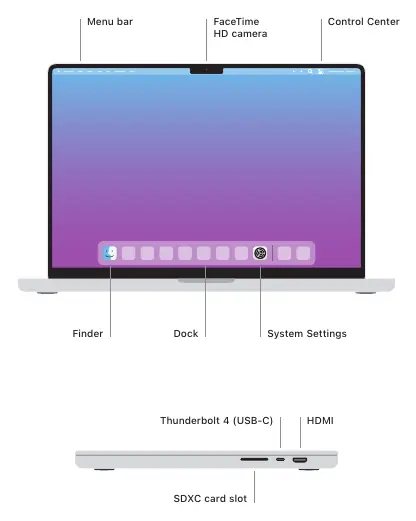
- Thunderbolt 4 (USB-C): High-speed data transfer and display connectivity.
- Headphone Jack: Standard audio output.
- HDMI: For connecting external displays.
- SDXC Card Slot: For easy media transfer from cameras and other devices.
Desktop Interface
The macOS interface provides intuitive navigation through the Menu bar, Control Center, and the Dock. Use the Finder to manage your files and access System Settings to personalize your computing experience.
Support and Resources
For comprehensive information on advanced features and troubleshooting, refer to the MacBook Pro Essentials guide available online. For direct assistance, visit the official Apple support website to find detailed documentation or contact support services.
Related manuals
Related manuals from the same brand or category.
Electronics / Monitors
iPhone 16e - Technical Specifications
AppleMobile / Smartphones
iPhone 16E SIM Card Modification Guide
AppleComputers / Keyboards Input
MacBook Pro 16-inch 2019 Teardown
AppleElectronics / Monitors
MacBook Pro (14-inch, M4 Pro or M4 Max, 2024) - Tech Specs
AppleComputers / Tablets
Apple iPad Pro 13-inch (M5) Recycler Guide
AppleSoftware / Apps Services
MacBook Air (Retina, 13-inch, 2020) Quick Start Guide
AppleElectronics / Monitors
Macintosh 128K Teardown
AppleMobile / Smartphones
Apple iPhone 15 128GB Smartphone Instructions
AppleMobile / Smartphones
Apple iPhone 16 Plus User Guide
Apple
Manual page author
David Miller
Documentation analyst
Organizes user manual content into clear summaries, with attention to model details, product context, and everyday usability.