Home Appliances / Small Kitchen Appliances
Arebos 1500g Bread Machine User Manual
Quick guide for the Arebos 1500g bread machine. Learn how to use the 15 programs, set the delay timer, troubleshoot common errors like HHH or EE0, and follow recipes for perfect bread.
Table of contents
Manual images
Click an image to enlargeQuick guide from the manual
The Arebos 1500g bread machine is designed for home use to bake various types of bread, yogurt, and jams. Before first use, it is recommended to run the machine empty for 10 minutes to eliminate odors from the heating element. Always ensure the bread pan is securely fixed before starting. The machine features 15 programs, a delay timer of up to 15 hours, and an automatic 1-hour keep-warm function.
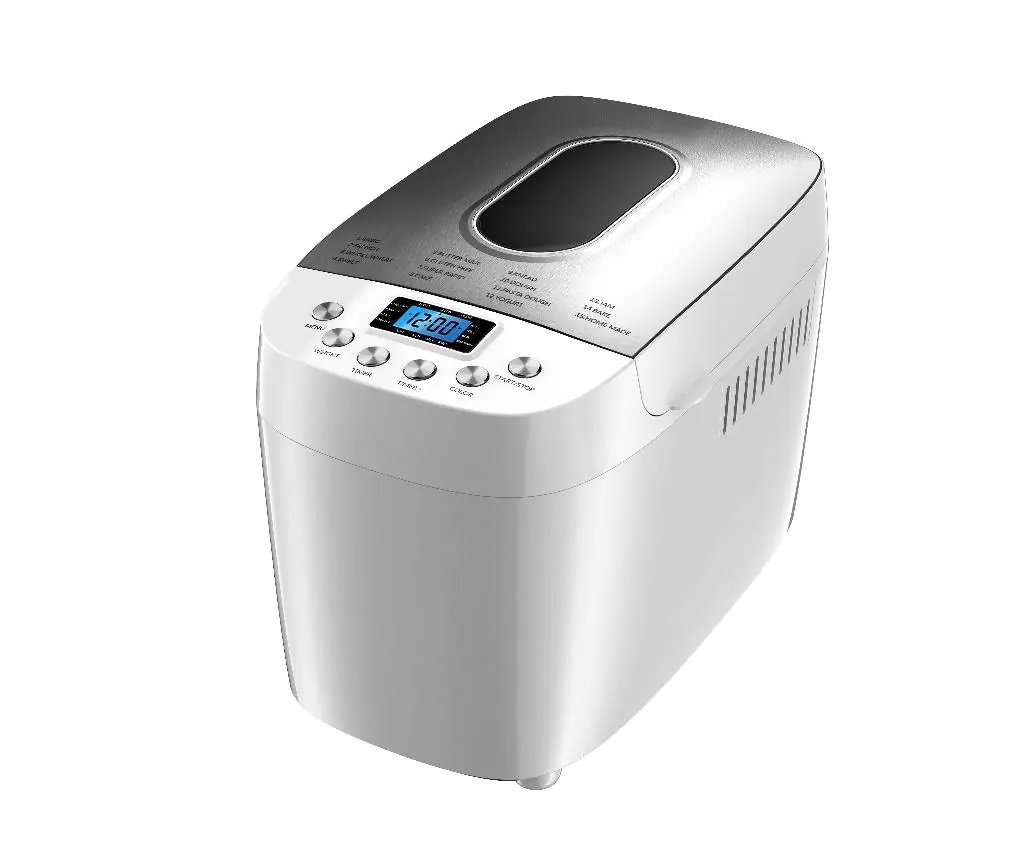
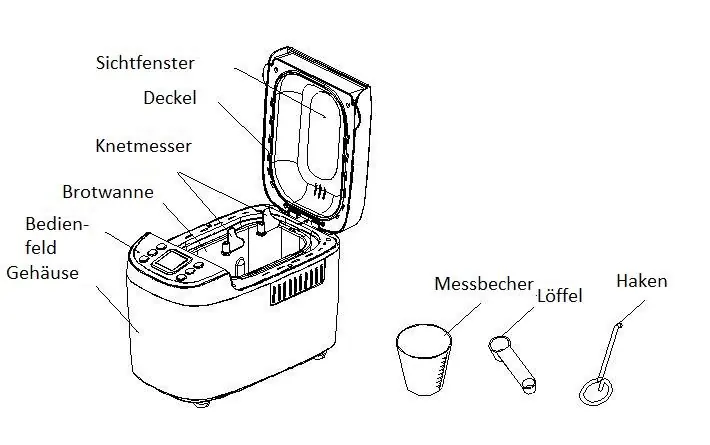
Device overview
The device consists of the main housing, a bread pan, a kneading blade, and a control panel. Accessories include a measuring cup, a measuring spoon, and a hook for removing the kneading blade from the finished bread.
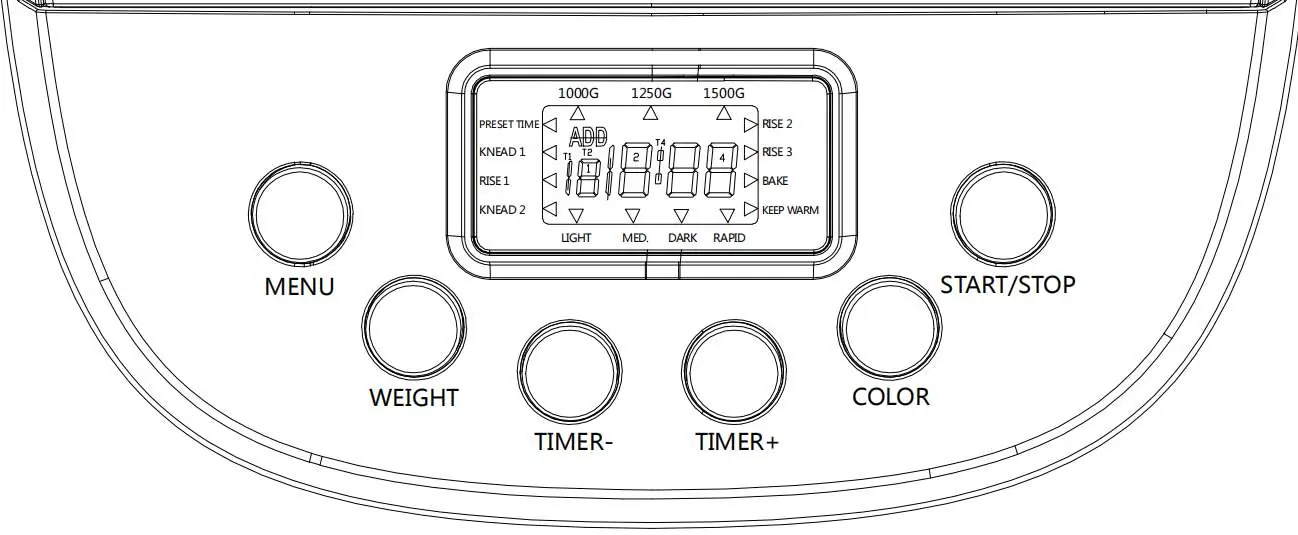
Control panel and programs
The control panel allows you to select the program, bread weight (1000g, 1250g, 1500g), crust color (Light, Medium, Dark), and set the delay timer. The 15 programs include: 1. Base, 2. French, 3. Whole Wheat, 4. Sweet, 5. Buttermilk, 6. Gluten-free, 7. Super Fast, 8. Cake, 9. Knead, 10. Dough, 11. Pasta Dough, 12. Yogurt, 13. Jam, 14. Bake, 15. Homemade.
Operating instructions
Adding ingredients: Always add liquids first, followed by sugar, salt, flour, and finally yeast. Ensure the yeast does not come into contact with liquids or salt before the kneading process begins. For high-grade wheat flour, the order can be reversed (yeast and flour first, then liquids).
Starting the machine: Select the desired program using the MENU button, set the weight and crust color, and press START/STOP. If you wish to use the delay timer, use the TIME+ and TIME- buttons to set the finish time.
Ingredients and tips
For best results, use bread flour with high gluten content. Yeast must be fresh and stored in the refrigerator. Do not use perishable ingredients like eggs or fresh milk when using the delay timer function. Ambient temperature should be between 15°C and 34°C for optimal rising.
Cleaning and maintenance
Always unplug the machine and let it cool down before cleaning. Clean the bread pan and kneading blade with a damp cloth; do not use abrasive agents. If the kneading blade is stuck, soak the pan in warm water for 30 minutes. Never immerse the main housing in water.
Troubleshooting
If the machine displays HHH, the internal temperature is too high; unplug and let it cool for 10-20 minutes. If EE0 is displayed, the temperature sensor is disconnected; contact authorized service. For other issues like bread collapsing or uneven mixing, check ingredient measurements and ensure the kneading blade is properly installed.
Manufacturer information
AREBOS GmbH
Practical help
Common problems
Display shows 'HHH'
The machine is too hot. Unplug, open the lid, and let it cool for 10-20 minutes before restarting.
Display shows 'EE0'
Temperature sensor error. Contact an authorized service center for repair.
Bread collapses in the center
Too much yeast, too much water, or wrong flour type. Check ingredient measurements and use bread flour.
Smoke during first use
Normal. Oil on the heating element is burning off. Ensure proper ventilation.
Bread is too small or didn't rise
Check yeast freshness, ensure it wasn't mixed with salt, or increase ambient temperature.
Before use
- Check that wall voltage matches the rating plate.
- Ensure the bread pan is securely fixed in the machine.
- Clean all parts thoroughly before first use.
- Run an empty cycle for 10 minutes to remove manufacturing odors.
- Measure all ingredients accurately before starting.
Specs in practice
- 1000g / 1250g / 1500g
- Selectable bread weight settings for different recipes.
Images and diagrams
- The control panel features buttons for Menu, Weight, Timer, Color, and Start/Stop.
- The LCD display indicates the selected program, weight, crust color, and remaining time.
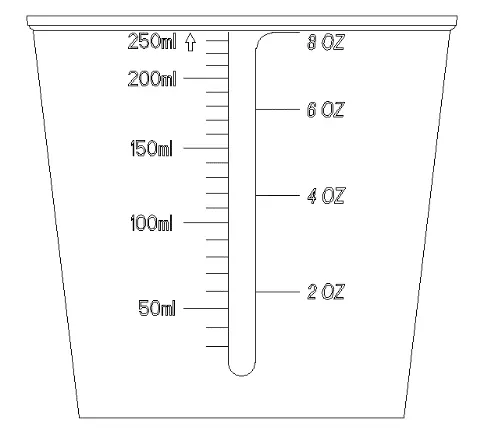
- The measuring cup and spoon are essential for accurate ingredient dosing.
Model compatibility
- Ambient temperature should be between 15°C and 34°C.
- Do not use perishable ingredients (eggs, milk) with the delay timer.

Manual page author
Michael Turner
Technical manual editor
Reviews PDF manuals for structure, safety notes, and practical product details so readers can find the right information quickly.