Electronics / Cameras
Arenti Mini 15T IP Camera User Guide
Comprehensive user guide for the Arenti Mini 15T indoor IP camera, covering setup, configuration, technical specifications, and safety instructions.
Table of contents
Product Overview
The Arenti Mini 15T is an indoor IP camera designed for home security. It features two-way audio, infrared night vision, and is compatible with Amazon Alexa and Google Assistant. The device supports local storage via a Micro SD card (up to 128GB).
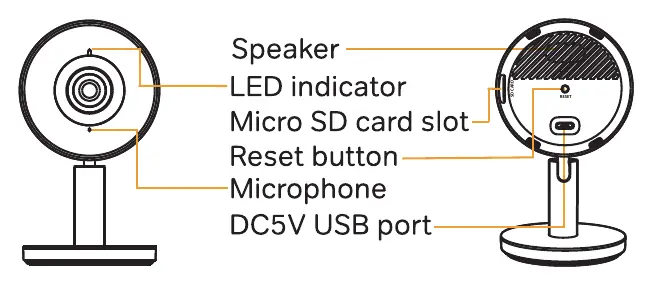
Packing List
The package includes the camera, a power adapter, a USB cable, mounting tape, and a quick start guide.
Camera Configuration
To set up your camera, follow these steps:
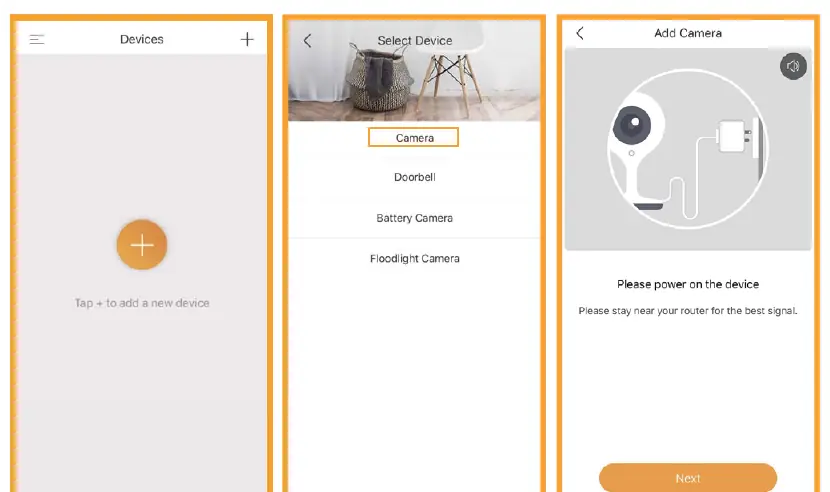
- Plug in the power adapter to turn on the camera.
- Ensure your smartphone is connected to a 2.4GHz or 5GHz Wi-Fi network.
- Download the Arenti app from the App Store or Google Play.
- Launch the app, sign up, and follow the on-screen instructions to add the device.
If you need to reset the camera, press and hold the reset button for 5 seconds until the camera beeps.
LED Status Indicators
- Flashing red light (slow): Waiting for configuration.
- Flashing red light (fast): Searching for Wi-Fi network.
- Fixed blue light: Camera connected to Wi-Fi.
- Flashing blue light: Access point mode.
Technical Specifications
- Sensor: 1/2.9 inch CMOS
- Resolution: 1920 x 1080 (2 Mega pixels)
- Night Vision: Infrared with 10m range
- Connectivity: Wi-Fi 802.11 a/b/g/n (2.4GHz/5GHz)
- Power: DC5V, 1A
- Operating Temperature: -20 to 55 degrees Celsius
Safety and Disposal
This device is intended for indoor use only. Do not dispose of the camera or its batteries with household waste. Please follow local regulations for the selective collection of electronic waste to protect the environment.
Related manuals
Related manuals from the same brand or category.

Manual page author
David Miller
Documentation analyst
Organizes user manual content into clear summaries, with attention to model details, product context, and everyday usability.