Electronics / Headphones Earbuds
Avantree Ace 130T Wireless USB Adapter Earbud Set User Guide
Quick start guide for the Avantree Ace 130T Wireless USB Adapter Earbud Set. Learn how to charge, pair with your PC using the DG10 dongle, and connect to mobile devices.
Table of contents
Manual images
Click an image to enlargeQuick Start Guide
This guide provides essential instructions for setting up and using your Avantree Ace 130T Wireless USB Adapter Earbud Set. Ensure you follow the steps for initial connection to your PC and subsequent pairing with mobile devices.
First Time Setup
To use the earbuds with your PC for the first time:
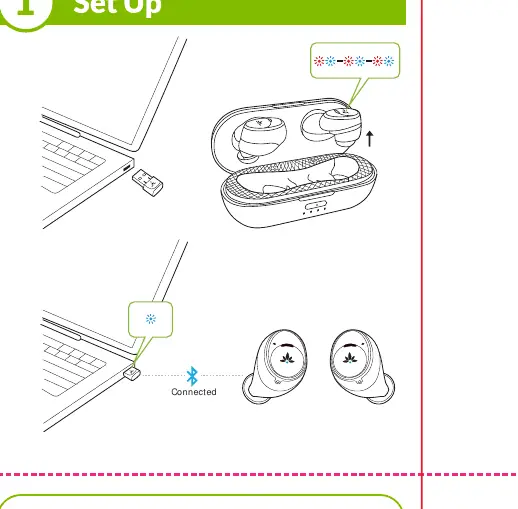
- Plug the DG10 USB dongle into your PC.
- Remove the earbuds from the charging case.
- The earbuds will enter pairing mode automatically.
- Wait for them to connect to each other. The LED on the DG10 will turn solid BLUE, and you will hear the voice prompt "connected" from the earbuds.
Pairing with Mobile Devices
To use the Ace 130 earbuds with other mobile devices:
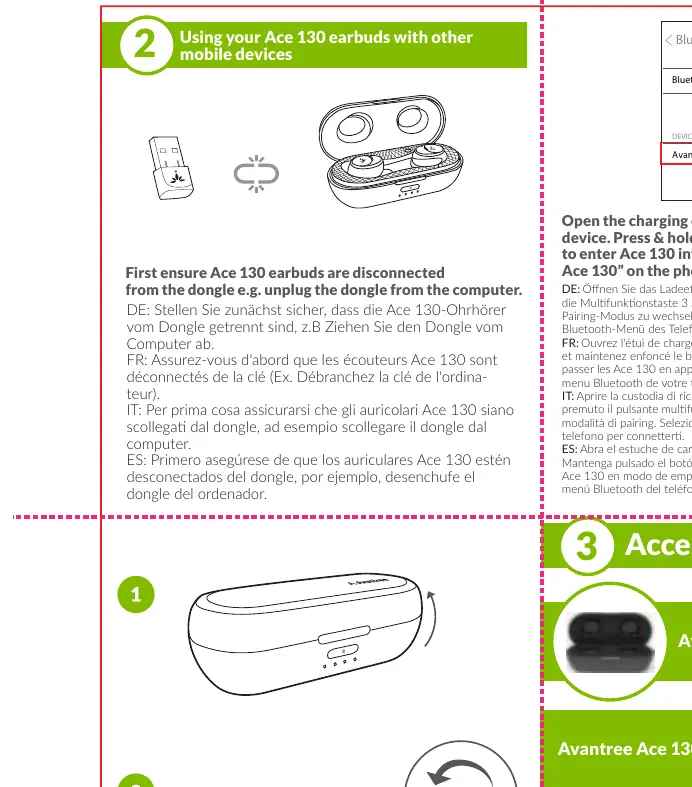
- Ensure the Ace 130 earbuds are disconnected from the dongle (e.g., unplug the dongle from the computer).
- Open the charging case and leave the earbuds inside.
- Press and hold the multifunction button for 3 seconds to enter Pairing Mode.
- Select "Avantree Ace 130" on your phone's Bluetooth menu to connect.
Charging
The charging case features an LED indicator to show battery levels:
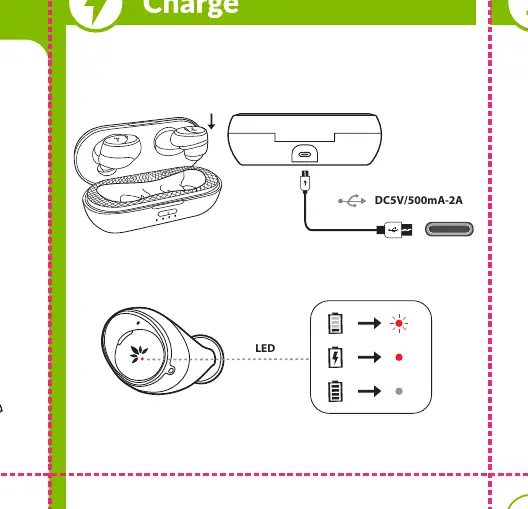
- <25%
- 25%-50%
- 50%-75%
- 75%-100%
Charging Times:
- Earbuds: Approximately 1 hour.
- Case: Approximately 1.5 hours.
Use the provided USB Type C charging cable and a power source (DC5V/500mA-2A).
Box Contents
- Avantree Ace 130 Earbuds
- Avantree DG10 USB Dongle
- Charging Case
- USB Type C charging cable
- 2 Sets of Earbud Tips (L/S)
Manufacturer information
Avantree
Practical help
Common problems
Earbuds will not pair with mobile device
Ensure the earbuds are disconnected from the DG10 dongle first (unplug the dongle from the computer).
Before use
- Charge the earbuds and case fully before first use.
- Ensure the DG10 dongle is plugged into the PC for initial setup.
- Remove earbuds from the case to trigger auto-pairing.
- Verify the LED on the DG10 turns solid blue.
Specs in practice
- Earbud Charging Time
- Approximately 1 hour for a full charge.
- Case Charging Time
- Approximately 1.5 hours for a full charge.
Images and diagrams
- The LED indicator on the charging case shows battery status in 25% increments.
- The multifunction button is used to initiate pairing mode for mobile devices.
Model compatibility
- The DG10 dongle is required for the initial PC connection.
- Earbuds must be disconnected from the dongle to pair with mobile phones.

Manual page author
Michael Turner
Technical manual editor
Reviews PDF manuals for structure, safety notes, and practical product details so readers can find the right information quickly.