Banda Audioparts ICE 3000 Digital Amplifier
Comprehensive guide for the Banda Audioparts ICE 3000 digital amplifier, covering installation, technical specifications, connection examples, and troubleshooting.
Table of contents
Product Overview
The Banda Audioparts ICE 3000 is a high-performance digital amplifier designed for demanding audio systems. Engineered in a high-tech laboratory, this unit provides robust power and reliability for automotive audio setups. To ensure optimal performance and longevity, it is essential to follow the installation and operation guidelines provided in this manual.
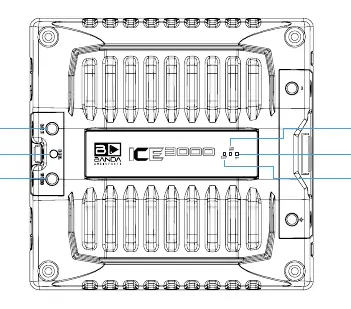
Installation and Power Connections
Proper installation is critical for the safety and performance of the amplifier. The power unit requires a secure connection to the vehicle's electrical system:
- GND Input: Must be connected directly to the vehicle chassis to ensure a solid ground.
- Drive Input (Remote): Connects to the electrical antenna or remote turn-on lead of your head unit.
- 12VDC Positive Input: Connects to the positive terminal of the battery. Note: Always use an external fuse to protect the system from electrical faults.
Use a minimum of 35mm power cables to ensure sufficient current flow and prevent voltage drops.
Operation and LED Indicators
The front panel features LED indicators to provide real-time status updates:
- Blue (ON): Indicates the amplifier is powered on and operating normally.
- Yellow (Flashing): Indicates that the battery voltage has dropped below the specified threshold (below 9V).
- Red (SHORT): Indicates a protection state, triggered by an output short circuit or excessive operating temperature.
Technical Specifications
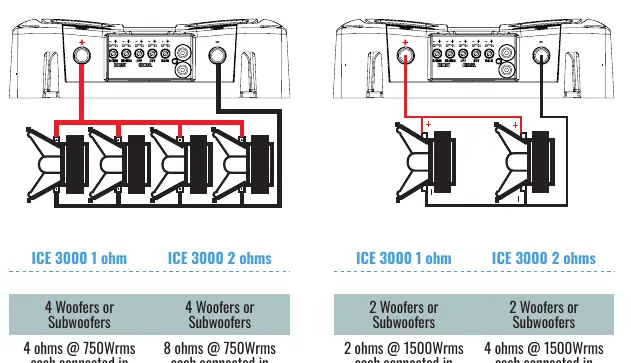
The ICE 3000 is available in 1-ohm and 2-ohm configurations, delivering up to 3000Wrms. Key specifications include:
- Frequency Response: 16Hz to 20KHz (-3dB)
- Input Impedance: 100K Ohms
- Signal-to-Noise Ratio: 80dB
- THD + N: Less than 1%
- Recommended Fuse: 150A
- Dimensions: 236mm x 225mm x 63mm
- Weight: 3.7 kg
Troubleshooting
If you encounter issues, refer to the following solutions:
- Overheating: Ensure the amplifier is installed in a well-ventilated area and that the cooling system is not obstructed.
- Short Circuit: Check all speaker cables for shorts and verify that the total speaker impedance is not below the amplifier's rated minimum.
- Voltage Drop: If the yellow LED flashes, check battery charge and ensure all power connections are tight and free of corrosion.
- Distortion: If the red LED flashes with the music, it indicates clipping. Adjust gain settings to reduce distortion and prevent coil overheating.

Manual page author
Michael Turner
Technical manual editor
Reviews PDF manuals for structure, safety notes, and practical product details so readers can find the right information quickly.