Electronics / Monitors
Baseus UnionJoy 17-Port Type-C HUB Adapter
A high-performance 17-port multifunctional Type-C docking station supporting triple display output, fast charging, and high-speed data transfer for laptops.
Table of contents
Product Overview
The Baseus UnionJoy 17-Port Type-C HUB Adapter is a comprehensive connectivity solution designed for laptops with full-featured Type-C ports. It expands your device's capabilities by providing a wide array of ports, including multiple USB 3.0 and 2.0 ports, three HDMI ports for triple display setups, an RJ45 Gigabit Ethernet port, SD/TF card slots, and an audio jack.
Technical Specifications
- Model: BS-HUB003
- Working Voltage: 5V-20V
- Working Current: 450-2550mA
- Dimensions: 80 x 80 x 162 mm
- Weight: Approximately 386g
- Compatibility: Mac OS, Windows 10 and later
Setup and Operation
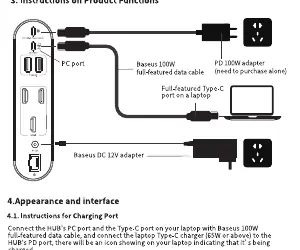
To begin, connect the HUB to your laptop using the provided full-featured Type-C data cable. For optimal performance and to charge your laptop, connect a compatible PD charger (65W-100W) to the PD port on the HUB. The included 12V DC adapter must be connected to the HUB to ensure stable operation of all connected peripherals.
Display Configurations
The HUB supports triple display output. On MacOS, it supports mirror and extended modes (note: MacOS does not support MST mode). On Windows, users can configure advanced display settings via the Intel Graphics Control Panel to manage single, clone, or extended desktop modes across multiple monitors.
Safety and Maintenance
To ensure longevity and safety: do not disassemble or repair the device yourself. Keep the product away from fire, liquids, and extreme environments such as high humidity or dust. If the device is not in use for an extended period, store it in its original packaging to prevent oxidation of the ports. It is normal for the HUB to generate heat during operation due to its high-performance internal chips.
Troubleshooting
- Connectivity Issues: Ensure your laptop's Type-C port supports charging, data transfer, and DP Alt Mode.
- Hard Drive Recognition: If a drive is not detected, check the disk management settings in your OS. NTFS drives may require reformatting to ExFAT for full read/write compatibility on MacOS.
- Network Issues: Verify the Ethernet cable connection and ensure the correct network driver is installed on your computer.
- Performance: If USB devices respond slowly, ensure the HUB is receiving sufficient power via the PD port.
Disposal
This product must be recycled according to local regulations for electronic waste. Do not dispose of it with ordinary household trash.
Related manuals
Related manuals from the same brand or category.
Power / Batteries Chargers
Baseus 150W Car Power Inverter
BaseusHome Appliances / Vacuum Cleaners
Baseus A3 Car Vacuum Cleaner 15000pa CRXCQA3-0S
Baseus
Manual page author
David Miller
Documentation analyst
Organizes user manual content into clear summaries, with attention to model details, product context, and everyday usability.