Power / Battery Monitors
User Manual for BMPRO RVView Battery Monitor
Quick guide for the BMPRO RVView 12V battery monitor. Learn about display indicators, troubleshooting screen issues, and technical specifications for your RV power system.
Table of contents
Quick guide from the manual
The BMPRO RVView is a wall-mounted display designed specifically to monitor battery voltage, charging sources, and load current for the BMPRO BatteryPlus35 system. It does not have an ON/OFF button; it is powered directly by the BatteryPlus35 via a data cable. If the screen is off, it is likely due to the BatteryPlus35 being in Storage Mode or a remote switch being activated.
Description of parts
The RVView monitor features a digital display with the following indicators:
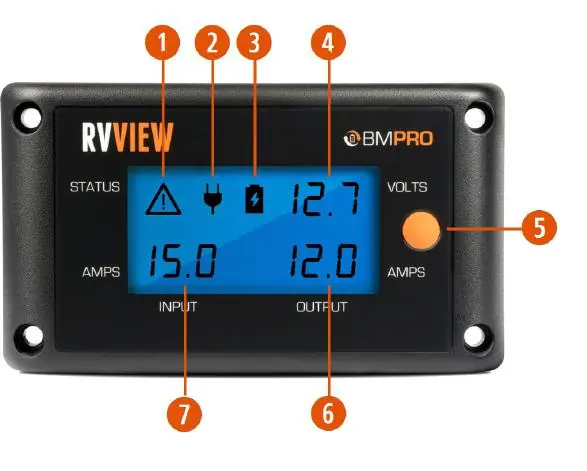
- Warning Indicator: Alerts you to faults with connected loads (e.g., short or overload) or loss of communication with the BC300.
- Power Source Indicator: Displays the active charging source (AC Mains, Auxiliary, Solar, or Blending).
- Battery Status Indicator: Shows the current state of the caravan battery (Idle, Charging, or Discharging).
- System Voltage: Displays the battery voltage or the output of the BatteryPlus35 in Power Supply Mode.
- Backlight Button: Toggles the screen backlight.
- Output Current: Shows current provided to loads.
- Input Current: Shows total current drawn from input sources.
Using your RVView
The RVView is designed to work seamlessly with the BatteryPlus35. It receives power through the connected data cable. To turn on the backlight, press the backlight button; it will automatically turn off after 30 seconds if not pressed again.
Troubleshooting
If the RVView screen has turned off, check the following:
- Remote Switch: Ensure the remote switch connected to the BatteryPlus35 has not been activated, as this cuts power to the data cable.
- Storage Mode: The BatteryPlus35 may have entered Storage Mode to conserve battery. To repower the monitor, connect the BatteryPlus35 to a power source and begin charging.
Specifications
- Input Voltage Range: 8-15V
- Battery Drain: < 22mA (with backlight off)
- Ambient Temperature: 0-50°C
- Dimensions: 140W x 80H x 15.5D (mm)
Safety and maintenance
The RVView is a high-precision electronic device. Do not attempt to dismantle, modify, or repair the unit yourself, as this will void the warranty. Keep the device away from water and liquids. Clean the housing only with a dry or moist cotton cloth; do not use alcohol, thinners, or benzene.
Practical help
Common problems
Screen is turned off
Check if the remote switch connected to the BatteryPlus35 is activated. Alternatively, the BatteryPlus35 may be in Storage Mode; connect to a power source to begin charging and restore power.
Warning indicator is displayed
Check for faults (short or overload) in loads connected to the BatteryPlus35. If using a BC300, check for communication loss.
Before use
- Ensure installation is performed by a suitably qualified installer.
- Inspect the product for any visible manufacturing defects before installation.
- Verify the data cable connection to the BatteryPlus35.
- Ensure the unit is kept away from water or other liquids.
Specs in practice
- Input Voltage Range
- The operating voltage range for the monitor is 8-15V.
- Battery Drain
- The device consumes less than 22mA when the backlight is off.
- Ambient Temperature
- The device is designed to operate between 0°C and 50°C.
Images and diagrams
- The monitor display includes 7 numbered sections: Warning Indicator, Power Source Indicator, Battery Status, System Voltage, Backlight Button, Output Current, and Input Current.
Model compatibility
- The RVView is designed specifically to operate with the BMPRO BatteryPlus35.

Manual page author
Michael Turner
Technical manual editor
Reviews PDF manuals for structure, safety notes, and practical product details so readers can find the right information quickly.