Electronics / Speakers Soundbars
Owner's Manual for boAt Airdopes 181PRO Bluetooth Earbuds
Quick guide for boAt Airdopes 181PRO, covering IWP technology, BEAST mode for gaming, ENx noise cancellation, charging procedures, and safety warnings.
Table of contents
Quick guide from the manual
The boAt Airdopes 181PRO are wireless earbuds designed for seamless connectivity and high-quality audio. This guide covers essential features, operation, and safety precautions to ensure optimal use.
Device Features
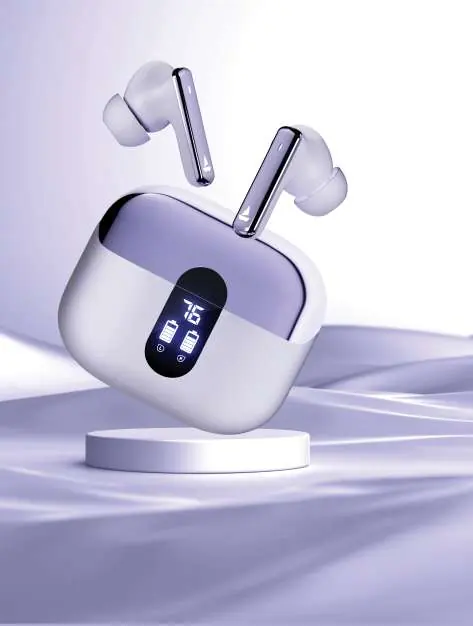
- IWP Technology: Enables instant connection. Simply open the charging case lid to power on the earbuds automatically.
- ASAP Charge: Provides up to 100 minutes of playtime with just a 5-minute charge.
- BEAST Mode: Optimized for gaming, this mode reduces latency to 50 ms for synchronized audio and visuals.
- ENx Technology: Integrated into the 4-microphone system, this technology suppresses background noise during calls for clear communication. It is activated by default.
Operation and Charging
To power on, open the charging case lid. To power off and charge, place the earbuds back into the case in the correct orientation and close the lid. The earbuds will automatically switch off and enter charging mode.
Safety and Maintenance
- Do not dismantle the earbuds; maintenance must be performed by a qualified service provider.
- Avoid using oily or volatile liquids for cleaning.
- Do not expose the earbuds to extreme temperatures.
- Avoid using the earbuds in unsafe environments, such as while driving or crossing streets, where full awareness is required.
- To prevent hearing damage, ensure the volume is set to an appropriate level; continuous exposure to noise above 85 dB can lead to hearing loss.
Recommendations
The earbuds may start at 100% volume when first switched on. Adjust the volume to your preferred level using your connected phone or media device.
Manufacturer information
boAt Lifestyle
Practical help
Common problems
Earbuds not disconnecting
Ensure they are placed back in the charging case in the correct orientation and the lid is closed.
Hearing discomfort or potential damage
Avoid continuous exposure to volume levels at or above 85 dB and adjust volume via your media device.
Before use
- Ensure the earbuds are charged.
- Check that the volume on your media device is set to a comfortable level.
- Ensure you are in a safe environment before wearing the earbuds.
Specs in practice
- BEAST Mode Latency
- 50 ms low latency for synchronized gaming audio.
Model compatibility
- ENx technology is activated by default and does not require manual activation.

Manual page author
Emily Carter
User documentation editor
Prepares concise manual descriptions and highlights the most useful setup, operation, and maintenance information for readers.