Garden / Robotic Lawnmowers
Bosch Indego 350 / Indego 400 Robotic Mower User Manual
Quick guide for the Bosch Indego 350 and Indego 400 robotic lawnmowers. Includes installation, operation, maintenance, and troubleshooting steps.
Table of contents
Manual images
Click an image to enlargeQuick guide from the manual
This manual provides essential information for the installation and operation of the Bosch Indego 350 and Indego 400 robotic mowers. Before starting, ensure the perimeter wire is correctly installed and the area is clear of obstacles.
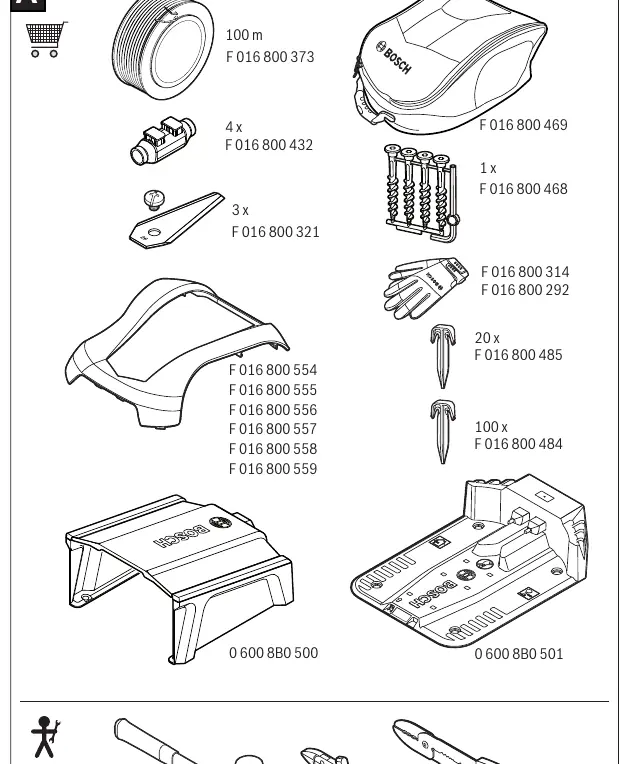
Safety
Always switch off the mower using the isolator switch before performing maintenance, tool changes, or transport. Wear gardening gloves when working near the sharp blades. Do not use high-pressure washers or garden hoses to clean the machine.
Installation
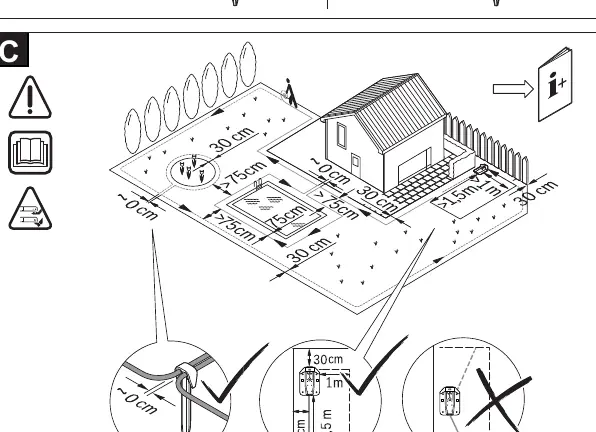
The docking station must be positioned on the perimeter wire at an outer edge of the cutting area. Ensure the cutting area is even and free of ditches, grooves, and steep slopes (max 15°/27%). For the first few weeks, set the cutting height to 50 mm to avoid cutting the perimeter wire.
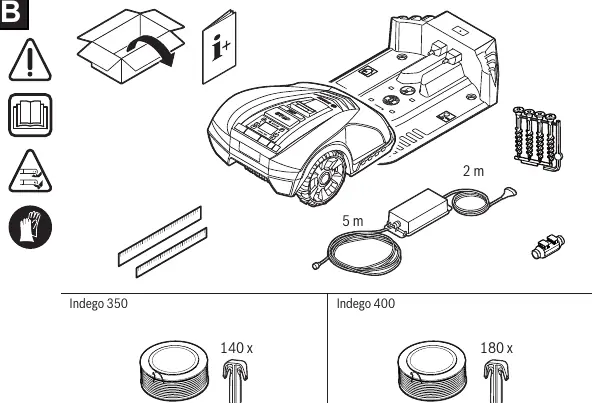
Operation
The mower can be operated in 'Manual' mode or via a programmed schedule. The 'SpotMow' feature is designed for small areas requiring special treatment. The mower is equipped with lift, rollover, tilt, and obstacle sensors to ensure safe operation.
Menu Navigation
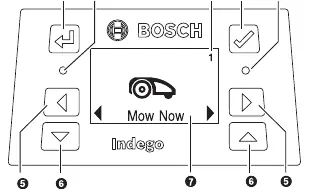
The mower features a menu system for settings, including 'Mow now', 'Calendar' (with Bosch AUTO function), 'Settings' (Mowing mode, Security, Alarm), 'Info' (System status), 'Advanced' (Wire ID, Sensor settings, Factory reset), and 'Tools' (Level check, Wire signal).
Maintenance
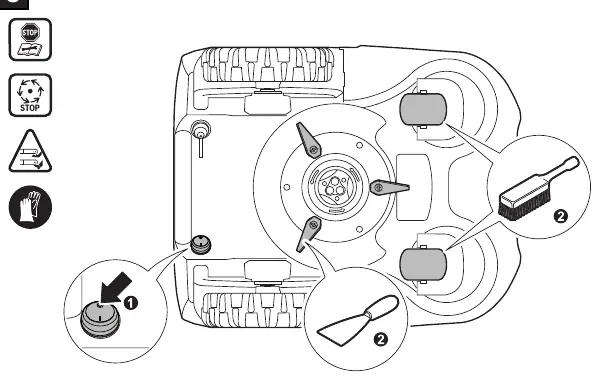
Regularly clean the exterior with a soft brush and cloth. Turn the mower upside down to clean the blade area and swivel castors. Ensure all nuts, bolts, and screws are tight. Replace worn blades and bolts in sets.

Troubleshooting
If the LED on the docking station flashes, check the perimeter wire for breaks or incorrect length. If the mower fails to operate, check the isolator switch, battery charge, and potential clogs. For persistent issues, consult the Bosch Service Centre.
Technical Data
The Indego 350 and 400 models feature a 19 cm cutting width, 30-50 mm cutting height, and 18V Li-Ion battery. They are IPX4 rated.
Manufacturer information
Bosch
Practical help
Common problems
LED on docking station flashes
Perimeter wire is interrupted, too long, or too short. Check wire continuity and length (20-250m).
Excessive vibrations/noise
Blade bolt is loose (tighten to 2.5 Nm) or blade is damaged/bent (replace blade).
Mower not docking reliably
Perimeter wire not properly laid around docking station. Follow installation guide.
Mower fails to operate
Isolator switch not turned on. Remove mower, turn switch on, and replace in docking station.
Before use
- Clear area of stones, sticks, wires, and other foreign objects.
- Ensure the cutting area is even and free of steep slopes (>15°/27%).
- Ensure the docking station is correctly positioned on the perimeter wire.
- Charge the battery fully before first use.
- Mow the lawn with a conventional mower if grass is longer than 5mm.
Specs in practice
- Cutting width
- 19 cm
- Cutting height
- 30-50 mm
Images and diagrams
- Control panel: Back button, Confirm button, Red LED (error), Green LED (on/active), Left/Right buttons, Down/Up buttons, Display.
- Installation: Docking station placement on the perimeter wire at the edge of the lawn.
Model compatibility
- Indego 350: Max lawn area 350 m2.
- Indego 400: Max lawn area 400 m2.

Manual page author
David Miller
Documentation analyst
Organizes user manual content into clear summaries, with attention to model details, product context, and everyday usability.