Garden / Lawn Mowers
Quick Start Guide for Greenworks Optimow S / M Robotic Lawnmower
Quick start guide for the Greenworks Optimow S / M robotic lawnmower. Learn how to set up, operate, clean, and maintain your mower, including key activation, blade maintenance, and app connectivity.
Table of contents
Manual images
Click an image to enlargeQuick Start Guide
This guide provides the essential steps to set up and operate your Greenworks Optimow S / M robotic lawnmower. Always refer to the full user manual for comprehensive safety and operational details.
Getting Started
Upon unboxing your robotic lawnmower, ensure all components are present. The primary setup involves the safety key:

- Locate the safety key slot on the mower.
- Insert the safety key to enable the mower's operation.
- To disable the mower, remove the safety key.
Powering On
To start the mower, locate the power button on the top panel. Press the button to engage the power. Ensure the safety key is inserted before attempting to power on the unit.
Cleaning and Maintenance
Regular maintenance is required to keep the mower in optimal condition. Always ensure the mower is powered off and the safety key is removed before performing any maintenance.
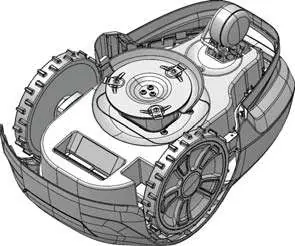
- Cleaning: You may use a hose or water to clean the mower. Ensure the unit is powered off before cleaning.
- Blade Maintenance: If the blades require attention, use a screwdriver to remove the screws securing the blade disc. Ensure you are wearing protective gloves during this process.
App Connectivity
The Optimow S / M can be managed via the Greenworks app. Download the app from the Google Play Store or Apple App Store to connect your device, monitor status, and manage settings.

Manufacturer information
Greenworks
Practical help
Common problems
Mower will not power on
Ensure the safety key is fully inserted into the slot and the power button has been pressed.
Blade maintenance difficulty
Ensure the mower is powered off and the safety key is removed before using a screwdriver to access the blade assembly.
Before use
- Unbox the mower and verify all parts.
- Insert the safety key into the designated slot.
- Press the power button to turn the unit on.
- Download the Greenworks app for remote management.
Images and diagrams
- Safety Key: Insert to enable operation, remove to disable.
- Power Button: Press to activate the mower.
- Blade Maintenance: Use a screwdriver to remove the blade disc screws.
Model compatibility
- Compatible with the Greenworks app available on Google Play and Apple App Store.

Manual page author
Michael Turner
Technical manual editor
Reviews PDF manuals for structure, safety notes, and practical product details so readers can find the right information quickly.