Electronics / Speakers & Soundbars
User Manual for Broan NuTone 1103233B Module Light Speaker
Quick guide for the Broan NuTone 1103233B Module Light Speaker. Learn how to pair the Bluetooth speaker, control the white and colored lights, adjust the fan, and troubleshoot pairing issues.
Table of contents
Manual images
Click an image to enlargeQuick Guide
The Broan NuTone 1103233B Module Light Speaker combines lighting, ventilation control, and Bluetooth audio. To begin, ensure the wall control is paired with the grille. Bluetooth audio can be connected by enabling Bluetooth on your phone and selecting 'ChromaComfort-Sensonic Speaker'.
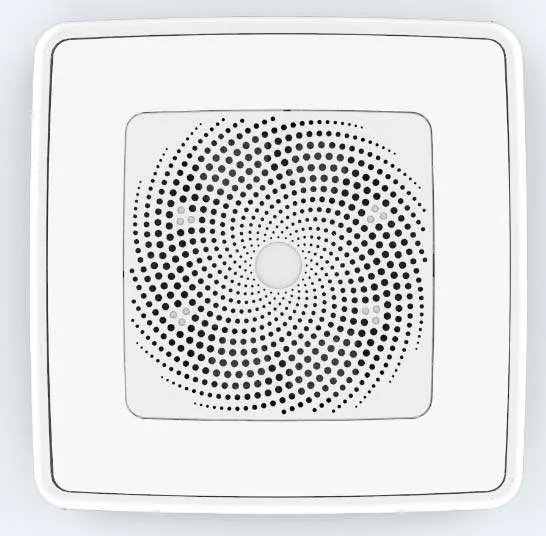
Installation and Bluetooth Setup
The unit operates on 120V/60Hz power. To connect your device:
- Turn on the Bluetooth feature on your phone.
- Search for the device named 'ChromaComfort-Sensonic Speaker'.
- Click to connect and open your music player software to begin playback.
Wall Control Functions
The wall control features several buttons to manage the light and fan settings. Note that most functions require the wall control to be paired with the grille.
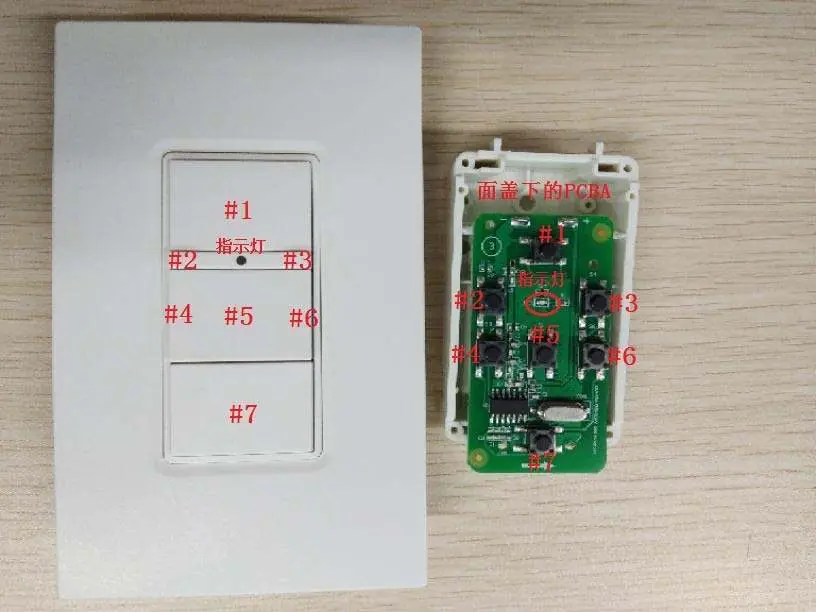
Button #1 (White Light & Pairing)
- Short press (<1.2s): Turns the white light on or off.
- Long press (>=1.2s): Turns the white light on.
- Pairing: Within 3 minutes of powering on the grille, press and hold Button #1 for more than 1.2s until the white light turns on to pair the wall control.
- Cancel Pairing: Press and hold Button #1 for more than 10s until the light dims and flashes twice.
Button #5 (Colored Light)
- Short press (<1.2s): Turns the colored light on or off.
- Long press (>=1.2s): Activates or deactivates RGB sweep mode.
Button #7 (Fan)
- Short press (<1.2s): Turns the fan on or off.
- Long press (>=1.2s): Toggles fan on/off. Pressing for over 10s will cancel the Bluetooth connection.
Luminance and Color Controls
- Button #2: Decreases luminance (short press for level-by-level, long press for gradual).
- Button #3: Increases luminance (short press for level-by-level, long press for gradual).
- Button #4: Used for RGB color inverted changes.
Warnings
Disconnect power at the service entrance before cleaning or servicing. Always add the grille current to the fan current to determine the total current draw. Install only with models indicated in the installation instructions.
Practical help
Common problems
Pairing failed or not working
Keep pressing Button #1 for more than 10s to cancel existing pairing, then try pairing again within 3 minutes of powering on the grille.
Bluetooth not connecting
Long press Button #7 for over 10s to reset the Bluetooth connection, wait 10s, then attempt to reconnect from your phone.
Buttons #2, #3, #4, or #6 not responding
Ensure the light is turned on (for #2 and #3) or the colored light is turned on (for #4 and #6).
Before use
- Ensure the unit is connected to a 120V/60Hz power source.
- Pair the wall control with the grille within 3 minutes of power-on.
- Enable Bluetooth on your mobile device.
- Verify the wall control is within range of the grille.
Specs in practice
- RGB Sweep Mode
- A dynamic lighting mode where colors cycle automatically.
- Short Press (<1.2s)
- Standard interaction for toggling functions.
- Long Press (>=1.2s)
- Extended interaction for pairing or mode changes.
Images and diagrams
- The wall control contains 7 numbered buttons.
- An indicator light on the wall control turns blue when a button is pressed effectively.
- The PCBA (internal circuit board) is located behind the wall control faceplate.
Model compatibility
- Install only with models indicated in the installation instructions.
- The device complies with Part 15 of the FCC Rules.

Manual page author
Michael Turner
Technical manual editor
Reviews PDF manuals for structure, safety notes, and practical product details so readers can find the right information quickly.