Computers / Label Makers
User Guide for Brother P-Touch 1260VP Label Maker
Quick guide for the Brother P-Touch 1260VP label maker. Learn about features, specifications, tape compatibility, and usage tips for professional labeling.
Table of contents
Manual images
Click an image to enlargeQuick Guide
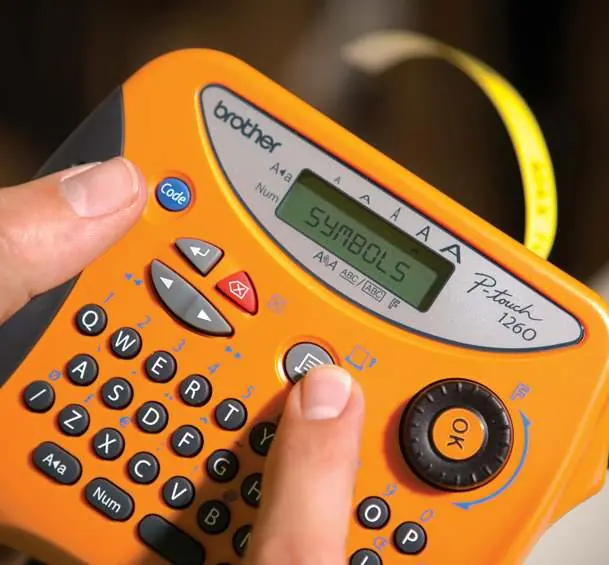
The Brother P-Touch 1260VP is a portable, durable label maker specifically designed for electricians and professionals who require clear, long-lasting labels for electrical installations, such as fuses, switches, sockets, and cables. The device features an ergonomic design with a rubber grip and wrist strap for portability.
Device Overview
The label maker is equipped with a QWERTY keyboard and a navigation knob for quick access to software functions. The LCD screen displays up to 8 characters on a single line, allowing you to preview and edit labels before printing.
Tape Information
This device uses Brother's TZ tapes, which are available in 6mm, 9mm, and 12mm widths. These tapes are constructed with six layers, making them resistant to chemicals, light, water, and extreme temperatures ranging from -80°C to 150°C. The included tape is a 12mm black-on-yellow extra-adhesive version, suitable for rough or uneven surfaces.
Usage Examples
The P-Touch 1260VP is ideal for creating professional labels in various environments. It supports over 20 electrical symbols, making it easy to label:
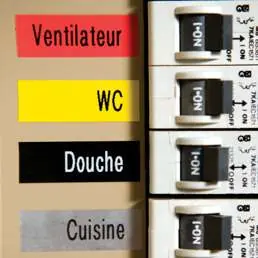
- Circuit breakers and fuse boxes
- Light switches and sockets
- Cables and wiring
- Network and communication ports
- Transformers and industrial equipment
Technical Specifications
- Dimensions: 154mm (W) x 129mm (D) x 79mm (H)
- Weight: 400g
- Power Supply: 6x AAA alkaline batteries or AC adapter (Model G/G1 included)
- Display: LCD, 1 line, 8 characters
- Print Resolution: 180dpi
- Print Speed: 10mm/sec
- Memory: 300 characters (9 areas)
- Features: 205 characters/symbols, 9 print styles, 4 frame styles, copy printing (1-9), vertical/mirror printing
Manufacturer information
Brother Industries, Ltd.
Practical help
Common problems
Label not sticking to surface
Ensure the surface is clean and dry. For rough, dirty, or uneven surfaces, use the included extra-adhesive TZ tape.
Label fading or text wearing off
Ensure you are using genuine Brother TZ laminated tapes, which are designed to be scratch, chemical, and UV resistant.
Before use
- Insert 6x AAA alkaline batteries or connect the provided AC adapter (Model G/G1).
- Ensure a compatible TZ tape cassette (6mm, 9mm, or 12mm) is correctly installed.
- Check that the tape end is fed through the guide before closing the cover.
- Verify the tape type and width are suitable for your labeling task.
Specs in practice
- Print Resolution (180dpi)
- Provides clear, sharp text suitable for professional electrical labeling.
- Tape Compatibility
- Supports 6mm, 9mm, and 12mm TZ tapes for various labeling needs.
- Power Options
- Can be powered by 6x AAA batteries for portability or the included AC adapter for stationary use.
Images and diagrams
- Navigation knob: Used for quick access to software functions and menu navigation.
- LCD Screen: Displays up to 8 characters for real-time label preview and editing.
Model compatibility
- Compatible exclusively with Brother TZ tape series.
- Designed for use with AC adapter type G/G1.

Manual page author
Emily Carter
User documentation editor
Prepares concise manual descriptions and highlights the most useful setup, operation, and maintenance information for readers.