General / Accessories
Brother P-touch 1010/1005/GL200 User's Guide
Comprehensive user guide for the Brother P-touch 1010, 1005, and GL200 label makers, covering setup, label design, printing, and troubleshooting.
Table of contents
Product Overview
The Brother P-touch 1010/1005/GL200 is a versatile label maker designed for creating custom labels for various applications. It supports multiple character sizes, styles, and frames, allowing for professional-looking results. The device is compatible with a variety of Brother TZ tape widths, including 3.5 mm, 6 mm, 9 mm, and 12 mm, offering flexibility in label design and color.
Getting Started
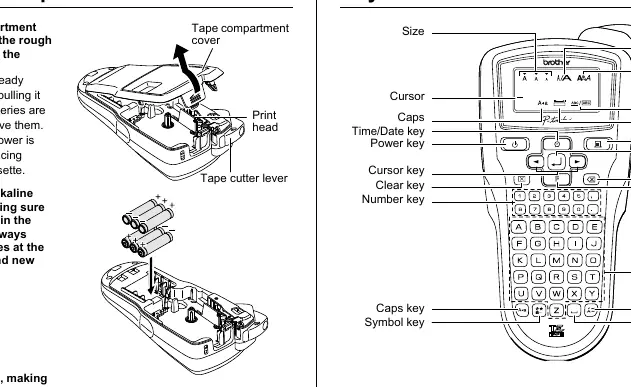
To begin using your P-touch, install six new AAA alkaline batteries or connect the optional AD-24ES AC adapter. Open the tape compartment cover to insert the tape cassette, ensuring it is firmly seated and the tape end is fed under the guides. If the ink ribbon is loose, wind the toothed wheel on the cassette before installation. After closing the cover, feed the tape and use the cutter lever to prepare it for printing.
Designing and Printing Labels
The device features an intuitive keyboard and LCD screen for text entry and editing. Users can switch between upper and lower case, create two-line text (on 9mm or 12mm tape), and insert symbols or accented characters. Advanced design features include adjustable label length, tab alignment, and various text styles such as bold, outline, shadow, and vertical orientation. The Auto Format function provides pre-set lengths for common applications like VCR tapes or file tabs. Before printing, use the preview function to check your text. Printing options include multiple copies, sequential numbering, and mirror printing for transparent surfaces.
Maintenance and Safety
To ensure longevity, keep the machine away from extreme temperatures, high humidity, and direct sunlight. Clean the print head gently with a soft, dry cotton swab; avoid using alcohol or organic solvents. If the cutter blade becomes blunt, replace the cutter unit (TC-5). Always use the specified AC adapter to prevent damage. If the device is not used for an extended period, remove the batteries to prevent leakage. Note that disconnecting power for more than two minutes will clear all text, formats, and system settings.
Troubleshooting
If you encounter issues, check the error messages on the display. Common problems like blank screens or printing errors are often resolved by checking battery installation or tape cassette seating. If the machine locks up, perform a system reset by turning it off and holding down specific keys while powering it back on, though this will erase stored data.
Manufacturer information
Brother Industries, Ltd.
Practical help
Common problems
Display stays blank after turning on
Check that batteries are correctly inserted or replace weak batteries; verify AC adapter connection.
Machine does not print or characters are malformed
Ensure the tape cassette is correctly inserted and not empty; check that the compartment cover is closed.
Machine locked up (no response to keys)
Turn off, then hold down the Function and Space keys while turning back on to reset to default settings.
Tape does not feed properly or gets stuck
Ensure tape end is under the tape guides; do not touch the cutter lever during the printing process.
Blank horizontal line on printed label
Clean the print head with a dry cotton swab using an up-and-down motion to remove dust.
Before use
- Install six AAA alkaline batteries or connect the AD-24ES AC adapter.
- Ensure the tape cassette is firmly slotted into place.
- Check that the tape end is fed under the tape guides.
- Wind the toothed wheel on the cassette if the ink ribbon is loose.
- Close the back cover securely.
- Set the language, unit (mm/inch), and date/time in the initial settings.
- Feed the tape once and use the cutter lever before the first print.
Specs in practice
- Power Supply
- Six AAA alkaline batteries (LR03) or AD-24ES AC adapter.
- Tape Cassette
- Brother TZ tape in 3.5 mm, 6 mm, 9 mm, and 12 mm widths.
- Operating Temperature
- Standard range is 10°C to 35°C.
Images and diagrams
- The tape compartment cover is located at the top end of the machine.
- The print head and tape cutter lever are accessible inside the tape compartment.
- The tape exit slot is located on the side of the machine.
- The LCD screen displays one row of 12 characters, supporting up to 80 characters in length.
- The cutter's edge is used to cleanly cut the tape after printing.
Model compatibility
- Use only Brother TZ tapes with the mark.
- Two-line text printing requires 9 mm or 12 mm wide tape.
- Frames cannot be printed on 3.5 mm tape.
- The AD-24ES AC adapter is the only specified power supply.

Manual page author
David Miller
Documentation analyst
Organizes user manual content into clear summaries, with attention to model details, product context, and everyday usability.