Home Appliances / Small Kitchen Appliances
User Manual for BUNN HB 10-Cup Coffee Brewer
Quick guide for the BUNN HB 10-Cup Coffee Brewer. Includes setup, programming, brewing instructions, cleaning, and troubleshooting.
Table of contents
Manual images
Click an image to enlargeQuick Start and Important Information
The BUNN HB 10-Cup Coffee Brewer is designed for household use. Before using, ensure the unit is plugged into a standard 120V grounded outlet. The brewer requires a minimum of 4 cups (20oz) of water to operate. Always keep the lid closed when not in use to prevent steam damage to cabinets.
Product Overview
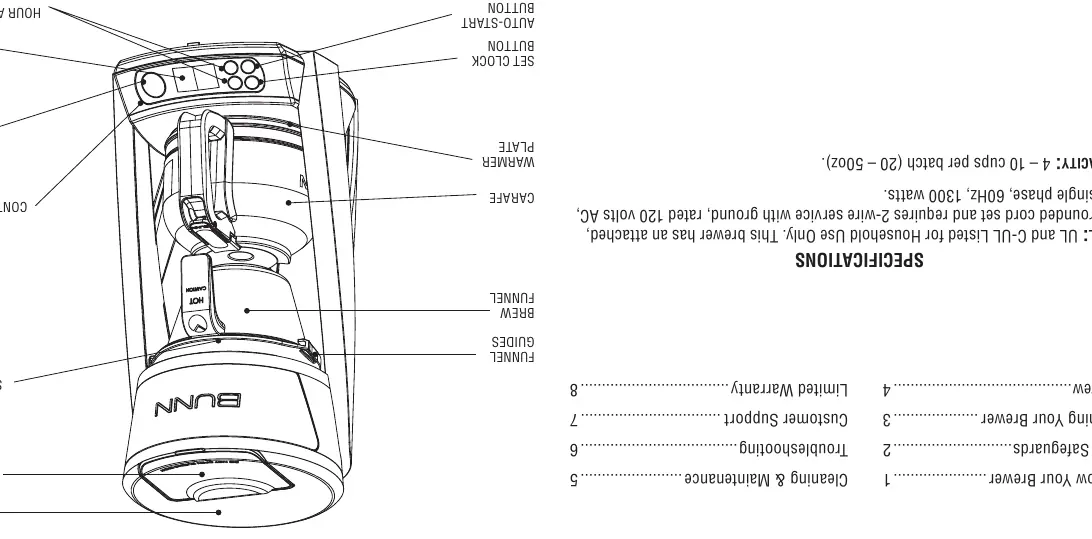
The brewer features a top tank for water, a sprayhead for even water distribution, a brew funnel, and a warmer plate. The control panel includes a digital display, clock set button, auto-start button, and a brew button. Note that the carafe lid is packed separately and must be attached.
Programming Your Brewer
To use the Auto-Start function, you must first set the clock:
- Plug in the brewer. The display will flash for 10 seconds.
- Use the H (hour) and M (minute) buttons to set the current time. Ensure AM/PM is correct.
- Press the Clock button to lock in the time.
To set Auto-Start:
- Press the Auto-Start button.
- Use H and M buttons to set the desired start time.
- Press the Auto-Start button again to activate. The button will illuminate white when active.
How to Brew
Follow these steps for the perfect cup:
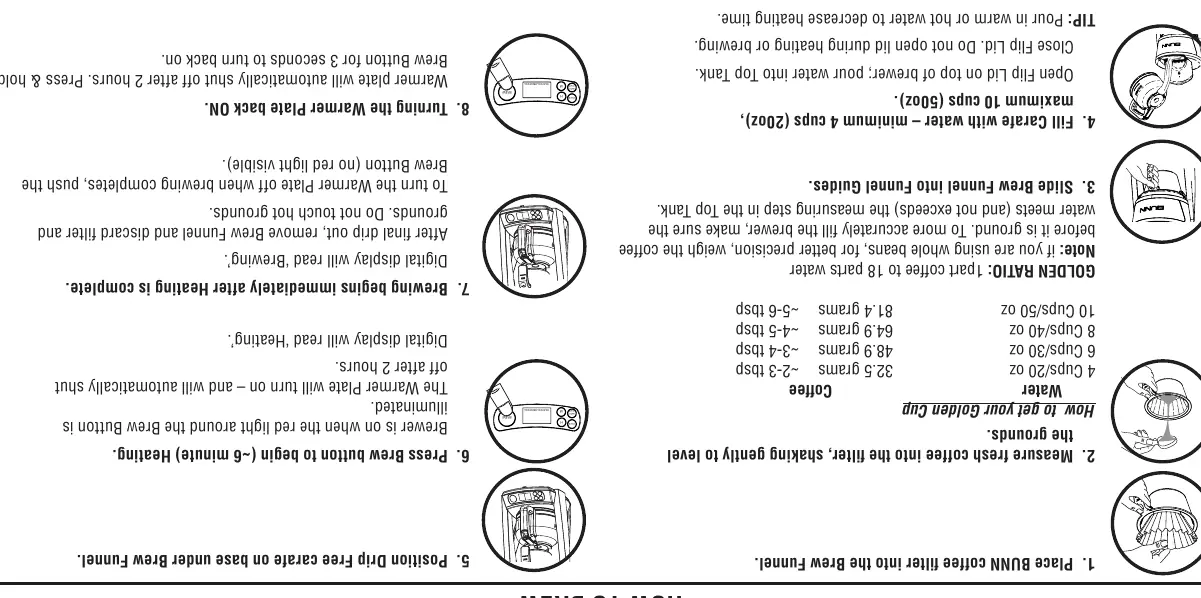
- Place a BUNN coffee filter into the brew funnel.
- Measure fresh coffee grounds into the filter. The recommended Golden Ratio is 1 part coffee to 18 parts water.
- Slide the brew funnel into the funnel guides.
- Fill the carafe with 20-50oz of water and pour into the top tank.
- Position the carafe on the warmer plate.
- Press the Brew button. The red light will illuminate, and the display will read 'Heating'.
- Once heating is complete, the display will read 'Brewing'.
Cleaning and Maintenance
Regular cleaning is essential to prevent mineral build-up:
- Wash the brew funnel and glass carafe after each use (top rack dishwasher safe).
- Wipe the exterior with a damp cloth and mild detergent.
- If the sprayhead is plugged with mineral deposits, remove it by turning with your fingertips and clean with a toothpick and mild detergent.
- To descale, fill the brewer with equal parts water and white vinegar (25oz each). Run a brew cycle, let it soak, then run 3+ cycles with fresh water to flush.
- Reset the 'CLEAN' indicator by holding the H and M buttons for 3 seconds while the brewer is idle.
Troubleshooting
If you encounter issues:
- Brewer does not turn on: Check the power outlet and ensure the Brew button is pressed.
- Coffee is not brewing: Ensure at least 4 cups of water are in the tank and the clock is set.
- Brew funnel overflows: Use BUNN paper filters and ensure the sprayhead is properly in place.
- Error Code EE:03: The brewer does not detect water. Check the top tank.
Specifications
The brewer operates on 120V AC, 60Hz, 11 amps, and 1300 watts. It has a brewing capacity of 4-10 cups (20-50oz) per batch.
Manufacturer information
Bunn-O-Matic Corporation
Practical help
Common problems
Brewer does not turn on
Ensure the unit is plugged into a working outlet and the Brew button is pressed.
Coffee is not brewing
Check that the water tank has at least 4 cups (20oz) of water and the clock is set.
Brew funnel overflows
Use BUNN paper filters (they are taller) and ensure the sprayhead is correctly installed.
Error Code EE:03
The brewer does not detect water. Check the top tank and ensure it is filled.
Off taste detected
Perform the cleaning and maintenance procedure to remove mineral build-up.
Before use
- Ensure the carafe lid is attached.
- Plug the brewer into a standard 120V grounded outlet.
- Set the clock before attempting to use the Auto-Start feature.
- Use at least 4 cups (20oz) of water for any brew cycle.
- Use BUNN paper filters to prevent overflow.
Specs in practice
- Brew Capacity
- 4 to 10 cups (20 to 50oz) per batch.
- Golden Ratio
- 1 part coffee to 18 parts water for optimal flavor.
Images and diagrams
- Control Panel: Contains H/M buttons for time, Auto-Start, Clock, and Brew buttons.
- Top Tank: The reservoir where water is poured for brewing.
- Sprayhead: The component that distributes hot water over the coffee grounds.
Model compatibility
- Use BUNN paper filters for best performance.
- Do not use the carafe on a range top or in a microwave.
- The brewer is sensitive to mineral build-up; clean every 3 months or when 'CLEAN' appears.

Manual page author
Emily Carter
User documentation editor
Prepares concise manual descriptions and highlights the most useful setup, operation, and maintenance information for readers.