Home Appliances / Small Kitchen Appliances
Capresso CM300 10-Cup Programmable Coffee Maker
Quick guide for the Capresso CM300 10-Cup Programmable Coffee Maker. Learn how to set the clock, program auto-brew, use the charcoal filter, handle the thermal carafe, and perform maintenance.
Table of contents
Manual images
Click an image to enlargeQuick guide from the manual
The Capresso CM300 is a programmable coffee maker designed for household use. To get started, clean all loose parts with warm water and run two full carafes of water through the machine without coffee. Always use cold water in the water container. The machine features a charcoal water filter to improve taste and a thermal carafe to keep coffee hot. Ensure the carafe lid is in the correct position for brewing and serving to avoid spills and heat loss.
Equipment
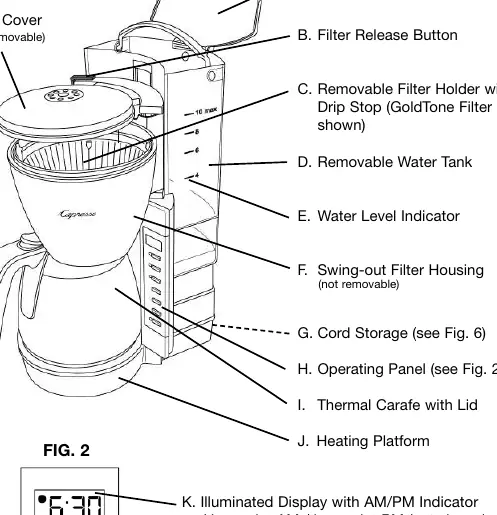
The package includes the coffee maker, thermal carafe with lid, measuring scoop, GoldTone filter (in the filter holder), and a charcoal filter with holder.
Preparing the Coffee Maker
Setting the Clock: When plugged in, the display flashes 12:00. Press and hold the hour button to set the hour (note the AM/PM dot indicator), then use the minute button to set the minutes.
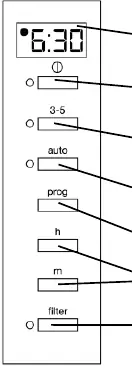
Setting Auto-On: Press the program button, then use the hour and minute buttons to set your desired start time. The display will revert to the current time after a few seconds.
The Charcoal Filter Indicator
The charcoal filter removes chlorine and impurities. To activate, soak the cartridge in water for 3 minutes, then insert it into the holder. Press the Filter button to start the electronic indicator. The light will blink after 6 weeks or 60 brewings, signaling it is time to replace the cartridge. If using spring or distilled water, you may disable the indicator by pressing the Filter button.
Making Coffee
1. Remove the water container and fill with cold water (do not exceed MAX).
2. Ensure the filter holder is securely in place.
3. Insert a size 4 paper filter or the included GoldTone filter. Add ground coffee (1 level scoop per cup).
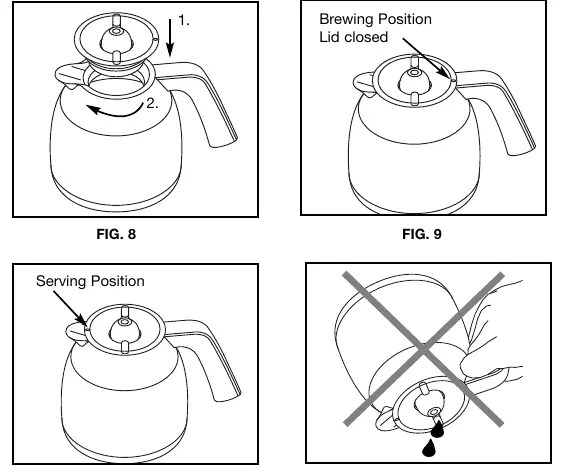
4. Ensure the thermal carafe is empty and the lid is closed in the brewing position (black dot aligned with the handle).
5. Press the On/Off button to start brewing. For smaller amounts (3-5 cups), press the 3-5 cup button first for better flavor extraction.
Handling of the Stainless Steel Thermal Carafe
The carafe lid must be in the brewing position (black dot toward the handle) during brewing. To pour, turn the lid counterclockwise 180 degrees until the black dot is over the pouring spout. Important: Do not place the carafe in the dishwasher. Do not remove the stainless steel bottom, as it protects the vacuum seal.
Cleaning and Decalcifying
Cleaning: Unplug the machine before cleaning. The filter holder and GoldTone filter are dishwasher safe (upper rack). Wipe the exterior with a soft, damp cloth. Never immerse the base in water.
Decalcifying: Perform this at least every 6 months or if brewing takes longer than 10 minutes. Remove filters, fill the water container with 20-24 oz of white vinegar, run the machine for 2 minutes, turn off for 15 minutes, then run the remainder. Rinse by brewing two full carafes of fresh water.
Troubleshooting
If coffee drips from the filter when the carafe is removed, the drip stop may be blocked by coffee grounds; clean the filter holder under running water. If coffee flows over the GoldTone filter, the grind may be too fine; use less coffee or switch to a paper filter.
Manufacturer information
Capresso
Practical help
Common problems
Coffee drips from the filter when the carafe is removed
Ground coffee is likely stuck in the drip stop. Remove the filter holder, clean it under running water, and push the drip stop mechanism several times to clear particles.
Ground coffee is flowing over the GoldTone filter
The coffee grind is too fine. Use a coarser grind, use less coffee, or switch to a size 4 paper filter.
Display is flashing
The machine has lost power for more than 10 seconds. You must reset the current time and any programmed auto-on settings.
Before use
- Clean all loose parts with warm water.
- Run two full carafes of water through the machine without coffee to clean internal parts.
- Set the current time on the display.
- Activate the charcoal filter by soaking it in water for 3 minutes before first use.
- Ensure the thermal carafe is empty before starting a brew cycle.
Specs in practice
- GoldTone Filter
- A reusable filter included with the machine. Coffee flows slower through this than through paper filters.
- Thermal Carafe
- Vacuum-insulated carafe. Do not put in the dishwasher and do not remove the bottom cover.
Images and diagrams
- Fig 1: Overview of the coffee maker components including the water tank, filter holder, and operating panel.
- Fig 2: Operating panel buttons for clock, timer, and brewing modes.
- Fig 8-10: Correct lid positioning for brewing (dot at handle) versus serving (dot at spout).
Model compatibility
- Use size 4 paper filters if not using the GoldTone filter.
- Do not use hot water to fill the water container.
- Replacement charcoal cartridges are available via the Capresso website.

Manual page author
Michael Turner
Technical manual editor
Reviews PDF manuals for structure, safety notes, and practical product details so readers can find the right information quickly.