Computers / Laptops
DELL Latitude 5420 Setup and Specifications
Comprehensive setup guide and technical specifications for the DELL Latitude 5420 laptop, including hardware details, port configurations, and safety guidelines.
Table of contents
Product Overview
The Latitude 5420 is a 14-inch laptop designed for professional use. This guide provides essential information for setting up your device, understanding its hardware components, and optimizing its performance.
Initial Setup
To begin using your Latitude 5420, connect the power adapter and press the power button. Note that the battery may be in power-saving mode during shipment; ensure the adapter is connected for the first startup. Follow the on-screen Windows setup instructions, connect to a network for updates, and sign in with or create a Microsoft account. It is recommended to explore pre-installed Dell applications such as SupportAssist for hardware health checks, Dell Update for driver management, and Dell Digital Delivery for software.
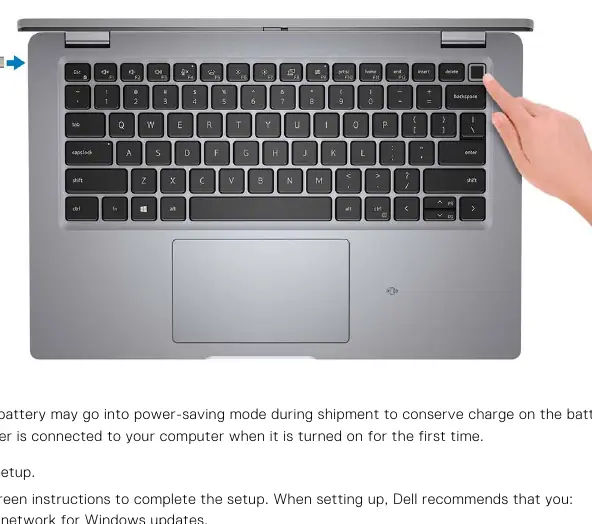
Hardware and Ports
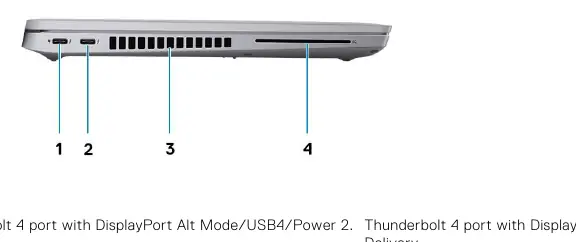
The device features a versatile array of ports and connectors to support various peripherals:
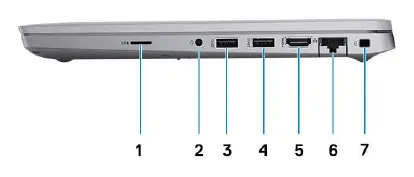
- Right Side: microSD-card slot, universal audio port, two USB 3.2 Gen 1 ports (one with PowerShare), HDMI 2.0 port, RJ45 Ethernet port, and a wedge-shaped lock slot.
- Left Side: Two Thunderbolt 4 ports with DisplayPort Alt Mode/USB4/Power Delivery, air vents, and an optional smart card reader slot.
- Front: Dual-array microphones, camera (FHD/HD options), IR emitter/Ambient Light Sensor, and battery diagnostic LED.
Technical Specifications
The Latitude 5420 supports 10th and 11th Generation Intel Core processors. Memory configurations include two SO-DIMM slots supporting up to 64 GB of DDR4 3200 MHz RAM. Storage options include M.2 2230/2280 PCIe NVMe solid-state drives. The display options range from HD to Full HD (FHD) with various technologies including Wide Viewing Angle (WVA) and low blue light features.
Safety and Maintenance
The display is designed to minimize blue light exposure. To reduce eye strain, maintain a viewing distance of 20 to 28 inches, blink frequently, and take regular breaks. Always operate and store the device within the specified temperature ranges (0°C to 40°C for operation) to ensure optimal performance and longevity. The system includes advanced hardware security features such as TPM 2.0, FIPS certification, and optional fingerprint readers integrated into the power button.
Related manuals
Related manuals from the same brand or category.
Computers / Laptops
DELL XPS 13 Plus 9320 Setup and Specifications
DELLComputers / Laptops
DELL Precision 5570 Setup and Specifications
DELLComputers / Laptops
DELL Precision 7670 External Display Connection Guide
DELLElectronics / Monitors
DELL Precision 5570 External Display Connection Guide
DELLElectronics / Monitors
DELL XPS 15 9530 Setup and Specifications
DELLElectronics / Televisions
DELL RFID 13.56MHz Wireless Module Integration Guide
DELLComputers / Laptops
LG Gram 14T90S 2-in-1 Laptop Overview
LGComputers / Laptops