General / Other Manuals
DigiTech Mosaic 12-String Effect User Manual
Quick guide for the DigiTech Mosaic 12-string effect pedal, covering setup, connection diagrams, control adjustments, and technical specifications.
Table of contents
Manual images
Jump to the sectionQuick guide from the manual
The DigiTech Mosaic is a 12-string effect pedal designed to add a lush, shimmering 12-string sound to both acoustic and electric guitars. It features a true bypass design, ensuring your original tone remains unaffected when the pedal is off. The pedal should ideally be placed first in your effects chain for optimal pitch-shifting performance.
Device description and controls
The pedal interface consists of the following elements:
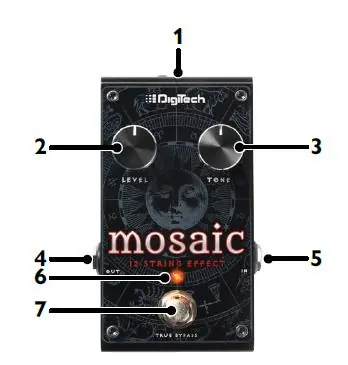
- Power Input: Use only the provided power supply.
- Level Knob: Adjusts the amount of the 12-string effect added to the dry signal.
- Tone Knob: Boosts high frequencies of the effect signal as it is turned up.
- Output Jack: Connect to your amplifier, the next pedal in your chain, or an effects loop return.
- Input Jack: Connect your instrument here.
- Effect LED: Indicates when the effect is active.
- Footswitch: Toggles the effect on and off.
Setup and connection
To connect the Mosaic pedal to your rig:
- Turn down the master volume on your amplifier.
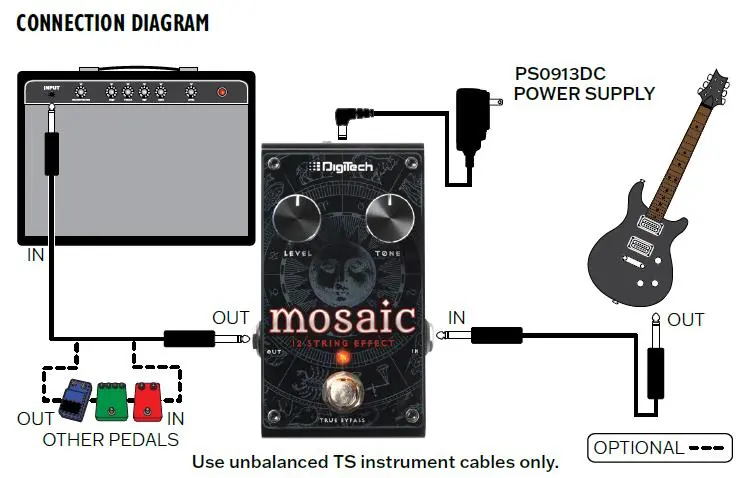
- Connect your instrument to the Input jack and the Output jack to your amplifier or next pedal.
- Connect the provided power supply to the Power input and plug it into a wall outlet.
- Turn on the amplifier and gradually increase the volume to the desired level.
Always use unbalanced TS instrument cables for connections.
Example settings
Start with these recommended settings:
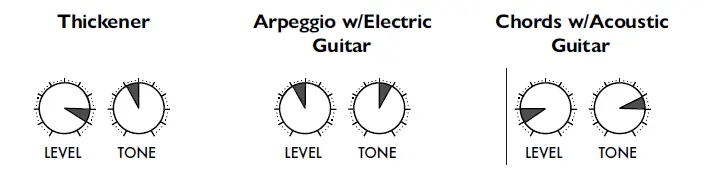
- Thickener: Set Level to approximately 10 o'clock and Tone to 1 o'clock.
- Arpeggio w/Electric Guitar: Set Level to 11 o'clock and Tone to 1 o'clock.
- Chords w/Acoustic Guitar: Set Level to 9 o'clock and Tone to 2 o'clock.
Safety and maintenance
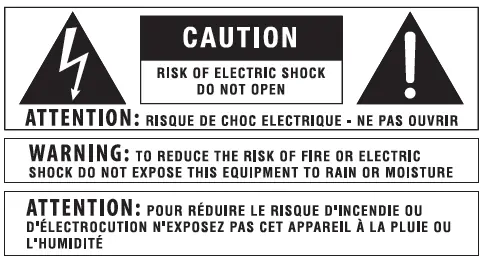
Do not open the device or attempt to service it yourself. Keep the device away from water and moisture. If the unit is exposed to liquid, turn it off immediately and contact service. Use only the specified power supply and accessories. The device is intended for indoor use only and should not be operated at altitudes above 2000m.
Technical specifications
- Sampling Frequency: 44.1 kHz
- Frequency Response: 20 Hz - 11 kHz (effect on)
- A/D/A Conversion: 24-bit
- Power Requirements: 9 VDC external power supply
- Dimensions: 4.75" x 2.875" x 1.75"
- Weight: 0.36 lbs
Practical help
Common problems
Effect sounds too thick
Lower the LEVEL knob and increase the TONE knob.
Effect not working as expected in chain
Ensure the Mosaic is the first pedal in your effects chain, as other effects placed before it may interfere with pitch-shifting.
Before use
- Verify you are using the provided power supply.
- Ensure the amplifier volume is turned down before connecting.
- Use only unbalanced TS instrument cables.
- Check that the pedal is placed first in the signal chain.
- Confirm the power outlet is compatible with the provided adapter.
Specs in practice
- Sampling Frequency 44.1 kHz
- Standard high-quality digital audio processing rate.
- Input Impedance (Effect On)
- 1 M Ohm, standard for guitar pickups to maintain signal integrity.
Images and diagrams
- The connection diagram shows the guitar connected to the pedal's Input, and the pedal's Output connected to the amplifier.
- Other pedals should be placed after the Mosaic in the signal chain.
Model compatibility
- Compatible with both acoustic and electric guitars.
- Must be used with a 9 VDC power supply.
- Not for use at altitudes above 2000m.

Manual page author
Emily Carter
User documentation editor
Prepares concise manual descriptions and highlights the most useful setup, operation, and maintenance information for readers.