Electronics / Speakers Soundbars
User Manual for DS18 DSP2.6DBT Digital Sound Processor
Quick guide for the DS18 DSP2.6DBT Digital Sound Processor, covering installation, wiring, menu navigation, configuration of crossover, EQ, limiter, and Bluetooth app pairing.
Table of contents
Quick guide from the manual
The DS18 DSP2.6DBT is a digital sound processor designed for audio system alignment. This manual provides instructions for physical installation, wiring, and configuring audio parameters via the device's rotary encoder or the dedicated smartphone app.
Installation
Ensure the device is powered with 10-15Vdc. Use a wire gauge of 1mm2 (18awg) or larger. Connect the REM IN to the player's remote output and the REM OUT to your amplifiers.
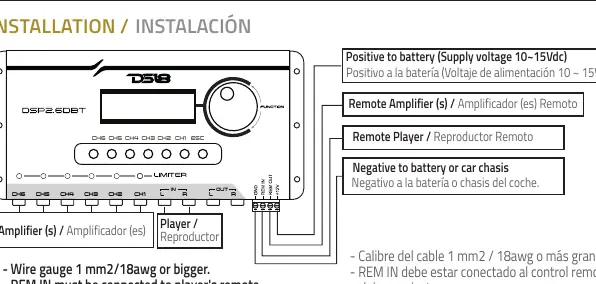
- Positive: Connect to battery (10-15Vdc).
- Negative: Connect to battery or car chassis.
- REM IN: Connect to player's remote.
- REM OUT: Connect to amplifiers.
Menu & Configurations
Use the rotary encoder to navigate menus and press it to select. Use the ESC button to return to previous screens.
- Main Gain: Adjust the overall gain.
- Routing Channel: Assign input signals (L, R, or L+R) to specific outputs.
- Crossover: Set filters (Butterworth, Linkwitz-Riley, Bessel) with slopes from 6dB/OCT to 48dB/OCT.
- Channel EQ: Adjust 3 independent frequencies per channel (20Hz-20kHz) with Q factor and gain control.
- Limiter: Set threshold, attack, and decay levels to protect speakers.
- Password: Protect configurations with a 4-digit code (default: 0000).
- Reset: Hold ESC on the initial display to restore factory settings. Note: This clears all custom configurations.
Bluetooth Interface
The processor can be configured in real-time via a smartphone app available on Google Play Store and Apple Store. To pair: enable location and Bluetooth on your phone, open the app, and select the processor. The default factory password is 0000.
Technical Specifications
- Operating Voltage: 9V-16Vdc (10-15Vdc recommended)
- Inputs: 2-channel RCA, unbalanced, 47kΩ impedance
- Outputs: 6-channel RCA, unbalanced, 470kΩ impedance
- Resolution: 24 Bits
- Sample Frequency: 48kHz
- THD+N: 0.01%
- Dimensions: 120 x 250 x 30 mm
Manufacturer information
DS18
Practical help
Common problems
Forgot the password
You must use the reset function to restore factory settings, which will clear all custom configurations.
Resetting to factory defaults
Return to the initial display, then press and hold the ESC button for a few seconds.
App cannot find the processor
Ensure the device's location and Bluetooth are turned on, and the processor is powered on.
Before use
- Verify power supply is between 10-15Vdc.
- Ensure wire gauge is at least 1mm2 (18awg).
- Connect REM IN to the player's remote output.
- Connect REM OUT to the amplifiers.
- Download the DS18 DSP app from the app store.
- Disconnect all outputs before performing a factory reset.
Specs in practice
- Operating Voltage
- The device requires 10-15Vdc to function correctly.
Images and diagrams
- The functional diagram shows the signal path from input through Mute, Routing, EQ, Crossover, Limiter, Gain, Phase, and Delay stages to the 6 outputs.
- The installation diagram illustrates the wiring connections for power, remote signals, and audio inputs/outputs.
Model compatibility
- Compatible with Android 4.3 or later.
- Compatible with all iOS versions.
- App is available only for the DS18 DSP line.

Manual page author
David Miller
Documentation analyst
Organizes user manual content into clear summaries, with attention to model details, product context, and everyday usability.