Electronics / Cameras
Eko Cubix Mini Spy Camera 1080p WiFi
Comprehensive user guide for the Eko Cubix 1080p mini spy camera, covering setup, recording modes, night vision, and file management.
Table of contents
Product Overview
The Eko Cubix is a compact, high-definition mini camera designed for versatile surveillance needs. Despite its small size, it offers 1080p video resolution, a 140-degree wide-angle lens, and infrared night vision capabilities. It is an ideal solution for discreet monitoring, provided it is used in accordance with local privacy laws and regulations.
Getting Started
Before using the camera for the first time, it is essential to charge the device for at least two hours using the provided USB cable. The camera supports microSD cards up to 32GB for storage. Please note that the device should not be used to record individuals without their consent or in private, intimate spaces such as bedrooms or bathrooms.
Recording Modes
The camera features multiple recording modes to suit different requirements. You can record in 720p or 1080p resolution. To start recording, turn on the device using the On/Off button and select your desired mode. The camera also includes a motion detection feature, which can be activated by holding the Mode button for three seconds while in standby mode. Videos are automatically saved in five-minute segments to ensure data integrity.
Night Vision and Photos
The Eko Cubix is equipped with infrared night vision for recording in low-light conditions. This can be toggled by holding the On/Off button for two seconds. Additionally, the camera can capture still photos with a resolution of 4032x3024 pixels by switching to photo mode using the Mode button.
File Management and Maintenance
To view your recordings, connect the camera to a computer via USB while the device is turned off. It will be recognized as a removable disk. You can also set the date and time stamp on your videos by creating a text file named TIMERSET.txt on the root of the memory card, formatted as YYYYMMDDHHMMSS Y. Always ensure the camera is kept away from water, extreme temperatures, and unauthorized tampering to maintain its functionality.
Official resources from the manual
Practical help
Common problems
Camera turns off automatically
The camera enters standby mode after 1 minute of inactivity to save battery. If the battery is empty or memory is full, it will save the file and shut down.
Blue and red lights flashing simultaneously
This indicates either the battery is empty, the memory card is full, or no memory card is installed.
Before use
- Charge the device for at least two hours.
- Insert a microSD card (up to 32GB, not included).
- Ensure the camera is not used in private or intimate areas.
- Verify local privacy and surveillance regulations.
Specs in practice
- Video Resolution
- Supports 1080p (Full HD) and 720p adjustable modes.
- Battery Life
- Approximately 60 minutes of continuous recording.
Images and diagrams
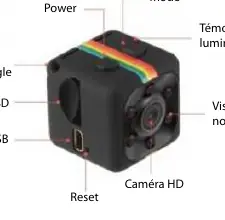
- Power and Mode buttons are located on the top of the device.
- The Micro USB port and Micro SD slot are on the side.
- The Reset button is located near the Micro USB port.
- The status indicator light is positioned near the lens.
Model compatibility
- Compatible with microSD cards up to 32GB.
- Can be used as a surveillance camera while connected to a 5V power source.

Manual page author
David Miller
Documentation analyst
Organizes user manual content into clear summaries, with attention to model details, product context, and everyday usability.