Automotive / Networking Equipment
Safety Information for ELTEC CYBOX RT 2-A
Essential safety guidelines, installation precautions, and radio frequency specifications for the ELTEC CYBOX RT 2-A wireless router. Learn about industrial usage, thermal management, and antenna requirements.
Table of contents
Important information from the manual
The ELTEC CYBOX RT 2-A is a wireless router designed exclusively for industrial environments (Class A product). This document outlines critical safety measures, including requirements for ESD protection, thermal management, and electrical safety. Users must ensure that the device is installed by trained personnel and that all safety protocols are followed to prevent equipment damage or personal injury.
Installation and Safety Precautions
Proper installation is vital for the safe operation of the device:
- Thermal Management: The device can reach temperatures exceeding 80°C. For optimal heat dissipation, install the device so that the connectors face downwards. Do not install near heat sources like radiators.
- Electrical Safety: Connect the device to protective earth before connecting the power supply. Always turn off the external power supply and remove the power cable before handling or disassembling the system.
- Handling: Only trained personnel should handle the device. Observe Electrostatic Discharge (ESD) protective measures at all times.
- Environment: The housing has an IP 40 protection class. Keep the device away from liquids and avoid exposure to dripping or splashing. Ensure the device is installed in a location inaccessible to children.
- Antenna Setup: Maintain a minimum separation distance of 20 cm between the antenna and the user's body. Ensure all power cables are unplugged before connecting or removing signal cables.
Radio Frequencies and Transmitting Power
The device operates on various frequency bands for WLAN, LTE, and UMTS. Users must adhere to the specified maximum power (e.i.r.p.) limits provided in the technical tables. Specifically, the WLAN frequency band 5.15 GHz to 5.35 GHz is restricted to indoor use only within EU member states.
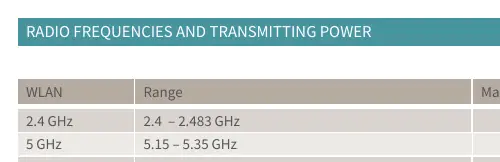
Regulatory and Antenna Information
The device is compliant with directive 2014/53/EU. Recommended antenna types include dipole antennas with 4.5 dBi (2.4 GHz) and 7.0 dBi (5 GHz) gain for WLAN, and 3.0 dBi gain for LTE/UMTS. For detailed configuration settings, refer to the full configuration manual available in the ELTEC Download Center.
Practical help
Common problems
Device overheating
Ensure the device is installed with connectors facing downwards to facilitate heat dissipation and keep it away from external heat sources.
Radio interference or compliance violation
Ensure the 5.15-5.35 GHz WLAN band is used only indoors and maintain a 20 cm separation distance between the antenna and the user.
Before use
- Verify the installation environment is industrial (Class A).
- Ensure personnel are trained and observe ESD protective measures.
- Connect the device to protective earth before connecting the power supply.
- Ensure all power cables are unplugged before connecting signal cables.
- Check that the device is installed in a location inaccessible to children.
Specs in practice
- Max. Power (e.i.r.p.)
- The maximum radiated power of the radio module; must be adhered to for regulatory compliance.
Model compatibility
- Product is for industrial use only (Class A).
- 5.15-5.35 GHz WLAN band is restricted to indoor use in EU member states.
- Requires dipole antennas with specific gain ratings (4.5/7.0 dBi for WLAN, 3.0 dBi for LTE/UMTS).

Manual page author
Emily Carter
User documentation editor
Prepares concise manual descriptions and highlights the most useful setup, operation, and maintenance information for readers.