General / Other Manuals
Eureka 1660SP Dust Cup Replacement
A step-by-step guide on how to replace the dust cup filter in your Eureka 1660SP vacuum cleaner to maintain optimal suction performance.
Table of contents
Introduction
Over time, the dust cup in your Eureka 1660SP vacuum cleaner may become worn or clogged, which can reduce the overall efficiency of the device. Replacing the dust cup is a straightforward process that helps restore maximum vacuuming performance. This guide provides the necessary steps to safely remove the old component and install a new one.
Required Tools and Parts
To perform this replacement, you will need the following items:
- Phillips #00 screwdriver
- Replacement dust cup
Replacement Procedure
Follow these steps carefully to replace the dust cup:
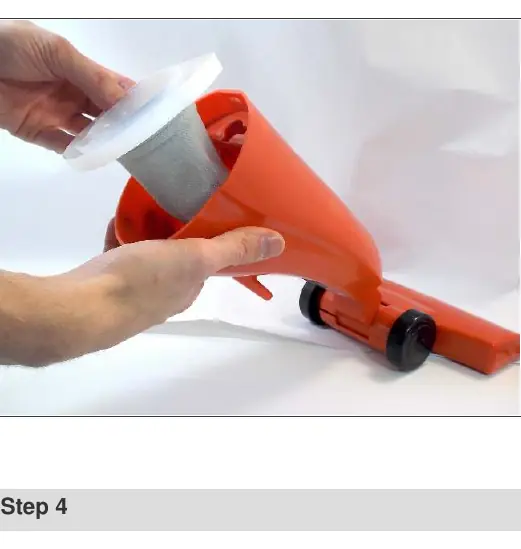
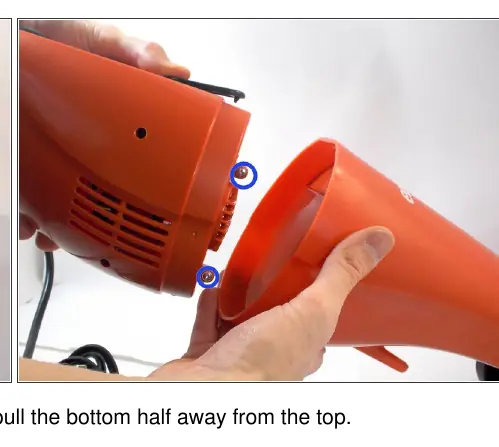
- Accessing the dust cup: Locate the black separator switch on the vacuum body. Press the switch and gently pull the bottom half of the vacuum away from the top section.
- Removing the screws: Once the sections are separated, use your Phillips #00 screwdriver to remove the screws securing the internal components.
- Removing the old dust cup: After the screws are removed, you will be able to see the dust cup located within the bottom half of the vacuum. Carefully lift the dust cup up and out of the cavity to remove it.
- Installing the new dust cup: Place the new dust cup into the cavity, ensuring it is properly seated.
- Reassembly: To complete the process, follow the removal steps in reverse order to reattach the vacuum sections and secure the screws.
Maintenance and Care
Regularly checking the condition of your vacuum's dust cup and filter is essential for maintaining suction power. If you notice a significant decrease in performance or visible damage to the cup, it is recommended to replace it promptly to prevent debris from entering the motor housing.
Related manuals
Related manuals from the same brand or category.

Manual page author
Michael Turner
Technical manual editor
Reviews PDF manuals for structure, safety notes, and practical product details so readers can find the right information quickly.