HVAC / Heaters & Fireplaces
User Manual for Faber Lusso 100BK and 151BK Refrigerator
Quick guide for the Faber Lusso 100BK and 151BK refrigerator. Includes installation steps, thermostat settings, defrosting procedures, maintenance, and troubleshooting.
Table of contents
Manual images
Click an image to enlargeQuick guide from the manual
This refrigerator is designed for household use. Before first use, ensure the unit is placed on a level, solid surface with adequate ventilation (30cm above, 5cm on sides and back). Operate the empty refrigerator for 2-3 hours (10 hours in summer) before storing food. Set the thermostat between 3 and 4 for normal operation.
Safety Instructions
- Electrical Safety: The appliance must be properly grounded. Do not use extension cables or inverters. If the power cord is damaged, it must be replaced by the manufacturer or a qualified service agent.
- Child Safety: Keep children supervised. To prevent entrapment, remove doors and leave shelves in place before disposing of the unit.
- Usage Warnings: Do not use mechanical devices to accelerate defrosting. Keep ventilation openings clear. Do not store explosive substances like aerosol cans inside.
Installation
Ensure the ground is level, solid, and dry. Avoid placing the unit upside down or horizontally. The angle of inclination should not exceed 45 degrees. Keep the refrigerator away from heat sources like stoves or direct sunlight to maintain efficiency.
How to Use the Refrigerator
Thermostat Settings: Turn the thermostat dial to between 3 and 4 for standard cooling. For ice making, turn the dial to 7 after placing water in the ice tray.
Defrosting: Defrosting is required when frost on the evaporator reaches 3-4mm. To defrost:
- Disconnect the power supply.
- Open the door and remove all food and the ice tray.
- Allow the frost to melt.
- Wipe and dry the evaporator thoroughly before restarting.
Maintenance
Cleaning: Disconnect the power before maintenance. Do not use abrasive powders, detergents, sodium carbonate, benzene, petrol, or acid alcohol, as these can damage the paint and plastic.
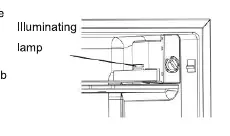
Replacing the Lamp: Disconnect the power supply. Rotate the used bulb anticlockwise to remove it. Insert the new bulb by rotating clockwise. The replacement bulb must be a screw bulb of less than 15W.
Troubleshooting
If you encounter issues, check the following:
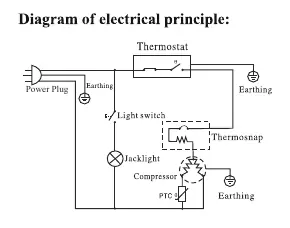
- No refrigeration: Check for power supply interruption, insufficient voltage, or a blown fuse.
- Insufficient cooling: Check thermostat position, ventilation space, door opening frequency, proximity to heat sources, or if the unit is overloaded with food.
- Food frozen inside: Check if the thermostat is set too high or if there is too much food stored.
- Unusual noises: Ensure the appliance is on a flat surface and not in contact with other items.
Manufacturer information
Faber
Practical help
Common problems
No refrigeration
Check if there is an interruption to the power supply, if the voltage is sufficient, or if the fuse has blown.
Insufficient cooling
Verify the thermostat position, ensure sufficient ventilation space around the unit, reduce door opening frequency, move away from heat sources, and check food load.
Food frozen inside
Check if the thermostat is set too high or if the refrigerator is overloaded.
Unusual noises
Ensure the appliance is positioned on a flat surface and is not in contact with other items.
Before use
- Ensure the ground is level, solid, and dry.
- Provide 30cm of space above and 5cm on sides/back for ventilation.
- Avoid direct sunlight or heat sources.
- Verify power supply is 220-240V / 50Hz.
- Run the empty refrigerator for 2-3 hours (10 hours in summer) before first use.
- Clean the interior surfaces.
Specs in practice
- Rated Voltage
- 220-240V~ (Standard household outlet required).
- Climate Type
- ST/T (Suitable for ambient temperatures 16°C to 38°C).
- Max Lamp Power
- 15W (Use screw bulb only).
Images and diagrams
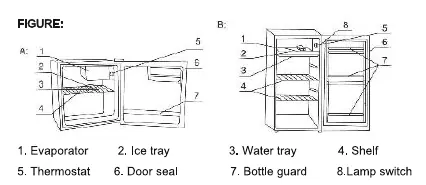
- Figure A/B identifies: 1. Evaporator, 2. Ice tray, 3. Water tray, 4. Shelf, 5. Thermostat, 6. Door seal, 7. Bottle guard, 8. Lamp switch.
Model compatibility
- Not intended for built-in installation.
- Not designed to be used with an inverter.

Manual page author
Emily Carter
User documentation editor
Prepares concise manual descriptions and highlights the most useful setup, operation, and maintenance information for readers.