Home Appliances / Refrigerators
User Manual for Faber e-MatriX heat and e-BoX Electric Fires
Quick guide for Faber e-MatriX heat and e-BoX electric fires. Learn how to operate the remote, pair the receiver, set heating schedules, and troubleshoot common issues.
Table of contents
Manual images
Click an image to enlargeQuick guide from the manual
This manual covers the operation and maintenance of Faber e-MatriX heat and e-BoX electric fires. Key operations include using the remote control to manage flame effects, heating output, and scheduling. Ensure the appliance is installed by a qualified professional and that the water supply is connected correctly before first use.
Safety instructions
Important: This appliance must be earthed. Do not use extension leads or multi-plug adaptors. Keep combustible materials like drapes away from the heater. Do not cover the appliance or use it to dry laundry. The water sump contains a biocidal product (Silver Biocide); do not drink this water. If the appliance is not used for more than 2 weeks, empty the water sump.
First time setup
Before operating the fire for the first time:
- Check the unit for transport damage.
- Ensure all ball valves are open and the water supply is turned on.
- Ensure the mains switch is in the ON (I) position.
- Install 2x AA 1.5V alkaline batteries in the remote control.
- The remote control is pre-paired with the receiver. If pairing is lost, follow the pairing procedure in the manual using the control box or engine buttons.
Remote control and operation
The remote control manages all functions. If the screen turns off, press and hold the confirm button for 1 second to reactivate. The fire starts with the minimum flame setting.
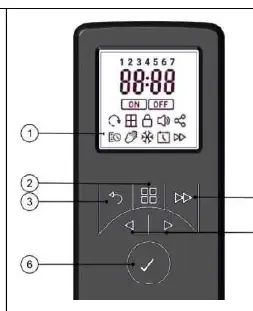
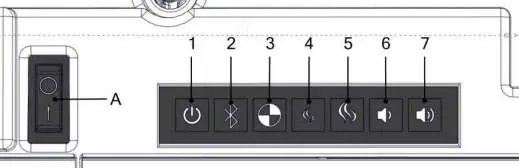
- Switching ON/OFF: Use the power button on the remote or the control box.
- Flame Setting: Adjust flame height (F1-F6) via the menu. Note that higher flames may cause condensation on the glass.
- Crackling Sound: Adjust volume (OFF-06) via the sound icon menu.
- Heat Output: Select between LO (1150-1350W), HI (2050-2250W), or FAN (fan only) modes.
Settings and advanced functions
Access the menu to configure:
- Date and Time: Essential for timer functions.
- Timer Mode: Four heating programs (P1-P4) can be customized for each day of the week.
- Frost Protection: Maintains a room temperature of 7°C.
- Temperature Units: Toggle between Celsius and Fahrenheit.
Maintenance
The device should be cleaned and checked by a qualified specialist to ensure safe use. The outside of the fire can be cleaned with a clean, damp cloth. Clean the glass using glass cleaner; do not use aggressive or abrasive agents.
Troubleshooting
If the fire does not operate, check the following:
- Flame won't start: Check power supply, water level, and transducer connections.
- Fault Code 51: Low water level or absorption valve activated. Check water connections.
- Fault Code 56: Water filling time too long. Check the mesh filter for debris.
- Fault Code 57: Water leak detected.
- Fault Code 58: Water level too high.
Manufacturer information
Faber
Practical help
Common problems
Flame effect will not start
Check if the power supply is connected, the mains switch is ON, the water level is sufficient, and transducers are connected.
Fault code 51 (blinking twice)
Indicates low water level or absorption valve activation. Check water connections and ensure the mains switch is cycled.
Fault code 56 (blinking four times)
Water filling time is too long. Close ball valves, unscrew and clean the mesh filter, then restart.
Remote control not working
Replace batteries or re-pair the remote with the receiver.
Before use
- Check for transport damage.
- Ensure all ball valves are open.
- Turn on the water supply.
- Ensure the mains switch is in the ON (I) position.
- Install 2x AA 1.5V alkaline batteries in the remote.
Specs in practice
- Full Heat (e-MatriX)
- 2050W (230V) to 2250W (240V).
- Half Heat (e-MatriX)
- 1150W (230V) to 1350W (240V).
- Inlet Water Pressure
- 0.5 to 8 Bar.
- Water Connection
- 1/2 or 3/4 inch.
Images and diagrams
- Control box buttons 1-7 allow manual operation of power, pairing, flame, and sound.
- Remote control display icons manage scheduling, temperature, and settings.
Model compatibility
- Suitable for well-insulated rooms or occasional use only.
- Must not be used with external timers or switching devices that regularly cut power.

Manual page author
Michael Turner
Technical manual editor
Reviews PDF manuals for structure, safety notes, and practical product details so readers can find the right information quickly.