Home Appliances / Range Hoods
User Manual for Fagerhult e-Sense Customised Stand-alone Sensors
Quick guide for Fagerhult e-Sense 86370 and 86371 sensors. Includes installation, sensor technology selection, remote control programming, and wiring diagrams.
Table of contents
Manual images
Jump to the sectionQuick guide from the manual
The Fagerhult e-Sense 86370 and 86371 are ceiling-mounted sensors designed for individual control. The 86370 is suitable for ceilings up to 6 meters, while the 86371 supports heights up to 12 meters. These sensors feature integrated DALI power supplies for up to 20 loads and support both PIR and microwave detection technologies.
Installation
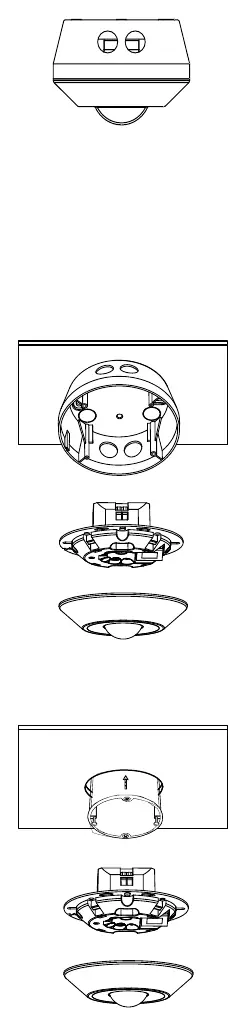
Sensors can be surface-mounted using the supplied installation socket or recessed into standard 60 mm holes. For microwave sensors, a stable base is required. The 86371 model includes a replaceable lens for specific detection patterns, such as corridors.
Sensor Technology Selection
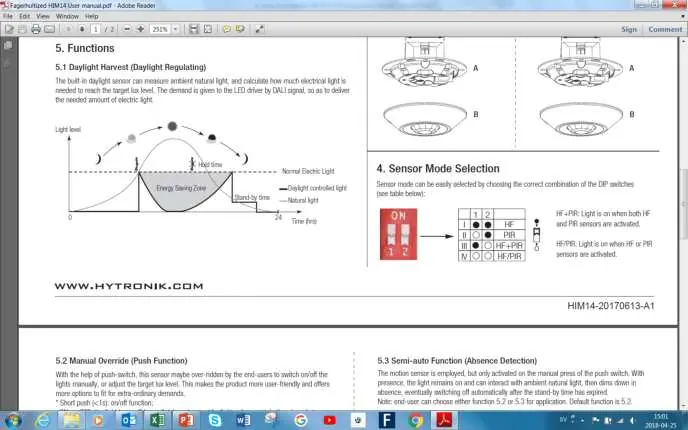
Use the red mode switch on the sensor to select detection technology:
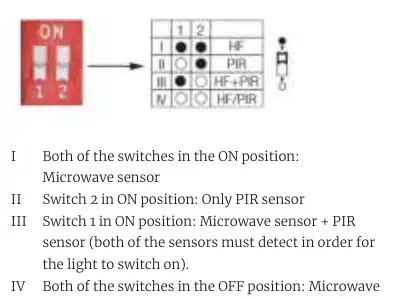
- I (Both ON): Microwave sensor only.
- II (Switch 2 ON): PIR sensor only.
- III (Switch 1 ON): Microwave + PIR (both must detect).
- IV (Both OFF): Microwave / PIR (either sensor triggers).
Programming with Remote Control
The 86368 remote control allows for quick configuration of settings, including:
- Detection Range: Adjustable for microwave sensors.
- Delay Time: Time after last presence before dimming.
- Standby Time: Duration at dimmed level before switching off.
- Standby Dimming Level: Light output during standby (10%, 20%, 30%, or 50%).
- Daylight Threshold: Prevents light activation when ambient light is sufficient.
Press the DEFAULT button to reset to factory settings. The TEST function is available for checking detection ranges.
Wiring and Compatibility
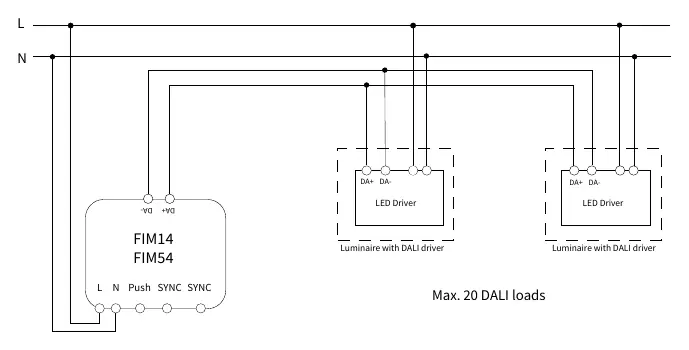
Sensors support DALI Broadcast communication. Up to 5 sensors can be synchronized for larger areas. Wiring examples are provided for single-sensor setups, multi-sensor synchronization, and manual pushbutton integration for dimming.
Technical Specifications
- Supply Voltage: 120-227 VAC, 50/60Hz
- DALI Power Supply: 40 mA, max 20 loads
- Power Consumption:< 1 W
- Detection Range: 360°
Manufacturer information
Fagerhult
Practical help
Common problems
Light flickers during dimming
Press the DEFAULT button on the remote to adjust and smooth the fade-time.
Sensor not detecting movement correctly
Check the mode switch settings on the sensor or use the TEST function to verify the detection range.
Light turns on when not needed
Adjust the Daylight Threshold or use the Manual learning sequence to set a more accurate lux level.
Before use
- Ensure the ceiling height is within the sensor's range (max 6m for 86370, 12m for 86371).
- Verify the DALI load does not exceed 20 units.
- Ensure a stable mounting base for microwave sensors.
- Select the appropriate sensor technology (PIR/Microwave) via the red mode switch.
Specs in practice
- Standby Time
- The duration the light remains at a dimmed level before turning off completely.
- Daylight Threshold
- The ambient light level above which the sensor will not turn on the lights.
Images and diagrams
- Wiring Example 1: Standard standalone setup with DALI broadcast.
- Wiring Example 2: Synchronized sensors for larger detection areas.
- Wiring Example 3: Synchronized sensors with an added manual pushbutton for dimming.
Model compatibility
- Compatible with DALI drivers.
- Supports up to 5 synchronized sensors.
- 86371 includes a specific lens for high-ceiling corridors.

Manual page author
Michael Turner
Technical manual editor
Reviews PDF manuals for structure, safety notes, and practical product details so readers can find the right information quickly.