Installation Guide for GE UNCAC-DW-WTLAF Under Cabinet Power Box
Comprehensive installation and safety guide for the GE UNCAC-DW-WTLAF Under Cabinet Power Box. Includes step-by-step mounting instructions, wiring requirements, and overload protection details.
Quick answers from the manual
Quick answer
- The GE UNCAC-DW-WTLAF is a hardwired under-cabinet power box. It requires a 120VAC 60Hz GFCI-protected circuit and supports a maximum load of 1500W. p. 1
Key actions
- Resetting overload protection p. 1
- Mounting the fixture p. 1
Problems and fixes
Press the overload protection reset button.
p. 1Maintenance and reset
- Press the overload protection reset button if the unit stops working due to an overload. p. 1
Technical specifications
| Parameter | Value | Meaning | Pages |
|---|---|---|---|
| Input Voltage | 120VAC 60Hz | Required power supply | p. 1 |
| Max Load | 1500W | Maximum power capacity | p. 1 |
Where to find it in the PDF
- Installation Guide p. 1
Table of contents
Manual images
Click an image to enlargeQuick guide from the manual
The GE UNCAC-DW-WTLAF is an under-cabinet power fixture providing an outlet, USB-A, and USB-C charging. Installation requires hardwiring to a 120VAC 60Hz circuit. Important: This device must be installed on a GFCI-protected circuit and is not compatible with dimmers.
Installation
Ensure the main power is turned off at the circuit breaker before beginning installation.
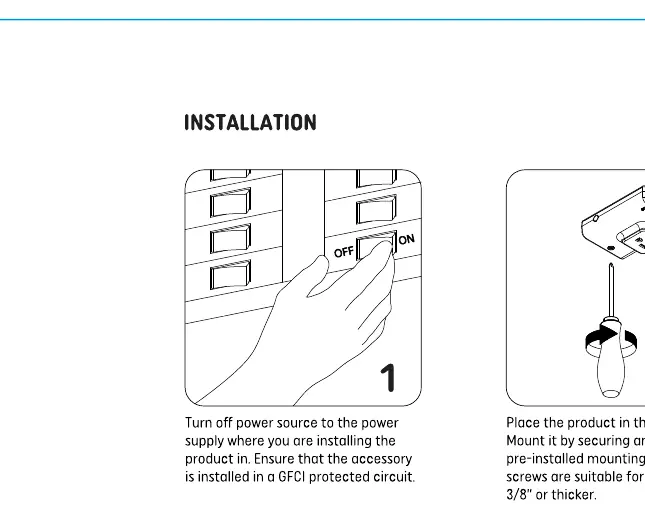
- Mounting: Place the product in the desired position and secure it using the pre-installed mounting screws.
- Wiring: Connect the unit to the electrical supply according to local codes.
- Linking: If using multiple fixtures, connect them using the provided linking cords.
- Finishing: Insert the installation hole covers to conceal the screws.
Safety and Warnings

- Do not use with dimmers.
- Maximum load is 1500W.
- Ensure the circuit is GFCI protected.
- If the load exceeds the allowable limit, the overload protection switch will trip. Press the button to reset.
Technical Specifications
- Input Voltage: 120VAC 60Hz
- Outlet Rating: 120V AC 20A / 1500W Max
- USB-A Output: 5V 3A / 9V 2A / 12V 1.5A
- USB-C Output: 5V 3A / 9V 2A / 12V 1.5A
Practical help
Common problems
If the load exceeds the allowable limit, the overload protection switch will trip. Press the reset button on the unit to restore power.
Ensure the circuit breaker is on and the unit is installed on a GFCI-protected circuit.
Before use
- Turn off power at the circuit breaker.
- Verify the circuit is GFCI protected.
- Ensure the installation surface is suitable for mounting screws.
- Confirm compatibility with the intended electrical load (Max 1500W).

Manual page author
Michael Turner
Technical manual editor
Reviews PDF manuals for structure, safety notes, and practical product details so readers can find the right information quickly.