Electronics / Cameras
User Guide for GoPro HERO 10 Black
Quick start guide for the GoPro HERO 10 Black action camera. Learn how to set up your device, install the battery and microSD card, charge the camera, and use the mounting system.
Table of contents
Manual images
Click an image to enlargeQuick Start Guide
This guide provides the essential steps to set up and begin using your GoPro HERO 10 Black action camera. For advanced features and detailed settings, please refer to the full documentation available through the GoPro Quik app.
Getting Started
Follow these steps to prepare your camera for use:
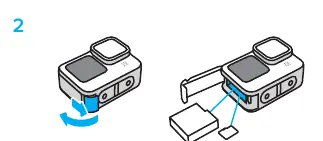
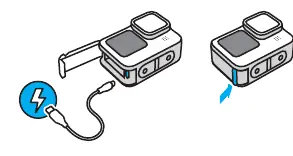
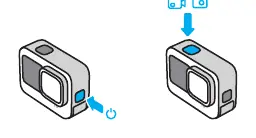
- Download the App: Download the GoPro Quik app from the Apple App Store or Google Play Store to manage your camera and updates.
- Insert Battery and SD Card: Open the side door of the camera. Insert the battery into the battery compartment and insert a compatible microSD card into the card slot.
- Charge the Camera: Connect the camera to a power source using a USB-C cable. The status light will indicate charging progress.
- Power On: Press the power button on the side of the camera to turn it on. Use the touch screen to select your desired recording mode (Video or Photo).
Mounting the Camera
The GoPro HERO 10 Black features built-in folding fingers for versatile mounting:
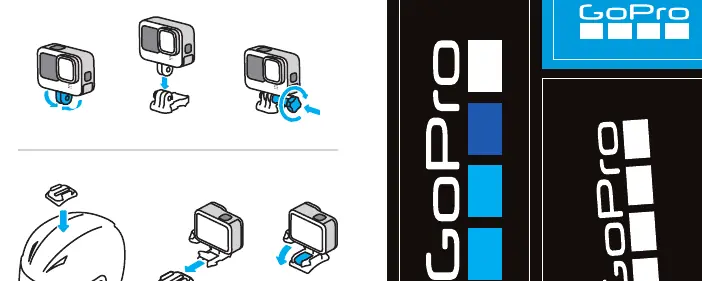
- Standard Mounts: Use the folding fingers to attach the camera to standard GoPro mounts. Secure it by tightening the thumbscrew.
- Adhesive Mounts: For helmet or surface mounting, attach the adhesive mount base to the desired surface, then slide the camera into the mount until it clicks into place.
Manufacturer information
GoPro, Inc.
Practical help
Common problems
Camera does not turn on
Ensure the battery is inserted correctly and fully charged.
Cannot record footage
Verify that a compatible microSD card is inserted correctly into the slot.
Before use
- Download the GoPro Quik app on your smartphone.
- Insert a compatible microSD card into the camera.
- Insert the battery into the battery compartment.
- Charge the camera fully using a USB-C cable before first use.
Specs in practice
- Folding Fingers
- Integrated mounting mechanism compatible with standard GoPro accessories.
Images and diagrams
- Step 1: Scan the QR code to download the Quik app.
- Step 2: Open the side door to access the battery and SD card slots.
- Step 3: Connect the USB-C cable to charge the device.
- Step 4: Press the power button to turn on and select recording mode.
Model compatibility
- Requires a microSD card (not included) for recording.

Manual page author
Emily Carter
User documentation editor
Prepares concise manual descriptions and highlights the most useful setup, operation, and maintenance information for readers.