Electronics / Cameras
User Manual for GoPro LIT HERO Action Camera
Quick guide for the GoPro LIT HERO action camera. Learn how to set up, record, use voice control, manage cloud uploads, and maintain your device.
Table of contents
Manual images
Click an image to enlargeQuick guide from the manual
The GoPro LIT HERO is an action camera designed for versatility. Before first use, ensure you have a compatible microSD card (A2/V30 class or higher) and charge the battery fully using the provided USB-C cable. Always ensure the side door is closed and locked to maintain waterproofing up to 5 meters.
Getting started
To power on the camera, press the Power/Mode button. To power off, hold the same button for 3 seconds. The touch screen allows you to navigate settings by swiping: swipe down for the dashboard, left/right to change modes, and up to view media.
Recording and modes
You can record video or take photos using the Shutter button. QuikCapture allows you to start recording instantly from an off state by pressing the Shutter button. The camera features four main modes: Video (16:9), Video in 4:3, Photo, and Slo-Mo. You can adjust resolution and frame rate settings directly on the touch screen.
Voice control and features
Voice control allows hands-free operation. Enable it via the dashboard and use commands like "GoPro, start recording" or "GoPro, take a photo". The camera also features HyperSmooth video stabilization, which is applied automatically when viewing or editing footage in the GoPro Quik app.
Connectivity and cloud
Connect your camera to the GoPro Quik app to manage settings, view media, and enable automatic cloud uploads. To set up auto-upload, subscribe to GoPro Premium, connect the camera to Wi-Fi, and plug it into a power source. You can also manually upload content via the dashboard.
Maintenance and troubleshooting
Keep the camera clean and dry. If used in salt water, rinse with fresh water and dry with a soft cloth. If the camera overheats, it will shut down automatically; allow it to cool before use. If the camera becomes unresponsive, hold the Mode button for 10 seconds to restart. Ensure the side door is properly sealed to maintain water resistance.
Mounting
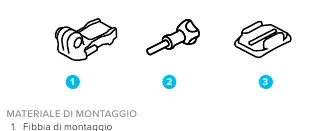
The camera features folding mounting fingers and 1/4-20 mounting threads for compatibility with standard accessories. To mount, rotate the fingers down, align with the mounting buckle, and secure with a thumbscrew. For adhesive mounts, ensure the surface is clean and dry, and allow 24 hours for the adhesive to set before use.

Manufacturer information
GoPro, Inc.
Practical help
Common problems
Camera will not turn on
Ensure the battery is charged. If it remains unresponsive, hold the Mode button for 10 seconds to force a restart.
Playback is stuttering on computer
Use the GoPro Player app or GoPro Quik app to view and export stabilized footage, as third-party apps may not support the file format or stabilization.
Camera overheating
Use lower resolution or frame rate settings, especially in hot environments, to reduce power consumption and heat generation.
SD card error
Restart the camera to attempt automatic file repair. If the issue persists, format the SD card via the camera settings.
Before use
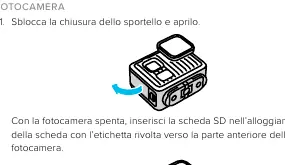
- Insert a compatible microSD card (A2/V30 class or higher).
- Charge the battery fully using the provided USB-C cable.
- Update the camera firmware using the GoPro Quik app.
- Ensure the side door is closed and locked for waterproofing.
- Check that the lens and microphone ports are clean.
Specs in practice
- 1/4-20 Mount
- Standard tripod-style mounting thread for compatibility with various accessories.
Images and diagrams
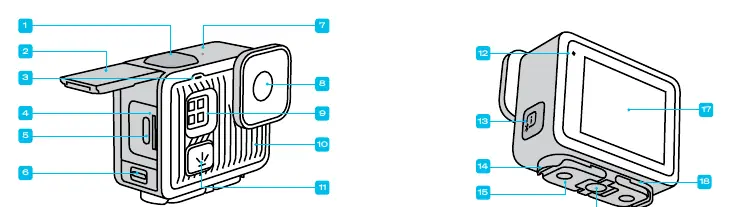
- Page 4: Camera layout showing the Shutter button, USB-C port, microSD slot, and microphones.
- Page 26: Mounting components including the buckle, thumbscrew, and adhesive mount.
- Page 27: Steps to attach the camera to a mounting buckle.
Model compatibility
- Waterproof up to 5 meters with the side door closed.
- Requires A2/V30 class microSD card for optimal performance.
- Compatible with GoPro Quik app for cloud backup and editing.

Manual page author
Emily Carter
User documentation editor
Prepares concise manual descriptions and highlights the most useful setup, operation, and maintenance information for readers.