GYBB 15W Wireless Charging Car Holder User Guide
Comprehensive user guide for the GYBB 15W Wireless Charging Car Holder, covering installation, operation, safety precautions, and maintenance.
Table of contents
Product Overview
The GYBB 15W Wireless Charging Car Holder is designed for efficient and safe charging of Qi-enabled smartphones while driving. It features an intelligent sensor for automatic clamping and a super capacitor that allows the holder to open and close even after the power is disconnected.
Technical Specifications
- Input: DC 5V/2.0A, 9V/2.0A, 12V/1.5A (MAX)
- Output: DC 5V/1.0A, 9V/1.16A, 12V/1.2A (MAX)
- Charging Distance: 6mm Max
- Conversion Rate: 65%-75%
- Working Temperature: -10°C to 55°C
Installation and Setup
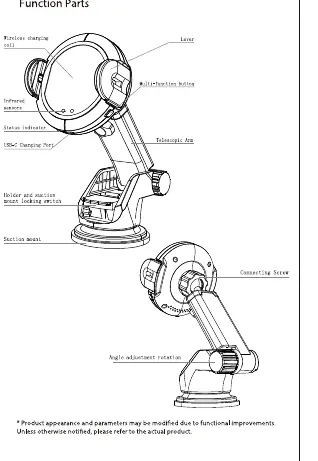
The device comes with a suction cup mount and an air vent pedestal, allowing for flexible placement in your vehicle. To install, attach the desired mount to the holder using the rotary locking mechanism. Connect the provided Type-C cable to the holder and a power source that meets the required specifications. For optimal 15W charging, use a QC3.0 compatible car charger.
Operation
The holder features an infrared sensor for automatic operation. When you place your phone near the sensor, the clips will open automatically and then close to secure the device. To remove your phone, press the push-button on the side of the holder. The LED indicator provides status updates: red light for standby, blue light for charging, and red/blue light for foreign object detection.
Safety and Maintenance
To ensure safe operation, keep the device away from moisture, rain, and extreme temperatures. Do not disassemble the product, as this will void the warranty. Clean the surface only with a dry, soft cloth; avoid harsh chemicals or alcohol. Ensure the device is not installed in a location that interferes with airbag deployment or obstructs the driver's view. If the device detects a foreign object, it will stop charging to prevent overheating.
Troubleshooting
If the device stops charging, check that the input voltage is within the rated range. If the output current exceeds the limit, the device will automatically stop charging. If a foreign object is detected, the red light will flash; remove the object immediately to resume normal operation.

Manual page author
Emily Carter
User documentation editor
Prepares concise manual descriptions and highlights the most useful setup, operation, and maintenance information for readers.