Home Appliances / Kitchen Appliances
Hamilton Beach 14525F Steamer Iron User Guide
Essential operating instructions for the Hamilton Beach 14525F Steamer Iron, covering steaming garments, steam ironing, and proper storage procedures.
Table of contents
How to Steam a Garment
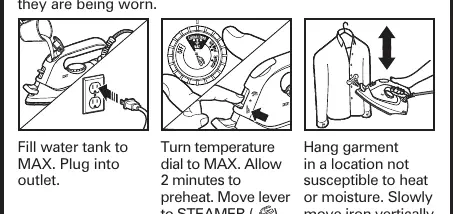
To effectively steam your garments, begin by filling the water tank to the MAX line and plugging the iron into a power outlet. Set the temperature dial to the MAX position and allow the iron to preheat for at least 2 minutes. Once preheated, move the lever to the steamer setting. Hang your garment in a location that is not susceptible to heat or moisture damage. Slowly move the iron vertically up and down over the fabric to remove wrinkles.
How to Steam Iron
For traditional steam ironing, ensure the water tank is filled to the MAX level and the device is plugged in. Allow the iron to preheat for 2 minutes to ensure optimal performance. Move the lever to the steam iron position. Caution: Attempting to steam iron on a lower temperature setting or failing to allow the iron to preheat for 2 minutes can result in hot water dripping from the soleplate.
Safety Precautions
Always prioritize safety when using your iron. The steam produced is extremely hot and poses a burn hazard. Always point the nozzle away from yourself and others. Never attempt to steam clothes while they are being worn. If you have any questions regarding the operation of your appliance, contact customer support at 1-800-851-8900 rather than returning the product to the store.
Storage and Maintenance
Proper storage is essential for the longevity of your iron. Follow these steps after each use:
- Move the lever to the DRY IRON position.
- Turn the temperature dial to the OFF position.
- Unplug the iron from the power outlet and allow it to cool completely.
- Empty any remaining water from the tank.
- Store the iron in an upright position to prevent damage to the soleplate.
Related manuals
Related manuals from the same brand or category.
Home Appliances / Kitchen Appliances
Hamilton Beach 12-Cup Programmable Coffee Maker
Hamilton BeachHome Appliances / Ovens
Hamilton Beach 12-Cup Programmable Coffee Maker
Hamilton BeachHome Appliances / Kitchen Appliances
Hamilton Beach 12-Cup Programmable Coffee Maker
Hamilton BeachHome Appliances / Ovens