Home Appliances / Washing Machines
HINKLEY 1500SMT Transformer Instruction Manual
Installation and setup guide for the Hinkley 1500SMT transformer, including wiring instructions, zone configuration, and app-based dimmer control.
Table of contents
Product Overview
The Hinkley 1500SMT is a professional-grade transformer designed for outdoor lighting systems. It features integrated dimming capabilities and supports multi-zone lighting control, allowing for flexible installation and management of landscape lighting fixtures.
Installation and Wiring
Before beginning the installation, ensure you have a clear workspace. Follow these steps to install the transformer:
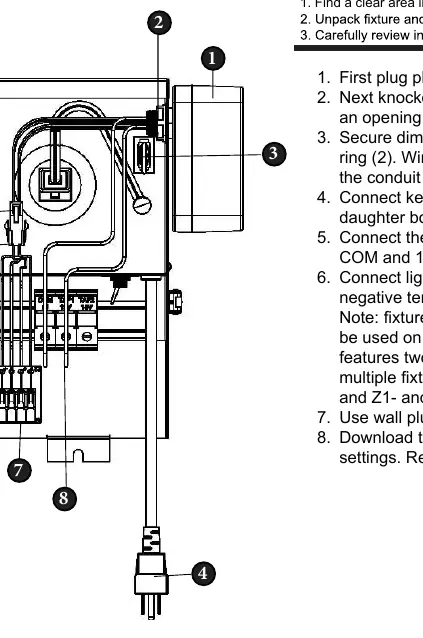
- Photocell Setup: Plug in the photocell jumper if your installation requires automatic dusk-to-dawn operation.
- Dimmer Box Mounting: Create an opening for the dimmer box by removing the conduit knockout. Secure the dimmer box to the transformer using the provided lock ring, ensuring all wires pass through the opening.
- Internal Connections: Connect the key connectors from the dimmer box to the daughter board. Attach the free wires from the dimmer box to the COM and 12V terminal block connectors.
- Fixture Wiring: Connect your light fixture wires to the positive and negative terminals on the daughter board. Note that fixture wires larger than 10 gauge are not compatible with the daughter board terminals.
- Zone Configuration: The board supports two distinct zones. Connect Zone 1 fixtures to the Z1+ and Z1- terminals, and Zone 2 fixtures to the Z2+ and Z2- terminals.
Power and Control
Once all wiring is securely connected, use the wall plug to power on the transformer. To manage dimming settings and advanced features, download the Hinkley app on your mobile device. The app provides a user-friendly interface for adjusting lighting levels and controlling the transformer settings remotely.
Related manuals
Related manuals from the same brand or category.
Industrial / Electrical