Furniture / Home Furnishing
Home Depot 18G Portable Ice Maker Instruction Manual
Quick guide for the Home Depot 18G portable ice maker. Includes setup, operation, cleaning, maintenance, and troubleshooting steps for optimal performance.
Table of contents
Manual images
Jump to the sectionQuick guide from the manual
This document provides essential instructions for the safe and efficient operation of the Home Depot 18G portable ice maker. Key requirements include placing the unit on a flat surface with at least 6 inches of clearance on all sides, using only potable drinking water, and allowing the refrigerant to settle for one hour before the first use.
Unit construction and operation
The ice maker features an ice scoop, ice basket, transparent top cover, and a water drain cap located at the front bottom. The control panel includes an ON/OFF button and two indicators: ADD WATER and ICE FULL.
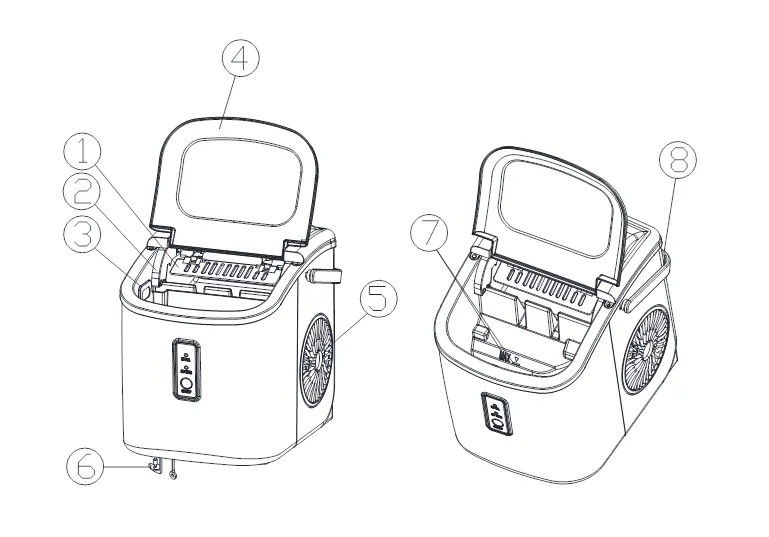
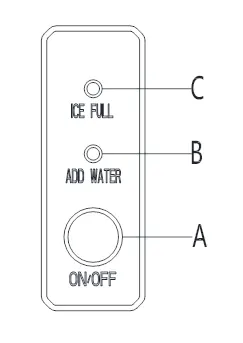
- Operation: Open the cover, remove the basket, and fill the tank with water up to the marked level. Press the ON/OFF button to start the cycle.
- Self-Cleaning: Plug in the unit and hold the ON/OFF button for more than 5 seconds to initiate the 30-minute cleaning program. Drain the water afterward using the bottom drain cap.
- Maintenance: Clean the interior weekly with a mild detergent solution and warm water. Always unplug the unit before cleaning or maintenance.
Safety and warnings
This appliance must be grounded. Do not use extension cords unless they are rated for at least 1875 watts (14AWG). Keep the unit away from direct sunlight and heat sources. Do not use liquids other than water to make ice. If the unit has been in a cold environment, allow it to reach room temperature before plugging it in.
Troubleshooting
If the ADD WATER indicator turns on, add water and restart. If the ICE FULL indicator is on, remove ice. If the ring indicator flashes red, ensure the ambient temperature is below 90°F and the unit is not obstructed. For persistent issues, contact support at [email protected].
Manufacturer information
The Home Depot
Practical help
Common problems
ADD WATER indicator is on
The water tank is empty. Fill with water and press the ON/OFF button to restart.
ICE FULL indicator is on
The ice basket is full. Remove the ice cubes to resume operation.
Ice cubes are cloudy
Use only drinking or distilled water. Consider installing a water filtration system.
Ice cubes smell of plastic
Clean the interior with lemon water, run a few ice-making cycles, and discard the ice.
Before use
- Remove all packaging and tape from the unit.
- Place on a level surface with 6 inches of clearance on all sides.
- Allow 1 hour for refrigerant to settle before plugging in.
- Clean the interior with warm water and mild detergent.
- Ensure the power plug is accessible.
Images and diagrams
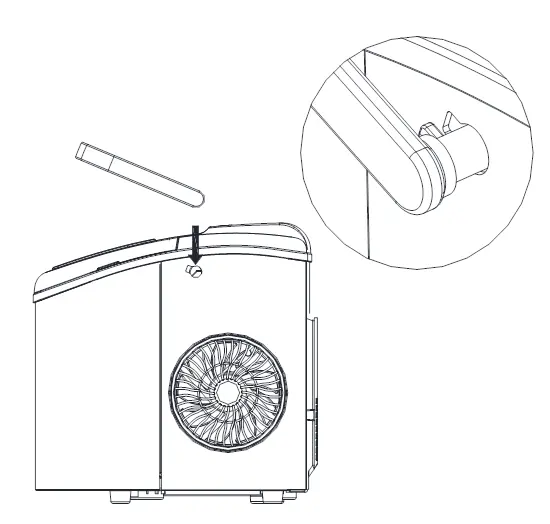
- 1-8: Components including scoop, sensors, basket, cover, air exhaust, drain cap, and handle.
- A-C: Control panel buttons and indicators (ON/OFF, ADD WATER, ICE FULL).
Model compatibility
- Use only potable/drinking water.
- Recommended ambient temperature: 50°F to 105°F.
- Do not use milk, juice, or other liquids.

Manual page author
David Miller
Documentation analyst
Organizes user manual content into clear summaries, with attention to model details, product context, and everyday usability.