Home Appliances / Refrigerators
User Guide for Home Depot 12FT Skelly with Servo
Quick setup and operation guide for the 12FT Skelly with Servo. Includes assembly steps, control box settings, troubleshooting, and safety instructions.
Table of contents
Manual images
Jump to the sectionQuick guide from the manual
This 12FT Skelly with Servo is a large-scale decoration requiring at least 2 adults for assembly (3 are strongly recommended). The product features an IR sensor, 3 function settings, and 8 eye modes. Ensure all cables are connected correctly and the adapter is plugged into a live outlet for proper operation.
Assembly
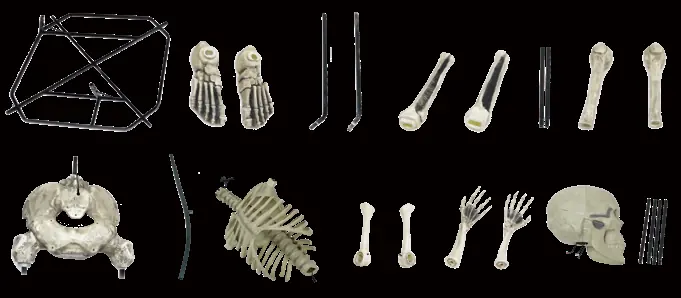
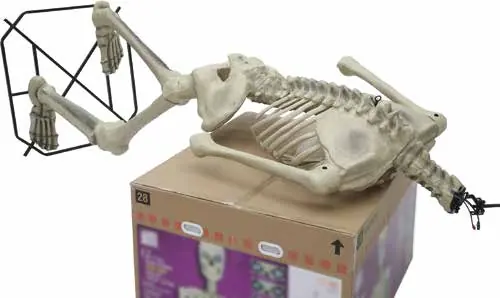
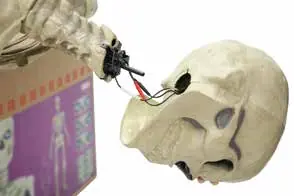
Assembly involves connecting the base, support poles, legs, pelvis, spine, rib cage, arms, and head. Use the included M6 hex wrench and a small Phillips screwdriver (not included). Follow the step-by-step diagrams carefully, ensuring all locking pins click into place and cable arrow indicators are aligned before tightening.

Operation
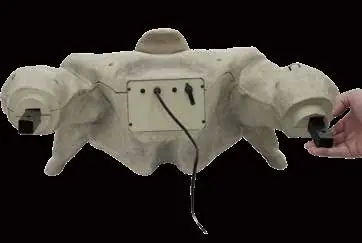
The control box is located underneath the pelvis. It has two buttons: one for power/mode selection and one for eye options. The skeleton can also be controlled via the included remote control (range up to 20 ft). The remote requires 2 x 1.5V AAA batteries.
Function Settings
- Lights Only: Lights stay on indefinitely.
- Timer/Sensor: Eyes on for 6 hours, off for 18 hours. IR sensor triggers an 18-second animation cycle during the 6-hour active period.
- Off/Step Pad: Deactivated unless the step pad is pressed, which triggers an 18-second animation cycle.
Safety and Maintenance
This item is for decoration only and is not a toy. Keep away from children. Do not push, tilt, or climb on the product. Use only the provided adapter. Store in original packaging away from heat and moisture. Remove batteries from the remote when not in use.
Troubleshooting
If the skeleton does not function (e.g., eyes don't light up), check all cable connections. If it does not activate, ensure the adapter is plugged in. If the remote is unresponsive, check the 20 ft range and replace the AAA batteries.
Manufacturer information
The Home Depot
Practical help
Common problems
Eyes do not light up
Ensure all cables are connected to their corresponding cables as shown in the assembly steps.
Item does not activate
Ensure the power adapter is securely plugged into a live electrical outlet.
Remote control not working
Ensure you are within a 20 ft range and replace the 2 x 1.5V AAA batteries.
Difficulty assembling the pelvis
Try adjusting the upper legs until they are properly aligned with the pelvis.
Before use
- Ensure at least 2 adults are available for assembly (3 recommended).
- Verify all parts from the parts list are present.
- Have an M6 hex wrench (included) and a small Phillips screwdriver (not included) ready.
- Check that the area is level.
- Ensure the adapter is ready for connection to a live outlet.
Specs in practice
- Power Adapter Input
- 120V~60Hz
- Power Adapter Output
- 5.9V 3A
- IR Sensor Range
- 13 ft / 4 meters, 80 degrees field of view
Images and diagrams
- Assembly steps 1.1-1.2 show base and foot connection.
- Steps 3.1-3.2 illustrate femur and pelvis attachment.
- Step 5.1 details the correct cable connection method using arrow indicators.
- Step 7.2 shows how to adjust the servo head bracket.
- Step 9.1 shows base stabilization with weights or guy wires.
Model compatibility
- Compatible with external timers.
- Compatible with 12 Foot Skeleton Lighting Kit (SKU 1009043296, sold separately).

Manual page author
David Miller
Documentation analyst
Organizes user manual content into clear summaries, with attention to model details, product context, and everyday usability.